Elecrow 5" - ESP IDF 5.3 (Screen shakes)

I’m trying to get the 5" Elecrow display (SKU: DIS0705H) working, but it’s not functioning properly.

The problem is that the example provided by Elecrow is an old example (ESP IDF 4) and uses Arduino libraries.

I’m trying to make it work properly using Expressif components, avoiding the workaround of using Arduino libraries.

The code that displays the screen is below:

f_elecrow_5In.c:

#include "f_elecrow_5in.h"
#include "driver/gpio.h"
#include "freertos/FreeRTOS.h"
#include "freertos/task.h"

#include "esp_lcd_panel_rgb.h"
#include "esp_lcd_panel_ops.h"
#include "esp_err.h"
#include "esp_log.h"
#include "esp_heap_caps.h"

esp_err_t elecrow_5in_init(esp_lcd_panel_handle_t *out_panel)
{
    esp_lcd_rgb_panel_config_t cfg = {
        .clk_src = LCD_CLK_SRC_PLL160M,
        .data_width = 16,
        .bits_per_pixel = 16,

        .de_gpio_num    = GPIO_NUM_40,
        .vsync_gpio_num = GPIO_NUM_41,
        .hsync_gpio_num = GPIO_NUM_39,
        .pclk_gpio_num  = GPIO_NUM_0,

        .disp_gpio_num  = GPIO_NUM_38,   // DISP/ENABLE
        .num_fbs = 1,

        .data_gpio_nums = {
            // B0..B4
            GPIO_NUM_8,  GPIO_NUM_3,  GPIO_NUM_46, GPIO_NUM_9,  GPIO_NUM_1,
            // G0..G5
            GPIO_NUM_5,  GPIO_NUM_6,  GPIO_NUM_7,  GPIO_NUM_15, GPIO_NUM_16, GPIO_NUM_4,
            // R0..R4
            GPIO_NUM_45, GPIO_NUM_48, GPIO_NUM_47, GPIO_NUM_21, GPIO_NUM_14
        },

        .bounce_buffer_size_px = 10 * 800,
        .sram_trans_align = 64,
        .psram_trans_align = 64,

        .flags = {
            .fb_in_psram = 1,
            .disp_active_low = 0,
        },

        .timings = {
            .pclk_hz = 15000000,
            .h_res = 800,
            .v_res = 480,

            .hsync_front_porch = 210,
            .hsync_pulse_width = 4,
            .hsync_back_porch  = 43,

            .vsync_front_porch = 22,
            .vsync_pulse_width = 4,
            .vsync_back_porch  = 12,

            .flags = {
                .pclk_active_neg = 1,
                .pclk_idle_high  = 0,
                .de_idle_high    = 0,
                .hsync_idle_low  = 0,
                .vsync_idle_low  = 0,
            },
            
        },
    };

    esp_lcd_panel_handle_t panel = NULL;
    esp_err_t err = esp_lcd_new_rgb_panel(&cfg, &panel);
    if (err != ESP_OK) return err;
    if ((err = esp_lcd_panel_reset(panel)) != ESP_OK) return err;
    if ((err = esp_lcd_panel_init(panel)) != ESP_OK) return err;
    if ((err = esp_lcd_panel_disp_on_off(panel, true)) != ESP_OK) return err;

    *out_panel = panel;
    return ESP_OK;
}

f_lvgl_port.c:

#include "freertos/FreeRTOS.h"
#include "freertos/task.h"
#include "esp_timer.h"
#include "esp_log.h"
#include "touch.h"
#include "lvgl_port.h"
#include "lvgl.h"
#include "esp_lcd_panel_ops.h"
#include "touch_calib.h"

static const char *TAG = "LVGL_PORT";
SemaphoreHandle_t xSemaphoreDisplay;

static esp_lcd_panel_handle_t s_panel = NULL;
static void lvgl_flush_cb(lv_disp_drv_t *disp_drv, const lv_area_t *area, lv_color_t *color_p) {
        int x1 = area->x1;
        int y1 = area->y1;
        int x2 = area->x2 + 1;
        int y2 = area->y2 + 1;
        esp_lcd_panel_draw_bitmap(s_panel, x1, y1, x2, y2, color_p);
        lv_disp_flush_ready(disp_drv);
}
static void lv_tick_task(void *arg) {
    (void)arg;
    lv_tick_inc(2);
}

void f_updateScreen(void *arg){
        while (1) {
                lock();
                        lv_timer_handler();
                unlock();        
            vTaskDelay(pdMS_TO_TICKS(20));
        }
}

static void lvgl_touch_read_cb(lv_indev_drv_t *indev_drv, lv_indev_data_t *data) {
    (void)indev_drv;

    if (touch_calib_is_calibrating()) {
        data->state = LV_INDEV_STATE_REL;
        return;
    }

    uint16_t rx, ry;
    if (!touch_get_xy(&rx, &ry)) {
        data->state = LV_INDEV_STATE_REL;
        return;
    }

    int x = 0, y = 0;

    if (!touch_calib_apply(rx, ry, &x, &y, 800, 480)) {
        // Fallback (se ainda não calibrado) — você pode deixar REL pra evitar cliques errados:
        // data->state = LV_INDEV_STATE_REL; return;

        // ou manter um map bruto provisório:
        x = 0; y = 0;
    }

    data->state = LV_INDEV_STATE_PR;
    data->point.x = x;
    data->point.y = y;

    // Debug:
    //printf("raw(%u,%u) -> px(%d,%d)\n", rx, ry, x, y);
}


void lvgl_port_init(esp_lcd_panel_handle_t panel) {
        s_panel = panel;

        lv_init();

        // // 1) buffers do LVGL (recomendo INTERNAL+DMA)
        // static lv_disp_draw_buf_t draw_buf;

        // // Use um buffer relativamente pequeno; 800 * 40 pixels funciona muito bem.
        // const int HOR = 800;
        // const int BUF_LINES =  20; // quanto mais linhas, mais RAM usada mas menos chamadas de flush (e.g. 800*240 = full screen)
        // static lv_color_t *buf1 = NULL;

        // buf1 = heap_caps_malloc(HOR * BUF_LINES * sizeof(lv_color_t),  MALLOC_CAP_DMA);
        // // É um teste (pode dar problema ou ficar lento)
        // //buf1 = heap_caps_malloc(HOR * BUF_LINES * sizeof(lv_color_t), MALLOC_CAP_SPIRAM);

        // assert(buf1);

        // lv_disp_draw_buf_init(&draw_buf, buf1, NULL, HOR * BUF_LINES);


        // 1) buffers do LVGL (DMA)
static lv_disp_draw_buf_t draw_buf;

const int HOR = 800;
const int BUF_LINES = 20;                 // 20~40 costuma ser bom
const size_t buf_pixels = HOR * BUF_LINES;

static lv_color_t *buf1 = NULL;
static lv_color_t *buf2 = NULL;

buf1 = heap_caps_malloc(buf_pixels * sizeof(lv_color_t), MALLOC_CAP_DMA);
buf2 = heap_caps_malloc(buf_pixels * sizeof(lv_color_t), MALLOC_CAP_DMA);

assert(buf1 && buf2);

lv_disp_draw_buf_init(&draw_buf, buf1, buf2, buf_pixels);


        // 2) driver de display
        static lv_disp_drv_t disp_drv;
        lv_disp_drv_init(&disp_drv);

        disp_drv.hor_res = 800;
        disp_drv.ver_res = 480;
        disp_drv.flush_cb = lvgl_flush_cb;
        disp_drv.draw_buf = &draw_buf;

        lv_disp_drv_register(&disp_drv);
            
        static lv_indev_drv_t indev_drv;
        lv_indev_drv_init(&indev_drv);
        indev_drv.type = LV_INDEV_TYPE_POINTER;
        indev_drv.read_cb = lvgl_touch_read_cb;
        lv_indev_drv_register(&indev_drv);

        // 3) Tick 1ms via esp_timer
        const esp_timer_create_args_t tick_args = {
            .callback = &lv_tick_task,
            .name = "lv_tick"
        };

        esp_timer_handle_t tick_timer = NULL;
        ESP_ERROR_CHECK(esp_timer_create(&tick_args, &tick_timer));
        ESP_ERROR_CHECK(esp_timer_start_periodic(tick_timer, 2 * 1000));

        xSemaphoreDisplay = xSemaphoreCreateBinary();
        xSemaphoreGive(xSemaphoreDisplay);

        //xTaskCreatePinnedToCoreWithCaps(f_updateScreen,"lvgl", 3200, NULL, tskIDLE_PRIORITY+4, NULL, 1, MALLOC_CAP_SPIRAM);
        xTaskCreatePinnedToCore(f_updateScreen, "lvgl", 3200, NULL, tskIDLE_PRIORITY+4, NULL, 1);
        xTaskCreatePinnedToCore(touch_init, "touch", 4096, NULL, tskIDLE_PRIORITY+1, NULL, 1);
        ESP_LOGI(TAG, "LVGL init OK");
}

void lock(){if (xSemaphoreDisplay!=NULL){xSemaphoreTake(xSemaphoreDisplay, portMAX_DELAY);}}
void unlock(){if (xSemaphoreDisplay!=NULL){xSemaphoreGive(xSemaphoreDisplay);}}

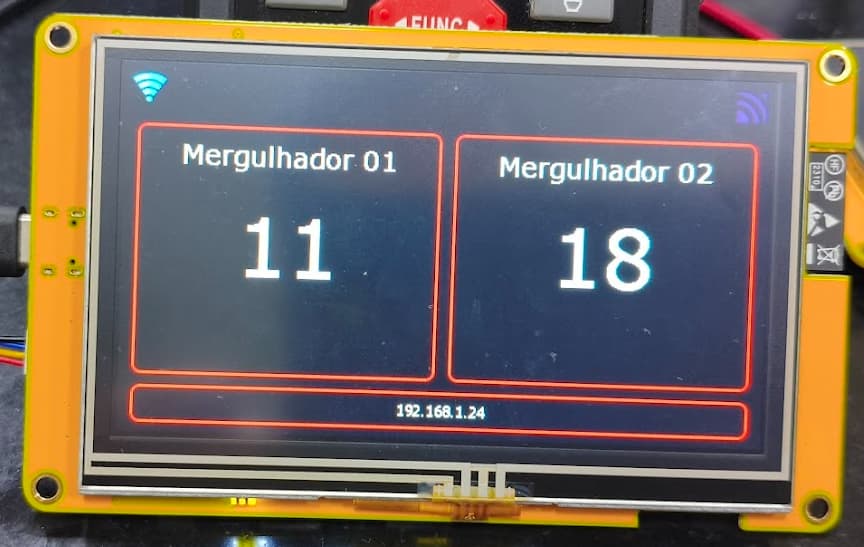
The issue is that the display correctly shows the screen drawn in LVGL.

That in itself isn’t the problem.

The issue is that the screen flickers constantly.

I’ve already tried everything with the help of AI (ChatGPT) and I can’t fix this flickering screen problem.

Does anyone have any idea what might be happening?

@Elecrow @kisvegabor

Hi Allan!

I did an electronic voting machine with an Elecrow 5 inch display. I also struggled there with some flickering and tearing of the screens but at the end I managed to get a good configuration that worked more or less stable.

You can take a look here: GitHub - giobauermeister/urna-esp32s3-lvgl: Electronic Voting Machine with ESP32-S3, ESP-IDF and LVGL (WIP)

Can you have a look and see if any configuration is different than yours?

Let’s continue discussing if you don’t find anything that helps.

In order to have a decent refresh rate using a display that has no internal memory you will need to use the second core to handle the transmitting of the buffers and to handle keeping the buffer data in sync. When all of this work gets handled by a single core it will impact performance in a very large way.

You can get it done using one core it’s just that the performance is going to suffer because of it and you need to make sure that you are keeping the buffers and the calls to lv_flush_ready in sync. This can be tricky to do because of having to use the vsync callback function which gets called after each time the buffer gets sent to the display. With an RGB display this happens in a never ending loop so a single buffer may be sent more than one time but you only want to call lv_flush_ready only after the first time the buffer data has been sent. With how the code is written in the ESP-IDF with the RGB driver there is no way easy way to identify what buffer has just finished being transmitted from inside of the vsync callback function. So the choices end up becoming either a blocking call that waits until the data has been sent or you need to “hack” the RGB driver to some degree in order to get the information that is needed from inside of the vsync callback. The blocking route is seen in Espressif’s examples on how to use the RGB driver on their GitHub repo. Personally I don’t like this method especially when dealing with a display that is larger than 320x320 in resolution because that blocking will cause a significant amount of latency resulting in a really low refresh rate of the display.

specifically this code is wrong…

static void lvgl_flush_cb(lv_display_t *disp, const lv_area_t *area, uint8_t *color_p) {
    esp_lcd_panel_draw_bitmap(panel_handle, area->x1, area->y1, area->x2 + 1, area->y2 + 1, color_p);
    lv_display_flush_ready(disp);
}

you cannot call lv_display_flush_ready from inside of the flush callback function. This is because the buffer data is being transmitted using a DMA buffer so the call to esp_lcd_panel_draw_bitmap is not a blocking call. It immediately returns before the data has even been sent. so you end up telling LVGL that the buffer has transmitted when in fact it has not.

You need to register a callback function on the vsync for the display and that is where you would call lv_display_flush_ready. you need to make sure that the flush ready function only gets called the first time the display buffer is transmitted after esp_lcd_panel_draw_bitmap is called.That’s the part that is the tricky part without having to use freeRTOS to cause a blocking condition to wait until that happens.

1 Like

I really wanted to thank you for taking the time to help me.

It’s not the first time you’ve saved my life.

I have no problem using the second processor, considering I’m using an ESP32 S3 with two processors.

I didn’t use it because I wasn’t aware of that particular detail.

I will study the observations you mentioned in conjunction with AI.

I downloaded your example and tried very hard to apply it to my use case.

I couldn’t implement it at all.

The example works, compiles, and runs…

However, when I apply it to my screen, it becomes very shaky…

In addition, it has a huge incompatibility with LVGL 8.4 x 9.X.

I solved it, and it got a little better by adding a traffic light before each update.

Lock() and Unlock() still have a slow screen…

#include "display.h"
#include "freertos/FreeRTOS.h"
#include "freertos/task.h"
#include "esp_log.h"
#include "f_elecrow_5in.h"
#include "esp_lcd_panel_ops.h"   // draw_bitmap
#include "driver/gpio.h"
#include "esp_heap_caps.h"
#include <assert.h>
#include "lvgl_port.h"
#include "lvgl.h"
#include "touch.h"
#include "sq/ui.h"
#include "touch_calib.h"
#include "f_wifi.h"
#include "f_configfile.h"
#include "lcd_test.h"


static const char *TAG = "DISPLAY";

#include "lvgl_port.h"  // declare lvgl_port_init()

void f_SetupDisplay() {
    ESP_LOGI(TAG, "Initializing display...");
    gpio_reset_pin(GPIO_NUM_2);
    gpio_set_direction(GPIO_NUM_2, GPIO_MODE_OUTPUT);
    gpio_set_level(GPIO_NUM_2, 1);    // backlight ON só depois do init
    vTaskDelay(pdMS_TO_TICKS(20));

    esp_lcd_panel_handle_t panel = NULL;
    ESP_ERROR_CHECK(elecrow_5in_init(&panel));
    lvgl_port_init(panel);
    touch_calib_run_if_needed(800, 480);
    ESP_LOGW(TAG, "Display setup complete, LVGL task is running in background.");   
    ui_init();
}

void StatusMQTT(bool status) {
        if (status){
                lock();
                lv_obj_clear_flag(ui_imgMQTT, LV_OBJ_FLAG_HIDDEN);
                unlock();
        }else{
                lock();
                lv_obj_add_flag(ui_imgMQTT, LV_OBJ_FLAG_HIDDEN);
                unlock();
        }
}
void StatusRS485(bool status) {
        if (status){
                lock();
                lv_obj_clear_flag(ui_imgSerial, LV_OBJ_FLAG_HIDDEN);
                lv_label_set_text(ui_lblStatus, "");
                unlock();
        }else{
                lock();
                lv_obj_add_flag(ui_imgSerial, LV_OBJ_FLAG_HIDDEN);
                lv_label_set_text(ui_lblStatus, "RS485 Disconnected...");
                lv_label_set_text(ui_lblProfundidade, "-1");
                lv_label_set_text(ui_lblTemperatura, "-1");
                unlock();
        }
}

void StatusWifi_img(bool status) {
        if (status){
                lock();
                lv_obj_clear_flag(ui_imgWifiOn, LV_OBJ_FLAG_HIDDEN);
                lv_obj_add_flag(ui_imgWifiOff, LV_OBJ_FLAG_HIDDEN);
                unlock();
        }else{
                lock();
                lv_obj_clear_flag(ui_imgWifiOff, LV_OBJ_FLAG_HIDDEN);
                lv_obj_add_flag(ui_imgWifiOn, LV_OBJ_FLAG_HIDDEN);
                unlock();
        }
}

void f_progressoDisplay(const char * texto, int tempo){
        lock();
        lv_label_set_text(ui_lblStartingStatus, texto);
        unlock();
        vTaskDelay(tempo / portTICK_PERIOD_MS);
}

void f_DisplayIP(char *ip) {
        lock();
        lv_label_set_text(ui_lblIP, ip);
        unlock();
}

void f_DisplayClienteConectado(void *parameters){
        lock();
        lv_label_set_text(ui_lblIP, "Cliente Conectado");
        unlock();
}

void setupConfigDisplay() {
        Dados_Wifi_t DadosWifi;
        esp_err_t valida = f_DadosWifi(&DadosWifi);
        if (valida == ESP_OK && DadosWifi.Mode == Station){
                lock();
                lv_label_set_text(ui_lblMode,  "Station");
                lv_label_set_text(ui_lblSSID, DadosWifi.SSID);
                unlock();
        }else {
                lock();
                lv_label_set_text(ui_lblMode,  "Access Point");
                lv_label_set_text(ui_lblSSID, "EnervisionDivers / Pass: 12345678" );
                lv_label_set_text(ui_lblIP, "192.168.1.1" );
                unlock();
        }

}

I haven’t been able to apply these modifications yet.

I’ll study how to implement them more thoroughly. The first tests I did resulted in many errors.

RGB displays are the hardest to get running right. You have to do a lot of tinkering to get things just right and to get a refresh speed that you are happy with.

espressif has a really good example of how to achieve an artifact free UI.

here is where you can specifically see how they have gone about setting up the flush function and the vsync callback.

vsync callback

LVGL flush callback

Here is the registering of the vsync callback

Here is the setting up of the FreeRTOS related bits

NOTE: Make sure you select the ESP-IDF version that matches the one you are using. the examples are different from one version to the next. The reason why I used version 5.2 is because it shows the more complicated use of FreeRTOS with respect to handling the frame buffers.

There are some code changes that can be made that would further improve the performance by using both cores on the ESP32 but that is going to be really advanced code to do that.

I spent quite a bit of time pulling my hair when I was writing a driver for the RGB displays. It took me several months to put together a driver that uses both cores to achieve the best possible speed.

also if you are familiar with Python you can save yourself a lot of effort with having to deal with the driver aspects of things. I put together a MicroPython binding where LVGL is built in and all of the driver stuff is already done. All you have to do is start the driver by passing your pins to it and away you go.

You always save my life!

I’ll study some examples.

Thank you so much for your attention!!!