Important: unclear posts may not receive useful answers.
Before posting
- Get familiar with Markdown to format and structure your post
- Be sure to update lvgl from the latest version from the
masterbranch.- Be sure you have checked the FAQ and read the relevant part of the documentation.
- If applicable use the Simulator to eliminate hardware related issues.
Delete this section if you read and applied the mentioned points.
Description
I am using LVGL v8.3 and trying to draw bar chart using Chart widget ( lv_chart ).
Currently using only 1 series with 2 data points and these data points are updated in runtime.
I am also setting the maximum height and width using lv_obj_set_size.
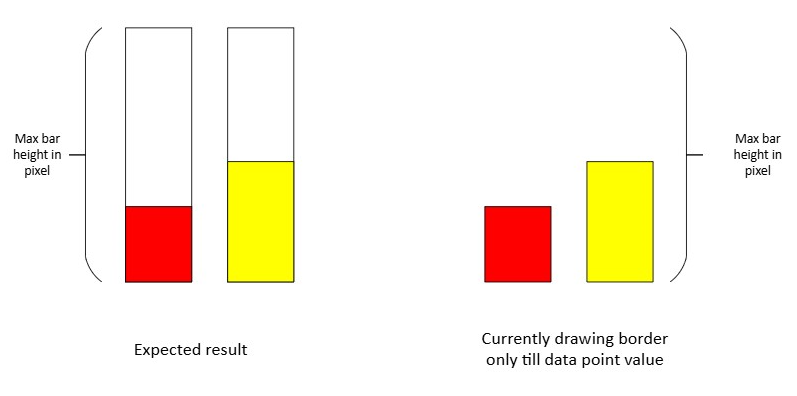
How to draw the always border to individual bar which is equivalent to max height of the bar irrespective the data point value.
What MCU/Processor/Board and compiler are you using?
S
What LVGL version are you using?
8.3
What do you want to achieve?
Draw the color border to individual bar irrespective the data point value
What have you tried so far?
Tried to set the border in callback function static void draw_event_cb(lv_event_t * e). However, border is draw only till the value of data point and not the always maximum height of the bar. Here border is automatically adjusted against the current data point value in series.
Code to reproduce
Add a code snippet which can run in the simulator. It should contain only the relevant code that compiles without errors when separated from your main code base.
The code block(s) should be formatted like:
static void draw_event_cb(lv_event_t * e)
{
     lv_obj_draw_part_dsc_t * dsc = lv_event_get_draw_part_dsc(e);
        // Set border properties for each bar
        dsc->rect_dsc->border_width = 2; // Set border width as needed
        dsc->rect_dsc->border_color = lv_color_black(); // Set border color
        dsc->rect_dsc->border_side = LV_BORDER_SIDE_FULL; // Border on all sides
    }
}