What do you want to achieve?
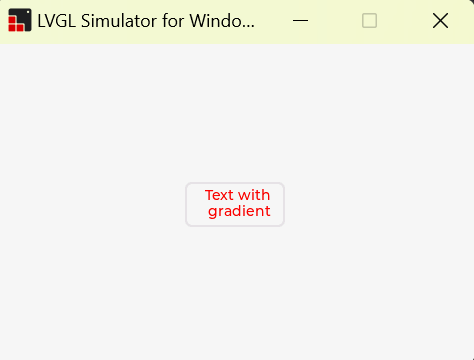
See the gradient effect
What have you tried so far?
Try the official code example
Code to reproduce
#define MASK_WIDTH 100
#define MASK_HEIGHT 45

static void add_mask_event_cb(lv_event_t* e)
{
    static lv_draw_mask_map_param_t m;
    static int16_t mask_id;

    lv_event_code_t code = lv_event_get_code(e);
    lv_obj_t* obj = lv_event_get_target(e);
    lv_opa_t* mask_map = lv_event_get_user_data(e);
    if (code == LV_EVENT_COVER_CHECK) {
        printf("LV_COVER_RES_MASKED\r\n");
        lv_event_set_cover_res(e, LV_COVER_RES_MASKED);
    }
    else if (code == LV_EVENT_DRAW_MAIN_BEGIN) {
        printf("%d,%d,%d,%d\r\n", obj->coords.x1, obj->coords.y1, obj->coords.x2, obj->coords.y2);

        lv_draw_mask_map_init(&m, &obj->coords, mask_map);
        mask_id = lv_draw_mask_add(&m, NULL);

    }
    else if (code == LV_EVENT_DRAW_MAIN_END) {
        lv_draw_mask_free_param(&m);
        lv_draw_mask_remove_id(mask_id);
    }
}


void lv_widget_demo() {


    /* Create the mask of a text by drawing it to a canvas*/
    static lv_opa_t mask_map[MASK_WIDTH * MASK_HEIGHT];

    /*Create a "8 bit alpha" canvas and clear it*/
    lv_obj_t* canvas = lv_canvas_create(lv_scr_act());
    lv_canvas_set_buffer(canvas, mask_map, MASK_WIDTH, MASK_HEIGHT, LV_IMG_CF_ALPHA_8BIT);
    lv_canvas_fill_bg(canvas, lv_color_black(), LV_OPA_TRANSP);

    /*Draw a label to the canvas. The result "image" will be used as mask*/
    lv_draw_label_dsc_t label_dsc;
    lv_draw_label_dsc_init(&label_dsc);
    label_dsc.color = lv_color_white();
    label_dsc.align = LV_TEXT_ALIGN_CENTER;
    lv_canvas_draw_text(canvas, 5, 5, MASK_WIDTH, &label_dsc, "Text with gradient");

    /*The mask is reads the canvas is not required anymore*/
    lv_obj_del(canvas);

    /* Create an object from where the text will be masked out.
     * Now it's a rectangle with a gradient but it could be an image too*/
    lv_obj_t* grad = lv_obj_create(lv_scr_act());
    lv_obj_set_size(grad, MASK_WIDTH, MASK_HEIGHT);
    lv_obj_center(grad);
    lv_obj_set_style_bg_color(grad, lv_color_hex(0xff0000), 0);
    lv_obj_set_style_bg_grad_color(grad, lv_color_hex(0x0000ff), 0);
    lv_obj_set_style_bg_grad_dir(grad, LV_GRAD_DIR_HOR, 0);
    lv_obj_add_event_cb(grad, add_mask_event_cb, LV_EVENT_ALL, mask_map);

}
Screenshot and/or video
Environment
visual studio 2022
- MCU/MPU/Board:
- LVGL version: 8.1.0-dev`