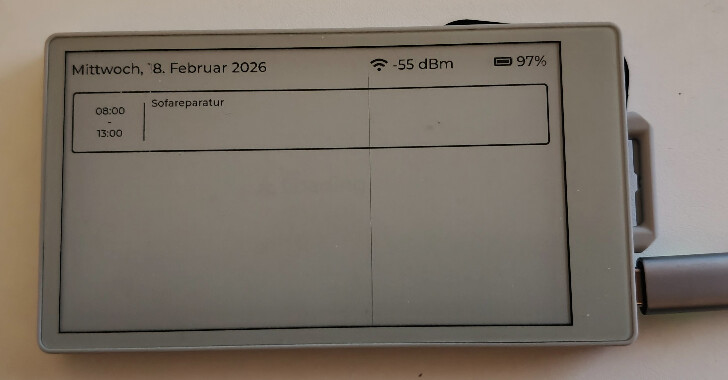
Hi @all,
I´m using this UI (generated with SquareLine Studio)
// This file was generated by SquareLine Studio
// SquareLine Studio version: SquareLine Studio 1.6.0
// LVGL version: 9.3
// Project name: Calendar

#include "../ui.h"

lv_obj_t * ui_screenstatus = NULL;
lv_obj_t * ui_screenstatusheader = NULL;
lv_obj_t * ui_screenstatuslabelbattery = NULL;
lv_obj_t * ui_screenstatuswifi = NULL;
lv_obj_t * ui_screenstatusstatuslabel = NULL;
// event funtions
void ui_event_screenstatus(lv_event_t * e)
{
    lv_event_code_t event_code = lv_event_get_code(e);

    if(event_code == LV_EVENT_SCREEN_LOADED) {
        ScreenStatusLoaded(e);
    }
}

// build funtions

void ui_screenstatus_screen_init(void)
{
    ui_screenstatus = lv_obj_create(NULL);
    lv_obj_remove_flag(ui_screenstatus, LV_OBJ_FLAG_SCROLLABLE | LV_OBJ_FLAG_SCROLL_ELASTIC |
                       LV_OBJ_FLAG_SCROLL_MOMENTUM);    /// Flags

    ui_screenstatusheader = lv_obj_create(ui_screenstatus);
    lv_obj_remove_style_all(ui_screenstatusheader);
    lv_obj_set_height(ui_screenstatusheader, 70);
    lv_obj_set_width(ui_screenstatusheader, lv_pct(100));
    lv_obj_set_align(ui_screenstatusheader, LV_ALIGN_TOP_MID);
    lv_obj_remove_flag(ui_screenstatusheader,
                       LV_OBJ_FLAG_CLICKABLE | LV_OBJ_FLAG_PRESS_LOCK | LV_OBJ_FLAG_CLICK_FOCUSABLE | LV_OBJ_FLAG_GESTURE_BUBBLE |
                       LV_OBJ_FLAG_SNAPPABLE | LV_OBJ_FLAG_SCROLLABLE);     /// Flags

    ui_screenstatuslabelbattery = lv_label_create(ui_screenstatusheader);
    lv_obj_set_width(ui_screenstatuslabelbattery, 150);
    lv_obj_set_height(ui_screenstatuslabelbattery, LV_SIZE_CONTENT);    /// 1
    lv_obj_set_x(ui_screenstatuslabelbattery, -20);
    lv_obj_set_y(ui_screenstatuslabelbattery, 0);
    lv_obj_set_align(ui_screenstatuslabelbattery, LV_ALIGN_RIGHT_MID);
    lv_label_set_long_mode(ui_screenstatuslabelbattery, LV_LABEL_LONG_MODE_SCROLL);
    lv_label_set_text(ui_screenstatuslabelbattery, "100%");
    lv_obj_remove_flag(ui_screenstatuslabelbattery,
                       LV_OBJ_FLAG_PRESS_LOCK | LV_OBJ_FLAG_CLICK_FOCUSABLE | LV_OBJ_FLAG_GESTURE_BUBBLE | LV_OBJ_FLAG_SNAPPABLE |
                       LV_OBJ_FLAG_SCROLLABLE | LV_OBJ_FLAG_SCROLL_ELASTIC | LV_OBJ_FLAG_SCROLL_MOMENTUM |
                       LV_OBJ_FLAG_SCROLL_CHAIN);     /// Flags
    lv_obj_set_scrollbar_mode(ui_screenstatuslabelbattery, LV_SCROLLBAR_MODE_OFF);
    lv_obj_set_style_text_align(ui_screenstatuslabelbattery, LV_TEXT_ALIGN_CENTER, LV_PART_MAIN | LV_STATE_DEFAULT);
    lv_obj_set_style_text_font(ui_screenstatuslabelbattery, &lv_font_montserrat_28, LV_PART_MAIN | LV_STATE_DEFAULT);

    ui_screenstatuswifi = lv_label_create(ui_screenstatusheader);
    lv_obj_set_width(ui_screenstatuswifi, 200);
    lv_obj_set_height(ui_screenstatuswifi, LV_SIZE_CONTENT);    /// 1
    lv_obj_set_x(ui_screenstatuswifi, -200);
    lv_obj_set_y(ui_screenstatuswifi, 0);
    lv_obj_set_align(ui_screenstatuswifi, LV_ALIGN_RIGHT_MID);
    lv_label_set_long_mode(ui_screenstatuswifi, LV_LABEL_LONG_MODE_SCROLL);
    lv_label_set_text(ui_screenstatuswifi, "-35 dBm");
    lv_obj_remove_flag(ui_screenstatuswifi,
                       LV_OBJ_FLAG_PRESS_LOCK | LV_OBJ_FLAG_CLICK_FOCUSABLE | LV_OBJ_FLAG_GESTURE_BUBBLE | LV_OBJ_FLAG_SNAPPABLE |
                       LV_OBJ_FLAG_SCROLLABLE | LV_OBJ_FLAG_SCROLL_ELASTIC | LV_OBJ_FLAG_SCROLL_MOMENTUM |
                       LV_OBJ_FLAG_SCROLL_CHAIN);     /// Flags
    lv_obj_set_style_text_align(ui_screenstatuswifi, LV_TEXT_ALIGN_CENTER, LV_PART_MAIN | LV_STATE_DEFAULT);
    lv_obj_set_style_text_font(ui_screenstatuswifi, &lv_font_montserrat_28, LV_PART_MAIN | LV_STATE_DEFAULT);

    ui_screenstatusstatuslabel = lv_label_create(ui_screenstatus);
    lv_obj_set_width(ui_screenstatusstatuslabel, 300);
    lv_obj_set_height(ui_screenstatusstatuslabel, LV_SIZE_CONTENT);    /// 1
    lv_obj_set_align(ui_screenstatusstatuslabel, LV_ALIGN_CENTER);
    lv_label_set_long_mode(ui_screenstatusstatuslabel, LV_LABEL_LONG_MODE_SCROLL);
    lv_label_set_text(ui_screenstatusstatuslabel, "Loading");
    lv_obj_remove_flag(ui_screenstatusstatuslabel,
                       LV_OBJ_FLAG_PRESS_LOCK | LV_OBJ_FLAG_CLICK_FOCUSABLE | LV_OBJ_FLAG_GESTURE_BUBBLE | LV_OBJ_FLAG_SNAPPABLE |
                       LV_OBJ_FLAG_SCROLLABLE | LV_OBJ_FLAG_SCROLL_ELASTIC | LV_OBJ_FLAG_SCROLL_MOMENTUM |
                       LV_OBJ_FLAG_SCROLL_CHAIN);     /// Flags
    lv_obj_set_scrollbar_mode(ui_screenstatusstatuslabel, LV_SCROLLBAR_MODE_OFF);
    lv_obj_set_style_text_align(ui_screenstatusstatuslabel, LV_TEXT_ALIGN_CENTER, LV_PART_MAIN | LV_STATE_DEFAULT);
    lv_obj_set_style_text_font(ui_screenstatusstatuslabel, &lv_font_montserrat_40, LV_PART_MAIN | LV_STATE_DEFAULT);

    lv_obj_add_event_cb(ui_screenstatus, ui_event_screenstatus, LV_EVENT_ALL, NULL);

}

void ui_screenstatus_screen_destroy(void)
{
    if(ui_screenstatus) lv_obj_del(ui_screenstatus);

    // NULL screen variables
    ui_screenstatus = NULL;
    ui_screenstatusheader = NULL;
    ui_screenstatuslabelbattery = NULL;
    ui_screenstatuswifi = NULL;
    ui_screenstatusstatuslabel = NULL;

}
I get weird scrolling bars, when I change the text of the status label and the battery label (see the picture) with one of these functions:
void ScreenStatus_UpdateRSSI(int8_t RSSI)
{
    char Buffer[16];

	/* Only update the value if it has changed */
    if ((strcmp(lv_label_get_text(ui_screenstatuswifi), Buffer) != 0) && (ui_screenstatuswifi != NULL)) {
		snprintf(Buffer, sizeof(Buffer), LV_SYMBOL_WIFI " %d dBm", RSSI);

		lv_label_set_text(ui_screenstatuswifi, Buffer);
	}
}

void ScreenStatus_UpdateText(const char* Text)
{
    if ((ui_screenstatusstatuslabel != NULL) && (Text != NULL)) {
        lv_label_set_text(ui_screenstatusstatuslabel, Text);
    }
}
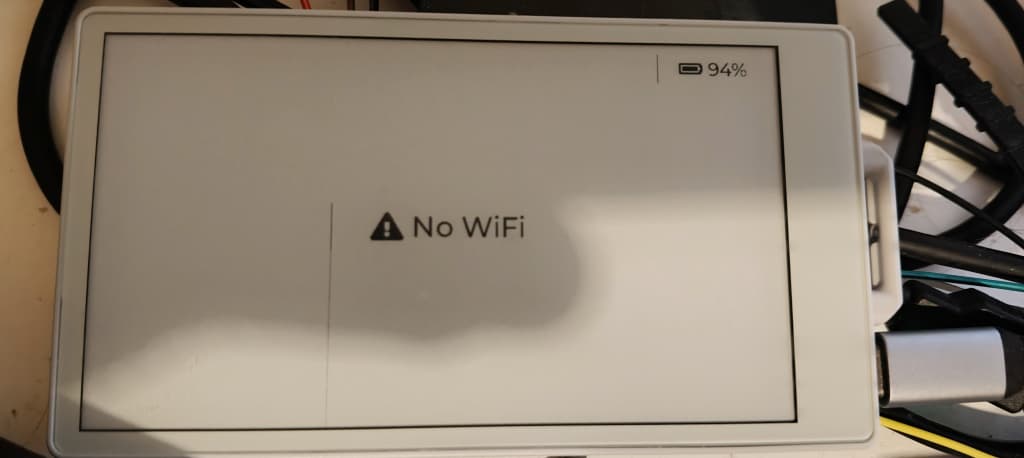
I´m not sure where they come from and how to disable them.