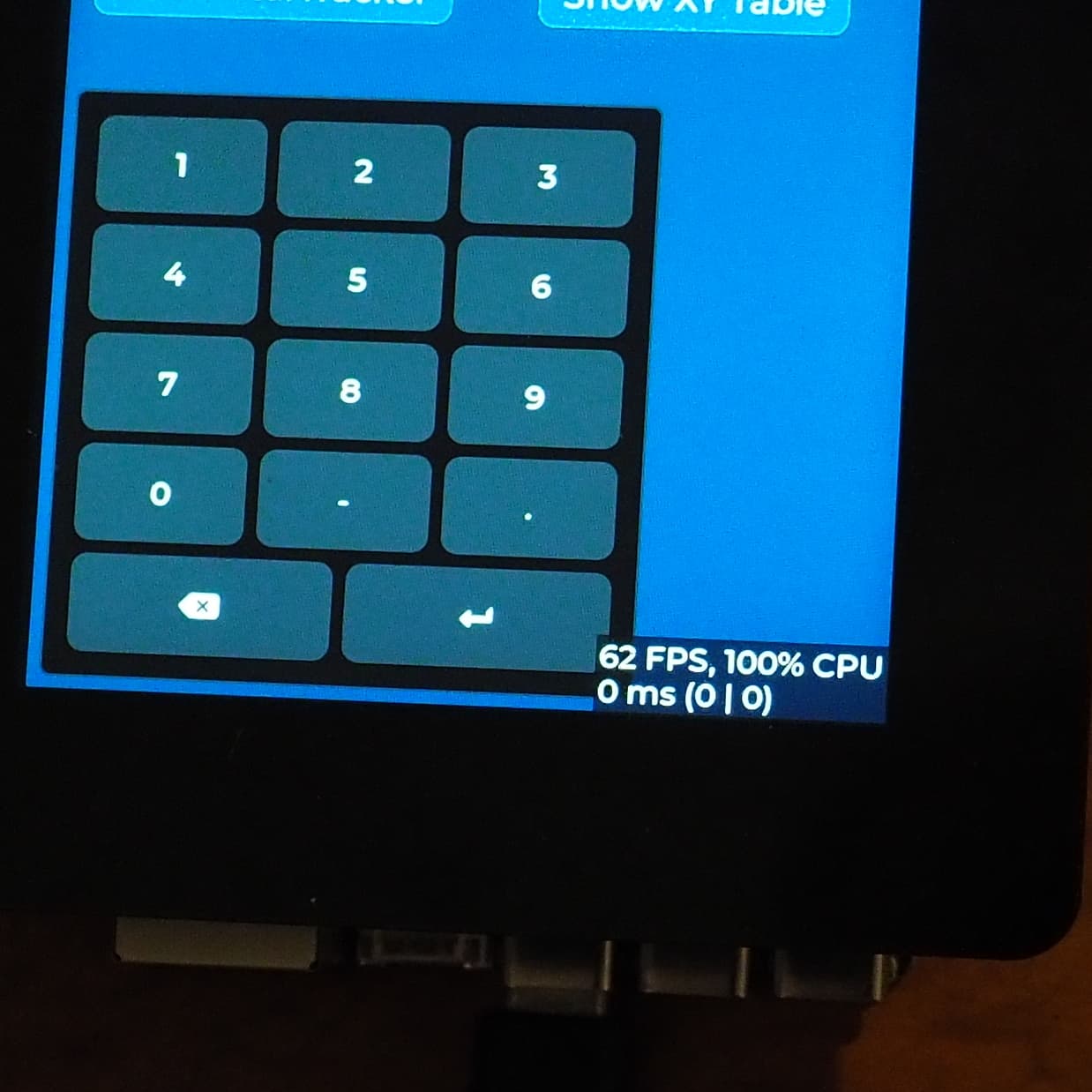
After a painful week trying to understand the ESP-IDF environment I finally got my project to compile and run. I have a Guition JC-ESP32P4-M3-DEV board working with a Rpi 5" LCD touch display.
I use lvgl to paint the screen but was surprised to see a widget in the lower right corner of the display.
Does anyone know where the frame rate and CPU usage comes from? And how do I suppress it?
I’m using the latest version of lvgl.
Screen driver: espressif_esp_lcd_ili9881.c
Touch: espressif_esp_lcd_touch_gt911
lvgl port: espressif_esp_lvgl_port
Many thanks for your reply. Unfortunately there is no lv_conf.h file in the project that I have cloned. There is a file sdkconfig.defaults that the user can edit and save as lv-conf.h I have done that but still have the problem. This is the section that I edited:
1: Enable system monitor component */
#define LV_USE_SYSMON   0
#if LV_USE_SYSMON
    /** Get the idle percentage. E.g. uint32_t my_get_idle(void); */
    #define LV_SYSMON_GET_IDLE lv_os_get_idle_percent
    /** 1: Enable usage of lv_os_get_proc_idle_percent.*/
    #define LV_SYSMON_PROC_IDLE_AVAILABLE 0
    #if LV_SYSMON_PROC_IDLE_AVAILABLE
        /** Get the applications idle percentage.
         * - Requires `LV_USE_OS == LV_OS_PTHREAD` */
        #define LV_SYSMON_GET_PROC_IDLE lv_os_get_proc_idle_percent
    #endif

    /** 1: Show CPU usage and FPS count.
     *  - Requires `LV_USE_SYSMON = 1` */
    #define LV_USE_PERF_MONITOR 0
    #if LV_USE_PERF_MONITOR
        #define LV_USE_PERF_MONITOR_POS LV_ALIGN_BOTTOM_RIGHT

        /** 0: Displays performance data on the screen; 1: Prints performance data using log. */
        #define LV_USE_PERF_MONITOR_LOG_MODE 0
    #endif

    /** 1: Show used memory and memory fragmentation.
     *     - Requires `LV_USE_STDLIB_MALLOC = LV_STDLIB_BUILTIN`
     *     - Requires `LV_USE_SYSMON = 1`*/
    #define LV_USE_MEM_MONITOR 0
    #if LV_USE_MEM_MONITOR
        #define LV_USE_MEM_MONITOR_POS LV_ALIGN_BOTTOM_LEFT
    #endif
#endif /*LV_USE_SYSMON*/
The ESP-IDF project folder occupies 465MB and comprises 7,076 files! Somewhere one of those files is undoing my setting of LV_USE_SYSMON Is there a way of turning off the monitor at runtime?
If I can get the espressif_esp_lcd_ili9881c library to work with Arduino I will abandon ESP_IDF.
Out of interest is it normal for the lcd to soak up 100% CPU? It isn’t a real problem for me as I use the second CPU on the ESP32P4 for time critical tasks.