Description
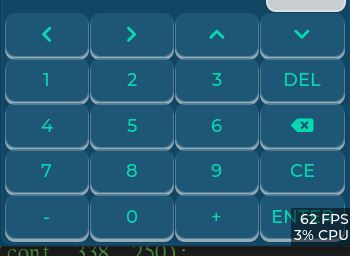
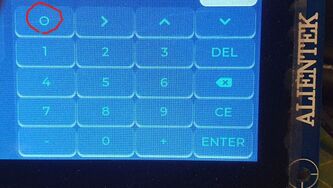
A btnmatrix is create in which the built-in symbol “LV_SYMBOL_LEFT” is used. It is shown correctly in VS simulator but incorrectly in STM32.
What MCU/Processor/Board and compiler are you using?
VS simulator and STM32H743
What LVGL version are you using?
v8
What do you want to achieve?
Show built-in symbol “LV_SYMBOL_LEFT” correctly in STM32
Code to reproduce
The code block(s) should be formatted like:
static const char* const num_kb_map[] = { LV_SYMBOL_LEFT,LV_SYMBOL_RIGHT,LV_SYMBOL_UP,LV_SYMBOL_DOWN,"\n",
                                          "1", "2", "3", "DEL","\n",
                                          "4", "5", "6", LV_SYMBOL_BACKSPACE, "\n",
                                          "7", "8", "9", "CE", "\n",
                                           "-", "0", "+", "ENTER" ,"", //LV_SYMBOL_OK
};

void keyboard_create(void)
{
    lv_obj_t* cont = lv_obj_create(lv_scr_act());
    lv_obj_align(cont, LV_ALIGN_TOP_RIGHT, -5, 345);
    lv_obj_set_size(cont, 338, 250);
    //lv_obj_set_style_pad_a11(cont,1, LV_STATE_DEFAULT);
    lv_obj_set_style_pad_all(cont, 1, 0);
    //lv_obj_set_style_pad_left(cont, 0, LV_STATE_DEFAULT);

    static lv_style_t style_cont;
    lv_style_init(&style_cont);
    lv_style_set_pad_all(&style_cont, 0);
    lv_style_set_pad_gap(&style_cont, 0);
    lv_obj_add_style(cont, &style_cont, LV_PART_ANY);

    num_keyboard_create(cont);
}
Screenshot and/or video
The case of VS
The case of STM32 (the 1st btn is shown incorrectly )
Thank you for your advice. Best Wishes.