Testing on lower end STM32 MCUs connected to a ST7735 display over SPI?

I am testing LVGL on some lower end STM32 devices like:

stm32F401RE (nucleo board):

  • 512kb Flash,
  • 96Kb RAM

stm32F103c8T6 (blue-pill):

  • 64kb Flash
  • 20kb RAM

The MCUs are connected to the 1.8 inch TFT displays (resolution of 160*128 pixels), over SPI.

I am trying to understand and measure what should be the optimal flash and RAM usage for a simple LVGL application.

Using just the Arc, Scale, and Slider widgets, the application gets:

  • ~200 kb of Flash size.
  • 66 kb of RAM

This is for the release build with -Os optimisation enabled.
Additionally, I am seeing frame rate of ~30 fps on all widgets. What are some settings I can look into to improve FPS and save on flash and RAM?

Please see attached is my current lv_conf.h configuration.

The setup can be seen from the video here: video-link

lv_conf.h (73.1 KB)

Hi

Kind of tricky question.

Regarding RAM/FLASH, would say overall the STM32F103C8T6 is quite limited / short in FLASH and RAM, even the STM32F4 could not be quite suitable due to low RAM depending on the GUI requirements.

Assuming the Display is 160*128 and we are using partial rendering with 1/10 of buffer, just for this we need 4.26KB just for the frame buffer.

According to the docs Requirements | LVGL Open there are some minimum requirements for RAM, and FLASH (although i have some doubts on the mentioned minimum 64KB for flash), in that regard the STM32F103C8 is quite limited, probably not impossible to use, but probably a challenge regarding FLASH/RAM, especially FLASH since for example just the default font lv_font_montserrat_14 requires around 13KB.

In terms of RAM, the LV_MEM_SIZE must be defined according to the usage we are going to have on the GUI, for low RAM micro this value needs to be carefullt choosen, assuming we are creating / deleting the widgets/objects in a way that only the active screen exists in memory we would need to check the worst case condition, just an ideia for “how” much RAM is required for a certain widget type:

  • Label: 284 bytes
  • Arc: 596 bytes
  • Slider: 1092 bytes
  • Scale (horizontal): 1396
  • Scale (Round): 1720

For each widget, and this was just a “small” test just by creating the object lv_obj_t* slider1 = lv_slider_create(lv_scr_act()) and checking LVGL memory usage, so no extra data, styles, events, etc…

Regarding FLASH, this is the one that it’s more easy to have some wasted space, since some of the stuff depend on what is defined in lv_conf.h, check for example the settings LV_DRAW_SW_SUPPORT_xxx to disable the ones that may not be “required” since in this case the compiler option -Xlinker --gc-sections, -ffunction-sections and -fdata-sections will not work alone to save some FLASH Space, same thing with the fonts LV_FONT_MONTSERRAT_xx, in case of custom fonts with large pixel size, create the font with just the necessary characters/symbols to save some space.

Personally would use something with minimum of 96KB of RAM (for very simple GUIs), 128KB to be more comfortable and 512KB of FLASH (Min 256KB), we also need RAM and FLASH to run the rest of the “code”…
Thanks!

Disabling the un-needed LV_DRAW_SW_SUPPORT_xxx pixel formats saved up around 40kb of Flash space for me. I am now around 165kb Flash space.

I only have now LV_FONT_MONTSERRAT_14 enabled and set as default.

Still looking at other options.

Well 165KB for LVGL code, is not that bad.

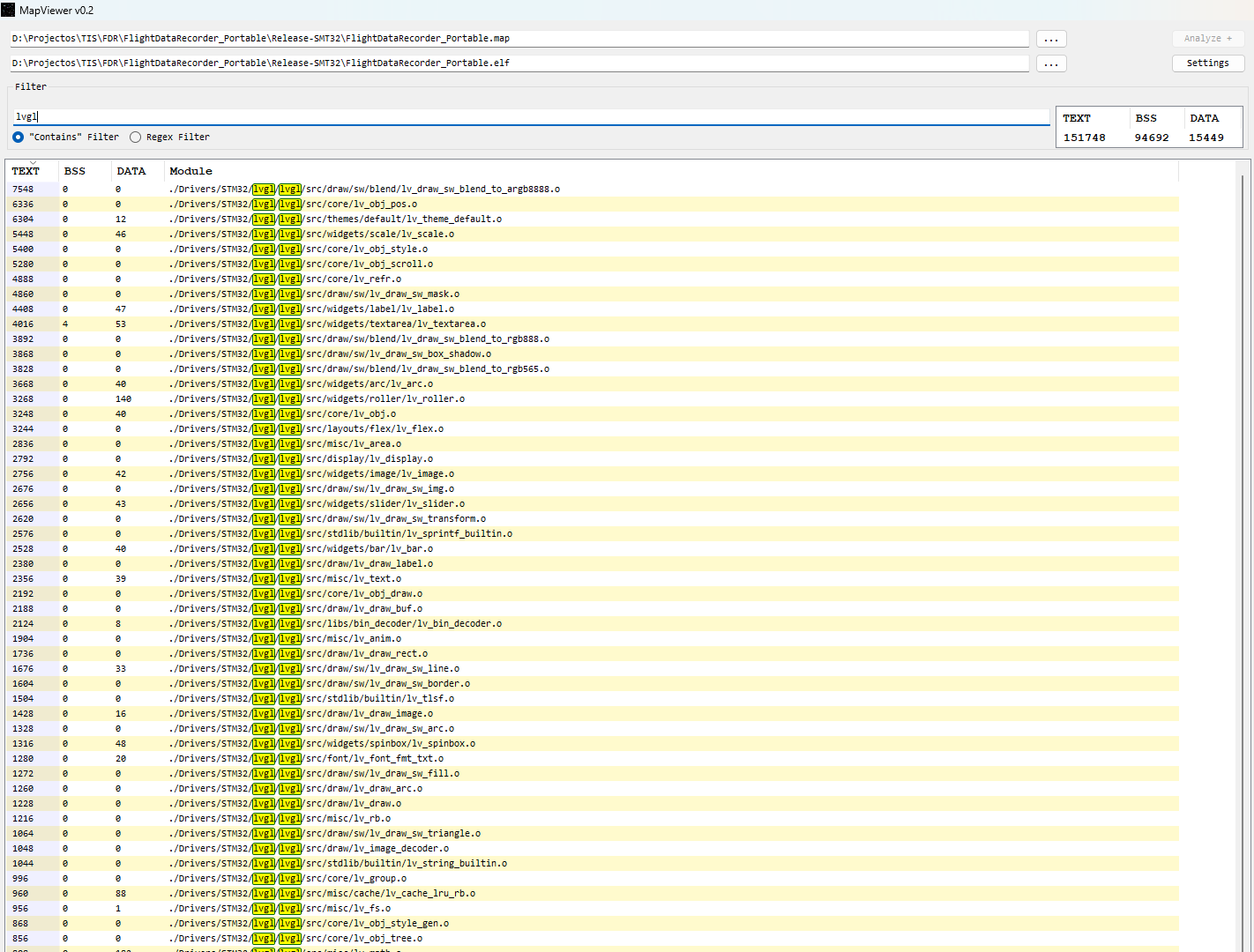
I usually use GitHub - govind-mukundan/MapViewer: A windows application to view and analyse information from the linker generated Map file · GitHub to check for the used space for “functions”/“files” (yes, better tools probably exist…)

For example, in one of my current projects


I supposedly have around of 151KB+15KB=166KB of space related to LVGL internal modules (this is with an older version v9.2.2, compiled for Cortex-M33 and optimization set to -O2), you can try this software or something similar to see if you can find anything else to “disable” to save some FLASH space related to LVGL.

For the STM32F401RE it’s quite comfortable, for the STM32F103C8T6 i will say it has to low FLASH size to handle LVGL.

Thanks, I am able to optimise further which significantly reduced my RAM usage to around 36kb.

I improved on the following areas

  1. Partial Rendering Mode
    After fixing my Partial-Rendering code for the display, which was using a full buffer:

    • 160*128 display resolution
    • LV_COLOR_FORMAT_RGB565 (i.e 16-bits = 2 bytes/pixel)

    Only using the frame-buffer size of 1/4 of the above, i.e. total exactly 10 Kb.
    I think can still go much lower than that but that starts dropping the FPS to less than 60-fps, but I guess I am fine with this now.

  2. Memory Pool Size
    My memory pool size is set to 24kb, I probably don’t need all of it i guess, but I have’nt yet measured how much I can cut short on this:

    #define LV_MEM_SIZE (24U * 1024U)

  3. Refresh Rate to 60 FPS from 30 FPS
    The following flag was set to limit refresh rate to 30 fps, its default value was 33.
    I changed it to 16, and now I can get 60 fps on all widgets,

    /** Default display refresh, input device read and animation step period. */
    #define LV_DEF_REFR_PERIOD 16

    The FPS drops only on the Chart widget when it is updating or scrolling.
    The rest of the widgets are all smooth. Also as I mentioned above, i need the Partial Rendering buffer size of atleast 1/4 of the display resolution.

Build Analyzer

There is a builtin Build Analyzer in the STM32CubeIDE, which shows different memory regions.

I guess, I can drop a few widgets to save up more on the Flash space, currently this is for using 7 different widgets: Arc, Slider, Switch, Scale, Button, Spinner, Chart

(I probably wont use all of them in a single application)