Hello everyone,
I am trying to create a simple list menu for my project.
When I build and run the project with the SDL backend, everything looks correct.
However, when I build the fbdev version and run it on the device, I face the following problems:
- My display uses the ST7789 driver. The framebuffer size is 320×240, but the physical screen is 320×170.
I set the window size to 320×170, and this works fine with SDL.
settings.window_width  = 320;
settings.window_height = 170;
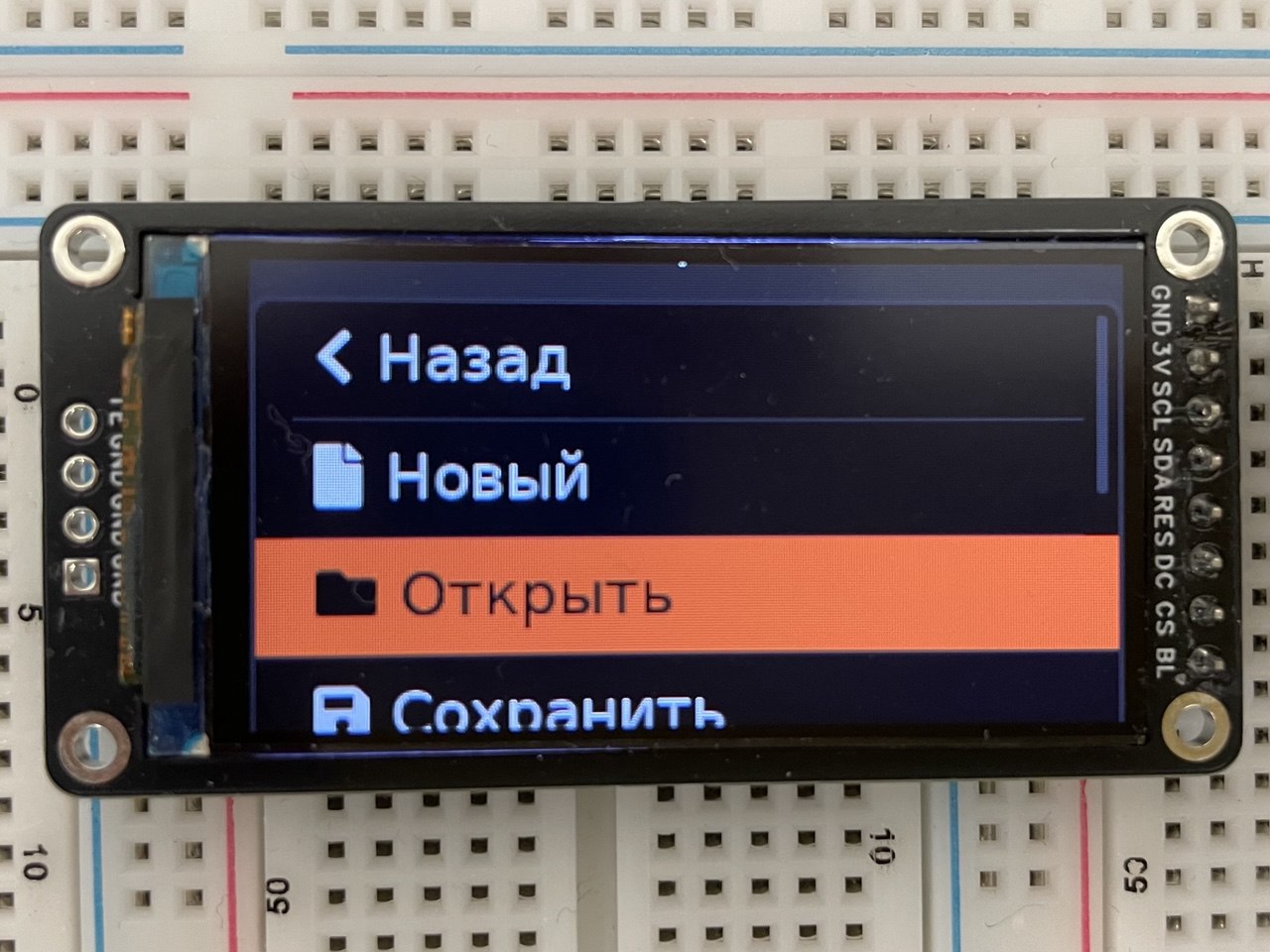
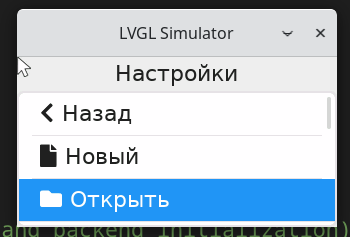
On the device (fbdev), the layout looks different compared to the SDL version.
2. The colors are different.
In the SDL version, the background is white and the buttons are blue.
On the device, the background is black and the buttons are orange.
I see the same color mismatch when running the LVGL demo.
What MCU / Processor / Board and compiler are you using?
- Board: NanoPi NEO Core
- Compiler: arm-linux-gnueabihf-g++
What do you want to achieve?
I want the fbdev version on the device to look the same as the SDL version, both in layout size and colors.
What have you tried so far?
- I changed the resolution from 320×240 to 320×170 in:
fbdev.c- the device tree
This did not solve the problem.
Code:
the display init fuction:
void init(uint32_t width, uint32_t height)
{
    /* Register all available backends */
    driver_backends_register();

    /* Set window size from parameters or environment variables */
    settings.window_width  = width;
    settings.window_height = height;

    /* Initialize LVGL */
    lv_init();

    /* Initialize the default backend */
    if(driver_backends_init_backend(NULL) == -1) {
        LV_LOG_ERROR("Failed to initialize display backend");
        return -1;
    }

    /* Get the default display object */
    pDisplay_ = lv_display_get_default();
    if(pDisplay_ == nullptr) {
        LV_LOG_ERROR("Failed to get default display");
        return -1;
    }

    /* Setup the virtual button input devices */
    setupInputDevices_();

    /* Create all screens */
    createScreens_();

    /* Load the default screen */
    loadScreen_(currentScreen_);
}
screen is inited like this:
    lv_obj_set_size(pTitleContainer, lv_pct(100), lv_pct(20));
    lv_obj_align(pTitleContainer, LV_ALIGN_TOP_MID, 0, 0);
    lv_obj_set_layout(pTitleContainer, LV_LAYOUT_FLEX);
    lv_obj_set_flex_flow(pTitleContainer, LV_FLEX_FLOW_COLUMN);
    lv_obj_set_flex_align(pTitleContainer, LV_FLEX_ALIGN_CENTER, LV_FLEX_ALIGN_CENTER, LV_FLEX_ALIGN_CENTER);
    lv_obj_clear_flag(pTitleContainer, LV_OBJ_FLAG_SCROLLABLE);
    lv_obj_set_style_bg_opa(pTitleContainer, LV_OPA_TRANSP, 0);
    lv_obj_set_style_border_width(pTitleContainer, 0, 0);

    lv_obj_t * pTitle = lv_label_create(pTitleContainer);
    lv_label_set_text(pTitle, "Настройки");
    lv_obj_set_style_text_align(pTitle, LV_TEXT_ALIGN_CENTER, 0);

    /* Create a list */
    lv_obj_t * pList = lv_list_create(pScreen_);
    lv_obj_set_size(pList, lv_pct(100), lv_pct(80));
    lv_obj_set_pos(pList, 0, ((*pHeight_ * TITLE_CONTAINER_HEIGHT_PCT) / 100));
    lv_obj_add_flag(pList, LV_OBJ_FLAG_FLOATING);

    /* Create buttons */
    lv_obj_t * button = lv_list_add_button(pList, LV_SYMBOL_LEFT, "Назад");
    lv_obj_set_user_data(button, reinterpret_cast<void*>(SettingsButtonId::BACK));
    lv_obj_add_event_cb(button, buttonHandler, LV_EVENT_CLICKED, this);
    lv_group_add_obj(pButtonGroup_, button);

    button = lv_list_add_button(pList, LV_SYMBOL_FILE, "Новый");
    lv_obj_set_user_data(button, reinterpret_cast<void*>(SettingsButtonId::NEW));
    lv_obj_add_event_cb(button, buttonHandler, LV_EVENT_CLICKED, this);
    lv_group_add_obj(pButtonGroup_, button);

    button = lv_list_add_button(pList, LV_SYMBOL_DIRECTORY, "Открыть");
    lv_obj_set_user_data(button, reinterpret_cast<void*>(SettingsButtonId::OPEN));
    lv_obj_add_event_cb(button, buttonHandler, LV_EVENT_CLICKED, this);
    lv_group_add_obj(pButtonGroup_, button);
Screenshot and/or video
SDL:
FBDEV: