Description
Hello,
I am working on a simple list menu using LVGL.
When I run the project with the SDL backend, everything looks correct.
However, when I build and run the fbdev backend for the target device, I see differences in layout and colors.
My display uses the ST7789 driver.
The framebuffer resolution is 320×240 (according to datasheet), but the physical screen is 320×170.
I configure LVGL for 320×170, and this works correctly with the SDL backend.
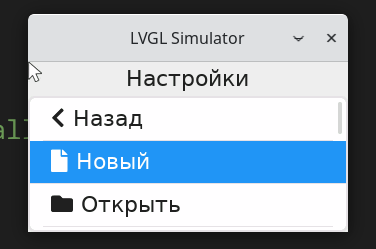
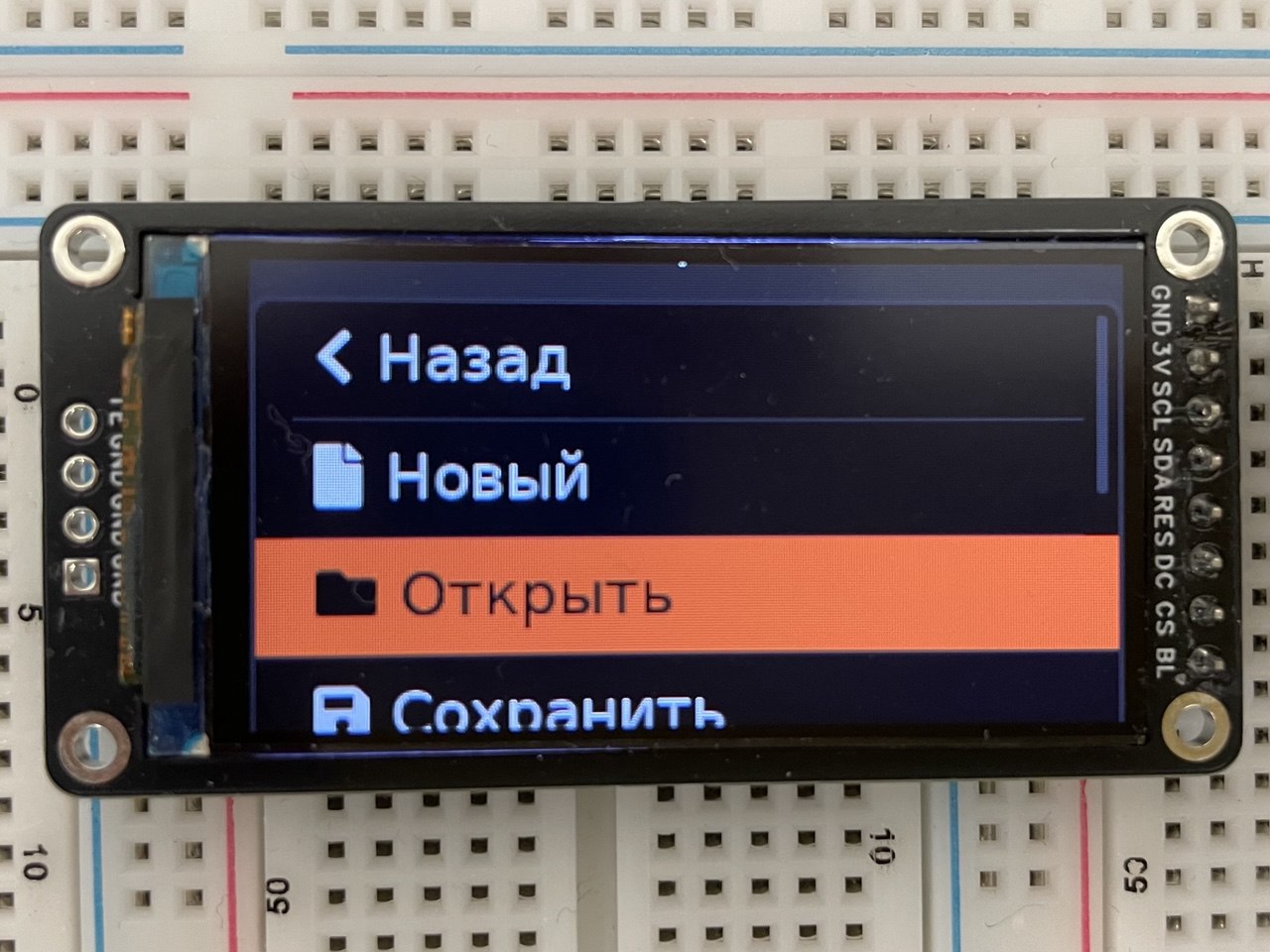
On the device (fbdev), the layout looks different compared to the SDL version.
Color mismatch
With the SDL backend:
background is white and buttons are blue
On the device (fbdev):
background is black and buttons are orange
I see the same color behavior when running the LVGL demo on the device.
What MCU/Processor/Board and compiler are you using?
Board: NanoPi NEO Core
Display: ST7789, 320x170, SPI
Compiler: arm-linux-gnueabihf-g++
LVGL: 9.5.0-dev
Backend: fbdev (target), SDL (host)
Device Tree:
 spi@01c69000 {
  	compatible = "allwinner,sun8i-h3-spi";
  	reg = <0x1c69000 0x1000>;
  	interrupts = <0x00 0x42 0x04>;
  	clocks = <0x04 0x1f 0x04 0x53>;
  	clock-names = "ahb\0mod";
  	dmas = <0x07 0x18 0x07 0x18>;
  	dma-names = "rx\0tx";
  	pinctrl-names = "default";
  	pinctrl-0 = <0x21>;
  	resets = <0x04 0x10>;
  	status = "okay";
  	#address-cells = <0x01>;
  	#size-cells = <0x00>;
  	linux,phandle = <0x66>;
  	phandle = <0x66>;

  	st7789@0 {
  		compatible = "sitronix,st7789v";
  		reg = <0x00>;
  		status = "okay";
  		spi-max-frequency = <0x4c4b400>;
  		rotate = <0x5a>;
  		fps = <0x3c>;
  		buswidth = <0x08>;
  		dc-gpios = <0x19 0x00 0x00 0x00>;
  		reset-gpios = <0x19 0x00 0x02 0x00>;
  		debug = <0x00>;
  		linux,phandle = <0x67>;
  		phandle = <0x67>;
  	};
  };
What do you want to achieve?
I want the fbdev output on the device to match the SDL output.
What have you tried so far?
Changed resolution from 320×240 to 320×170 in:
fbdev.c
device tree
This did not solve the issue.
Code to reproduce
// Display initialization
int Display::init(uint32_t width, uint32_t height)
{
    driver_backends_register();

    /* Set window size from parameters or environment variables */
    /* REMARK: settings.window_width and settings.window_height are ignored in fbdev backend */
    settings.window_width  = width;
    settings.window_height = height;
    pWidth_                = &settings.window_width;
    pHeight_               = &settings.window_height;

    lv_init();

    if (driver_backends_init_backend(NULL) == -1) {
        LV_LOG_ERROR("Failed to initialize display backend");
        return -1;
    }

    pDisplay_ = lv_display_get_default();
    if (pDisplay_ == nullptr) {
        LV_LOG_ERROR("Failed to get default display");
        return -1;
    }

    // Font loading (FreeType or default)
#if LV_USE_FREETYPE
    pFont_ = lv_freetype_font_create(FONT_PATH, LV_FREETYPE_FONT_RENDER_MODE_BITMAP,
                                     FONT_SIZE, LV_FREETYPE_FONT_STYLE_NORMAL);
    if (pFont_ != nullptr) {
        pFont_->fallback = &lv_font_montserrat_22;
    } else {
        pFont_ = &lv_font_montserrat_22;
    }
#else
    pFont_ = &lv_font_montserrat_22;
#endif

    setupInputDevices_();

    createScreens_();  // Creates all screens (main, settings, etc.)

    loadScreen_(SCREEN_SETTINGS);  // Load the settings screen

    return 0;
}

// SettingsScreen constructor (called from createScreens_)
SettingsScreen::SettingsScreen(uint32_t * pWidth, uint32_t * pHeight, const lv_font_t * pFont)
    : pWidth_(pWidth), pHeight_(pHeight), pFont_(pFont), pScreen_(nullptr), pButtonGroup_(nullptr)
{
    /* Create the screen object */
    pScreen_ = lv_obj_create(nullptr);
    lv_obj_set_size(pScreen_, *pWidth_, *pHeight_);
    lv_obj_set_style_bg_color(pScreen_, lv_color_make(0xef, 0xef, 0xef), 0);
    lv_obj_set_style_bg_opa(pScreen_, LV_OPA_COVER, 0);

    if (pFont_ != nullptr) {
        lv_obj_set_style_text_font(pScreen_, pFont_, 0);
    }

    /* Create the button group */
    pButtonGroup_ = lv_group_create();

    /* Create title container */
    lv_obj_t * pTitleContainer = lv_obj_create(pScreen_);
    lv_obj_set_size(pTitleContainer, lv_pct(100), lv_pct(20));
    lv_obj_align(pTitleContainer, LV_ALIGN_TOP_MID, 0, 0);
    lv_obj_set_layout(pTitleContainer, LV_LAYOUT_FLEX);
    lv_obj_set_flex_flow(pTitleContainer, LV_FLEX_FLOW_COLUMN);
    lv_obj_set_flex_align(pTitleContainer, LV_FLEX_ALIGN_CENTER, LV_FLEX_ALIGN_CENTER, LV_FLEX_ALIGN_CENTER);
    lv_obj_clear_flag(pTitleContainer, LV_OBJ_FLAG_SCROLLABLE);
    lv_obj_set_style_bg_opa(pTitleContainer, LV_OPA_TRANSP, 0);
    lv_obj_set_style_border_width(pTitleContainer, 0, 0);

    lv_obj_t * pTitle = lv_label_create(pTitleContainer);
    lv_label_set_text(pTitle, "Настройки");
    lv_obj_set_style_text_align(pTitle, LV_TEXT_ALIGN_CENTER, 0);

    /* Create a list */
    lv_obj_t * pList = lv_list_create(pScreen_);
    lv_obj_set_size(pList, lv_pct(100), lv_pct(80));
    lv_obj_set_pos(pList, 0, ((*pHeight_ * 20) / 100));
    lv_obj_add_flag(pList, LV_OBJ_FLAG_FLOATING);

    /* Create buttons */
    lv_obj_t * button = lv_list_add_button(pList, LV_SYMBOL_LEFT, "Назад");
    lv_obj_set_user_data(button, reinterpret_cast<void*>(SettingsButtonId::BACK));
    lv_obj_add_event_cb(button, buttonHandler, LV_EVENT_CLICKED, this);
    lv_group_add_obj(pButtonGroup_, button);

    button = lv_list_add_button(pList, LV_SYMBOL_FILE, "Новый");
    lv_obj_set_user_data(button, reinterpret_cast<void*>(SettingsButtonId::NEW));
    lv_obj_add_event_cb(button, buttonHandler, LV_EVENT_CLICKED, this);
    lv_group_add_obj(pButtonGroup_, button);

    button = lv_list_add_button(pList, LV_SYMBOL_DIRECTORY, "Открыть");
    lv_obj_set_user_data(button, reinterpret_cast<void*>(SettingsButtonId::OPEN));
    lv_obj_add_event_cb(button, buttonHandler, LV_EVENT_CLICKED, this);
    lv_group_add_obj(pButtonGroup_, button);

    button = lv_list_add_button(pList, LV_SYMBOL_SAVE, "Сохранить");
    lv_obj_set_user_data(button, reinterpret_cast<void*>(SettingsButtonId::SAVE));
    lv_obj_add_event_cb(button, buttonHandler, LV_EVENT_CLICKED, this);
    lv_group_add_obj(pButtonGroup_, button);

    // Additional buttons (DELETE, EDIT, BLUETOOTH, etc.) follow the same pattern...
}
Screenshot and/or video
SDL:
FBDEV:
P.S.
My guess is that I may be using pWidth_ and pHeight_ incorrectly during initialization, which could explain the layout differences.
However, this does not explain the color mismatch.
Any clarification would be helpful.