I am creating a quick access panel in the lv_layer_top() layer.
I also created a navigation bar in the layer lv_layer_top().
Everything is working, except the touch detection in the screen, outside the navigation bar and outside the quick access screen.
Before I added this flag ( “lv_obj_add_flag(lv_layer_top(), LV_OBJ_FLAG_CLICKABLE);” ), the icon on my home screen detected the click (the navigation bar also worked), but the gesture detection to show the quick access screen did not work.
Is there any way for the lv_layer_top() to propagate screen touches to the other layers ?
Is there any other easy and clean solution ?
What do you want to achieve?
All system screens created by me can access the quick access panel.
What have you tried so far?
Code below.
Code to reproduce
esp_err_t ui_quick_settings_panel_init(const ui_task_dev_t* ui_msg)
{
    ESP_LOGI(UI_PANEL_TAG, LOG_USER1("ui_quick_settings_panel_init() function called !!!"));

    lv_obj_add_event_cb(lv_layer_top(), global_gesture_event_cb, LV_EVENT_GESTURE, NULL);

    lv_obj_add_flag(lv_layer_top(), LV_OBJ_FLAG_CLICKABLE);

    return ESP_OK;
}

static void global_gesture_event_cb(lv_event_t * e)
{
    lv_event_code_t event_code = lv_event_get_code(e);

    ESP_LOGI(UI_PANEL_TAG, "global_gesture_event_cb CALLED !!!");

    if (event_code == LV_EVENT_GESTURE)
    {
        ESP_LOGI(UI_PANEL_TAG, "event_code == LV_EVENT_GESTURE");


        lv_dir_t gesture_dir = lv_indev_get_gesture_dir(lv_indev_active());

        // Se o painel for NULL e o gesto for para baixo, o comando é para CRIAR e MOSTRAR o painel
        if (gesture_dir == LV_DIR_BOTTOM && ui_quick_settings_panel == NULL)
        {
            ui_task_dev_t var;
            var.event_id = CMD_QUICK_SETTINGS_PANEL_SWIPE_DOWN;
            var.event_data = NULL;  // nenhum dado, somente comando.

            xQueueSend( ui_gateway_queue, (void *)&var, 0 );  // The call will return immediately if the queue is full and xTicksToWait is set to 0.
                                                              // Talvez fazer um tratameto de erro, caso a fila esteja cheia.
        }

        // Se o painel NÃO for NULL e o gesto for para cima, o comando é para ESCONDER o painel
        if (gesture_dir == LV_DIR_TOP && ui_quick_settings_panel != NULL)
        {
            ui_task_dev_t var;
            var.event_id = CMD_QUICK_SETTINGS_PANEL_SWIPE_UP;
            var.event_data = NULL;
            xQueueSend(ui_gateway_queue, (void *)&var, 0);
        }
    }
}
I don’t think there is a way (at least easy and direct).
From my understanding, it is possible to propagate events / gestures to an object parent LV_OBJ_FLAG_EVENT_BUBBLE and LV_OBJ_FLAG_GESTURE_BUBBLE, but layer_top belong to the display root level so it “absorbs” the events and they don’t pass to the “active screen” since it’s at the same “level”.
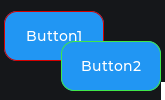
I think is like if you have two buttons draw on the screen (screen is the parent to booth), even if they overlap a click on button2 (on top, even in an area shared with Button1) will not generate a click on the button1 underneath him.
That complicates things, and not clean solution in my opinion.I’ll have to add call to a function ( ui_setup_screen_gestures() ) every time I create a new screen ( tested and partially OK ).
But now, only screen detects SWIPE_UP gesture.
The panel dont detects SWIPE_UP gesture.
So, I have to do the SWIPE_UP gesture outside the panel for the panel to close.
I would like the SWEEP_UP gesture to work on both the screen and the panel, for the panel to close.
// Example:
void ui_setup_screen_gestures(lv_obj_t *screen_root)
{
    // screen_root is the object created with lv_obj_create(NULL)
    lv_obj_add_event_cb(screen_root, global_gesture_event_cb, LV_EVENT_GESTURE, NULL);
}
It seems to go from sys → top → screen → bottom. and it doesn’t seem to have a way to propagate the touch’s between layers unless the object is not clickable or is hidden.
My analyse may be incorrect. I would suggest to try and open an issue on the GitHub repo and maybe someone of the developers could answer that or think of it has a possible feature.
Register the callback every time that create and show a new screen:
void ui_setup_screen_gestures(lv_obj_t *screen_root)
{
    // screen_root is the object created with lv_obj_create(NULL)
    lv_obj_add_event_cb(screen_root, global_gesture_event_cb, LV_EVENT_GESTURE, NULL);
}
And create the panel in the active screen instead of the lv_layer_top() layer:
The panel is created when opened and destroyed when closed, that is, the panel is not persistent (created only once, and only shown(with or without anim) and hidden(with or without anim) ).
// Called every time it detects a swipe down gesture on the screen.
static void create_quick_settings_panel()
{
    lv_obj_t* current_screen = lv_screen_active();
    ui_quick_settings_panel = lv_obj_create(current_screen);
    ...
}
I just tested it here and verified that the panel can be placed on the lv_layer_top() layer.
The gestures remain attached to the active (root) screen.
Now i added a “screen mask” too.
static void dismiss_mask_cb(lv_event_t* e)
{
    ESP_LOGI(UI_PANEL_TAG, LOG_USER1("Function: %s"), __func__);

    if ( is_panel_closed() ) return;  // ui_quick_settings_panel == NULL

    hide_panel();
}

////////////////////////////////////////////////////////////////////////////////////////////
//

static void create_screen_mask()
{
    background_mask = lv_obj_create(lv_screen_active());
    lv_obj_set_size(background_mask, LV_PCT(100), LV_PCT(100));
    lv_obj_set_style_bg_opa(background_mask, LV_OPA_TRANSP, 0);
    lv_obj_remove_flag(background_mask, LV_OBJ_FLAG_SCROLLABLE);

    // Adds the click event to the mask. This captures any clicks in the EMPTY area.
    lv_obj_add_event_cb(background_mask, dismiss_mask_cb, LV_EVENT_PRESSED, NULL);
}
Everything is working, except for the gestures within the panel, which are in lv_layer_top() and obviously don’t work because I only registered the gesture callback on the active screen.
So I tried to add the same gestures callback, that is attached to active screen, to lv_layer_top(), but not worked on lv_layer_top(). Gesture on lv_layer_top() don´t call registered callback, only active screen call registerd callback.