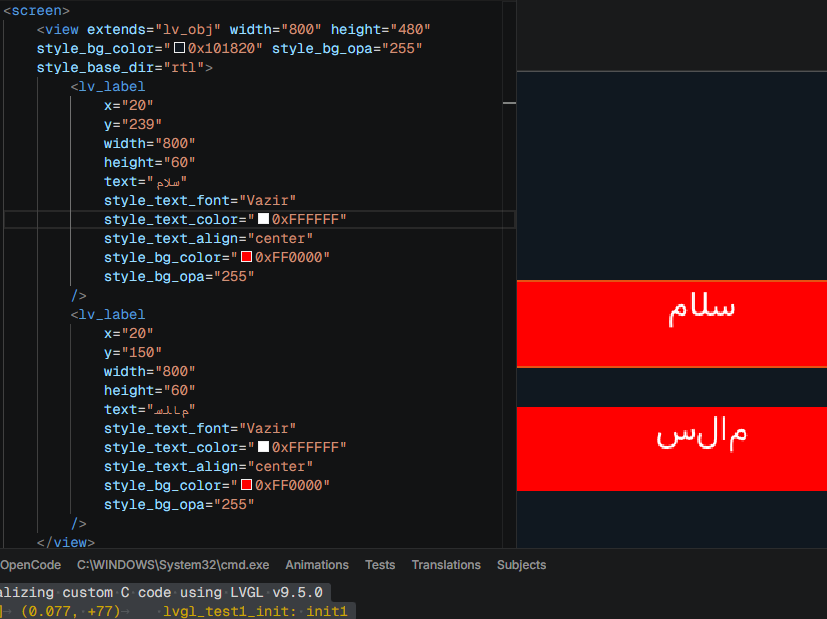
Description
I am having a Persian/Arabic font issue specifically in the LVGL Pro Editor Preview/Simulator.
I believe the problem may be related to the “lv_conf.h” configuration used by the LVGL Pro Editor Preview.
I am using:
- LVGL Pro Editor
- LVGL v9.5.0
- Windows
- Preview/Simulator
- STM32H743 target project
Default DejaVu Persian/Hebrew Font
I enabled the built-in Persian/Hebrew DejaVu font in “lv_conf.h”.
The “lv_conf.h” file I edited is located at:
“C:\Users\AmirBG\AppData\Roaming\lvgl-editor\resources\v9.5.0\libs\include\lvgl\lv_conf.h”
I enabled:
“LV_FONT_DEJAVU_16_PERSIAN_HEBREW”
However, when I try to use this font in the LVGL Pro Editor Preview/XML, the font is not recognized.
LVGL reports that the font cannot be found.
This makes me suspect that the “lv_conf.h” file I edited may not be the configuration file actually used by the LVGL Pro Editor Preview/Simulator, or that the font is not being registered with the XML font system.
Important Observation: Vazir Works Differently
I also tested the Vazir font.
When I add/register Vazir, LVGL can find the font by its name.
For example, when I use:
“Vazir”
the XML system can recognize the font.
However, the built-in DejaVu Persian/Hebrew font does not appear to be recognized in the same way, even though:
“LV_FONT_DEJAVU_16_PERSIAN_HEBREW”
is enabled in “lv_conf.h”.
This is the important difference I am trying to understand.
The problem is therefore not simply that “Persian fonts do not work”.
The Preview can recognize a custom font such as Vazir, while the built-in Persian/Hebrew DejaVu font that is enabled through “lv_conf.h” is not found by the XML/Preview system.
Persian Rendering Problem
When I use Vazir:
- English/Latin characters are rendered correctly.
- The font itself can be found by the XML system.
However, Persian text still has problems with:
- RTL layout
- Persian character joining
- Proper contextual forms of Persian/Arabic characters
For example:
“سلام دنیا”
- «ایند مالس»
does not appear as expected in the Preview.
My Main Questions
1. Is this the correct “lv_conf.h”?
I edited:
“C:\Users\AmirBG\AppData\Roaming\lvgl-editor\resources\v9.5.0\libs\include\lvgl\lv_conf.h”
Is this actually the correct “lv_conf.h” that is used by the LVGL Pro Editor Preview/Simulator?
If not, where is the correct configuration file that should be edited?
2. What is the correct configuration?
What is the correct configuration required to enable the built-in Persian/Hebrew DejaVu font in LVGL Pro Editor?
For example, should I only enable:
“LV_FONT_DEJAVU_16_PERSIAN_HEBREW”
or are there additional font-related settings that must also be enabled?
3. How should the built-in font be referenced from XML?
If “LV_FONT_DEJAVU_16_PERSIAN_HEBREW” is enabled, how should this font be referenced from LVGL XML?
Does enabling the font automatically register it with the XML font system, or does it need to be explicitly registered with a font name?
4. Why does Vazir work differently?
Why can the Preview/XML system recognize the custom Vazir font when it is added, while the built-in DejaVu Persian/Hebrew font enabled through “lv_conf.h” is not found?
Is there a difference between:
- fonts compiled into LVGL through “lv_conf.h”
- fonts explicitly registered with the XML system
- fonts provided by LVGL Pro Editor
5. Is this a Preview/Simulator issue?
Could this be a limitation or bug in the LVGL Pro Editor Preview/Simulator, where the Preview uses a different “lv_conf.h” or font registration mechanism than the generated LVGL project?
I would like to know the correct way to configure the Preview so that the built-in Persian/Arabic font is actually available to the XML system.
6. Persian/Arabic shaping and RTL
After the font is correctly detected, is any additional configuration required for:
- Persian/Arabic character shaping
- Character joining
- Contextual glyph selection
- RTL text layout
- Right alignment
Or is the “LV_FONT_DEJAVU_16_PERSIAN_HEBREW” option supposed to handle these features by itself?
Summary
The main issue I am trying to solve is:
I enabled “LV_FONT_DEJAVU_16_PERSIAN_HEBREW” in the “lv_conf.h” located inside the LVGL Pro Editor resources, but the LVGL Pro Editor Preview/XML system does not recognize the built-in Persian/Hebrew font. A custom font such as Vazir can be recognized when explicitly added.