Options to load image from buffer

Display image from buffer on RGB666 display connected to ESP32 board?

As of now, I download an image (converted from jpeg to binary format using lvgl_img_conv’s clit.ts feature) from a http server into a buffer object, then save the buffer object to a file on the SPIFFs system, and then load the image from the SPIFFs system. That works perfectly fine, except that it takes about 15 seconds or so after the SPIFFs file is created to load the image onto the RGB565 display using LVGL. I’m trying to replicate the same result by directly uploading the image from the buffer object, hoping to reduce overall time to display.

Code to reproduce

void http_get(char *file){
    
    int cum_data_read = 0;
    int i = 1, j = 1;
    int resp_length;
    char *output_buffer = (char *)calloc(sizeof(char), MAX_HTTP_OUTPUT_BUFFER); //MAX_HTTP_OUTPUT_BUFFER defined as 2048
    char uri[256];
    snprintf(uri, sizeof(uri), "%s://%s:%s/esp?file=%s", httpServer, httpIpAddress, httpPort, file);
    esp_http_client_config_t config = {
        .url = uri
    };
    esp_http_client_handle_t client = esp_http_client_init(&config);
    esp_err_t err = ESP_OK;

    // GET Request
    esp_http_client_set_method(client, HTTP_METHOD_GET);

    do {
        esp_err_t err = esp_http_client_open(client, 0);
        if (err != ESP_OK){
            j++;
        } else {
            break;
        }
    }
    while (j<=5);

    if (j > 5){
        ESP_LOGE(TAG, "Failed to open HTTP connection: %s", esp_err_to_name(err));
    } else {
        int content_length = esp_http_client_fetch_headers(client);
        uint8_t *image_buffer = (uint8_t *)calloc(content_length, sizeof(uint8_t));
        if (content_length < 0) {
            ESP_LOGE(TAG, "HTTP client fetch headers failed");
        } else {
            do {
                resp_length = esp_http_client_read_response(client, output_buffer, MAX_HTTP_OUTPUT_BUFFER);
                if (resp_length >= 0) {
                    memcpy(image_buffer + cum_data_read, output_buffer, resp_length);
                    cum_data_read += resp_length;
                } else {
                    ESP_LOGE(TAG, "Failed to read response");
                }
                i++;
            }
            while (cum_data_read < content_length);
            create_file_app(file, image_buffer, cum_data_read); //This function creates image file on SPIFFs system as expected
            free(image_buffer);
            xEventGroupSetBits(main_event_group, FILE_DOWNLOAD_COMPLETE_BIT);
            display_img(file);
        }
    }
    esp_http_client_close(client);
}


void display_img(char *file){
    char filename[256];
    snprintf(filename, sizeof(filename), "A:/spiffs/%s",file);
    lv_obj_t *img1 = lv_img_create(lv_scr_act());
    lv_img_set_src(img1, filename);
    
    // Lock the mutex due to the LVGL APIs are not thread-safe
    if (lvgl_port_lock(-1)) {
        lvgl_port_unlock();
    }
}

So far, this works well. What I’m trying to do is load image directly from the buffer instead of first saving it to a file on SPIFFs and then loading the file from SPIFFs. To do that, here’s what I’ve got:

void http_get(char *file){
    
    int cum_data_read = 0;
    int i = 1, j = 1;
    int resp_length;
    char *output_buffer = (char *)calloc(sizeof(char), MAX_HTTP_OUTPUT_BUFFER); //MAX_HTTP_OUTPUT_BUFFER defined as 2048
    char uri[256];
    snprintf(uri, sizeof(uri), "%s://%s:%s/esp?file=%s", httpServer, httpIpAddress, httpPort, file);
    esp_http_client_config_t config = {
        .url = uri
    };
    esp_http_client_handle_t client = esp_http_client_init(&config);
    esp_err_t err = ESP_OK;

    // GET Request
    esp_http_client_set_method(client, HTTP_METHOD_GET);

    do {
        esp_err_t err = esp_http_client_open(client, 0);
        if (err != ESP_OK){
            j++;
        } else {
            break;
        }
    }
    while (j<=5);

    if (j > 5){
        ESP_LOGE(TAG, "Failed to open HTTP connection: %s", esp_err_to_name(err));
    } else {
        int content_length = esp_http_client_fetch_headers(client);
        uint8_t *image_buffer = (uint8_t *)calloc(content_length, sizeof(uint8_t));
        if (content_length < 0) {
            ESP_LOGE(TAG, "HTTP client fetch headers failed");
        } else {
            do {
                resp_length = esp_http_client_read_response(client, output_buffer, MAX_HTTP_OUTPUT_BUFFER);
                if (resp_length >= 0) {
                    memcpy(image_buffer + cum_data_read, output_buffer, resp_length);
                    cum_data_read += resp_length;
                } else {
                    ESP_LOGE(TAG, "Failed to read response");
                }
                i++;
            }
            while (cum_data_read < content_length);
            xEventGroupSetBits(main_event_group, FILE_DOWNLOAD_COMPLETE_BIT);
            display_img(image_buffer);
        }
    }
    esp_http_client_close(client);
}

void display_img(uint8_t *img_buffer){
    if (img_buffer == NULL) {
        ESP_LOGE(TAG, "Image buffer is NULL");
        return;  // Exit the function or handle the error accordingly
    } else {
        ESP_LOGI(TAG, "Image buffer is OK");
    }

    lv_obj_t *img1 = lv_img_create(lv_scr_act());
    
    lv_img_dsc_t newImg = {
        .header.always_zero = 0,
        .header.w =480,
        .header.h =480,
        .data_size = 480 * 480 * 2,
        .header.cf = LV_IMG_CF_TRUE_COLOR_ALPHA,
        .data = (const uint8_t *) img_buffer
    };
    lv_img_set_src(img1, &newImg);
    

    // Lock the mutex due to the LVGL APIs are not thread-safe
    if (lvgl_port_lock(-1)) {
        lvgl_port_unlock(); // Release the mutex
    }
}

Screenshot and/or video

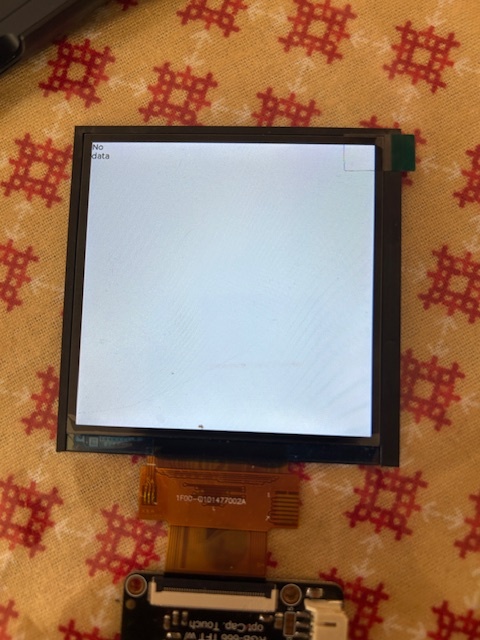
Here’s what I get when trying to load image from buffer
Environment

  • ESP32-S3 with Square RGB666 TTL TFT Display - 3.4" 480x480
  • **LVGL version 8.4

try static

Can you please elaborate?

Simply basic C knowledge. Variable inside func is destroyed after func end.
Lvgl cant. draw destroyed image…

void display_img(uint8_t *img_buffer){
    if (img_buffer == NULL) {
        ESP_LOGE(TAG, "Image buffer is NULL");
        return;  // Exit the function or handle the error accordingly
    } else {
        ESP_LOGI(TAG, "Image buffer is OK");
    }

    lv_obj_t *img1 = lv_img_create(lv_scr_act());
    
  static  lv_img_dsc_t newImg = {
        .header.always_zero = 0,
        .header.w =480,
        .header.h =480,
        .data_size = 480 * 480 * 2,
        .header.cf = LV_IMG_CF_TRUE_COLOR_ALPHA,
        .data = (const uint8_t *) img_buffer
    };
    lv_img_set_src(img1, &newImg);
    

Thanks. The static variable newImg did the trick. But I also had to make adjustments to header.data_size and data because lv_img_conv adds 4 bytes of header info that cause LVGL to crash or display “No Data” when displaying data from a variable (doesn’t create an issue when displaying data from a file for some reason). So in addition to using static newImg, the following did the trick:

header.data_size = height * width * 3 (for ARGB565 data produced by lv_img_conv) - 4,
header.data = (const uint8_t*)  img_buffer + 4

This code

void http_get(char *file){
    
    int cum_data_read = 0;
    int i = 1, j = 1;
    int resp_length;
    char *output_buffer = (char *)calloc(sizeof(char), MAX_HTTP_OUTPUT_BUFFER); //MAX_HTTP_OUTPUT_BUFFER defined as 2048
    char uri[256];
    snprintf(uri, sizeof(uri), "%s://%s:%s/esp?file=%s", httpServer, httpIpAddress, httpPort, file);
    esp_http_client_config_t config = {
        .url = uri
    };
    esp_http_client_handle_t client = esp_http_client_init(&config);
    esp_err_t err = ESP_OK;

    // GET Request
    esp_http_client_set_method(client, HTTP_METHOD_GET);

    do {
        esp_err_t err = esp_http_client_open(client, 0);
        if (err != ESP_OK){
            j++;
        } else {
            break;
        }
    }
    while (j<=5);

    if (j > 5){
        ESP_LOGE(TAG, "Failed to open HTTP connection: %s", esp_err_to_name(err));
    } else {
        int content_length = esp_http_client_fetch_headers(client);
        uint8_t *image_buffer = (uint8_t *)calloc(content_length, sizeof(uint8_t));
        if (content_length < 0) {
            ESP_LOGE(TAG, "HTTP client fetch headers failed");
        } else {
            do {
                resp_length = esp_http_client_read_response(client, output_buffer, MAX_HTTP_OUTPUT_BUFFER);
                if (resp_length >= 0) {
                    memcpy(image_buffer + cum_data_read, output_buffer, resp_length);
                    cum_data_read += resp_length;
                } else {
                    ESP_LOGE(TAG, "Failed to read response");
                }
                i++;
            }
            while (cum_data_read < content_length);
            xEventGroupSetBits(main_event_group, FILE_DOWNLOAD_COMPLETE_BIT);
            display_img(image_buffer);
        }
    }
    esp_http_client_close(client);
}


void display_img(uint8_t *img_buffer){
    if (img_buffer == NULL) {
        ESP_LOGE(TAG, "Image buffer is NULL");
        return;  // Exit the function or handle the error accordingly
    } else {
        ESP_LOGI(TAG, "Image buffer is OK");
    }

    lv_obj_t *img1 = lv_img_create(lv_scr_act());
    
  static  lv_img_dsc_t newImg = {
        .header.always_zero = 0,
        .header.w =480,
        .header.h =480,
        .data_size = 480 * 480 * 2,
        .header.cf = LV_IMG_CF_TRUE_COLOR_ALPHA,
        .data = (const uint8_t *) img_buffer
    };
    lv_img_set_src(img1, &newImg);

is actually not the best way to go about doing because of how you are handling the allocation of memory for the image buffer data but also because of the allocation of the lv_obj_t structure for the image widget.

Now I am making some assumptions here that the code above is actually getting called more than once. It appears like it might be. If it is then you do not want to be circularly allocating buffers over and over again without destroying them at all.

specifically seen at this line…

char *output_buffer = (char *)calloc(sizeof(char), MAX_HTTP_OUTPUT_BUFFER);

this line

uint8_t *image_buffer = (uint8_t *)calloc(content_length, sizeof(uint8_t));

and the creating of the image widget seen here

lv_obj_t *img1 = lv_img_create(lv_scr_act());

to limit the amount of memory frag it would be ideal to allocate the image buffer as a size that would be able to fix any of the images you are downloading, you would need to know the maximum size beforehand to be able to do that. It if the size is not known it still is able to be done using code similar to this…


char *output_buffer = NULL;
uint8_t *image_buffer = NULL;
lv_obj_t *img1 = NULL;

void http_get(char *file){

    int cum_data_read = 0;
    int i = 1, j = 1;
    int resp_length;

    if (output_buffer == NULL) {
        // allocate output buffer
        output_buffer = (char *)calloc(1, sizeof(char) * MAX_HTTP_OUTPUT_BUFFER); //MAX_HTTP_OUTPUT_BUFFER defined as 2048
    } else {
        // set the buffer to all zeros.
        output_buffer = memset(output_buffer, 0, sizeof(char) * MAX_HTTP_OUTPUT_BUFFER);
    }
    char uri[256];
    snprintf(uri, sizeof(uri), "%s://%s:%s/esp?file=%s", httpServer, httpIpAddress, httpPort, file);
    esp_http_client_config_t config = {
        .url = uri
    };
    esp_http_client_handle_t client = esp_http_client_init(&config);
    esp_err_t err = ESP_OK;

    // GET Request
    esp_http_client_set_method(client, HTTP_METHOD_GET);

    do {
        esp_err_t err = esp_http_client_open(client, 0);
        if (err != ESP_OK){
            j++;
        } else {
            break;
        }
    }
    while (j<=5);

    if (j > 5){
        ESP_LOGE(TAG, "Failed to open HTTP connection: %s", esp_err_to_name(err));
    } else {
        int content_length = esp_http_client_fetch_headers(client);
        
        if (content_length < 0) {
            ESP_LOGE(TAG, "HTTP client fetch headers failed");
        } else {
            if (image_buffer == NULL) {
                // allocate the buffer
                image_buffer = (uint8_t *)calloc(1, content_length * sizeof(uint8_t));
            } else {
                // reallocate the buffer
                image_buffer = (uint8_t *)calloc(image_buffer, content_length * sizeof(uint8_t));
                // set the buffer to all zeros.
                image_buffer = memset(image_buffer, 0, content_length * sizeof(uint8_t));
            }
            
            if (img_buffer == NULL) {
                ESP_LOGE(TAG, "Image buffer is NULL");
            } else {
                ESP_LOGI(TAG, "Image buffer is OK");
           
                do {
                    resp_length = esp_http_client_read_response(client, output_buffer, MAX_HTTP_OUTPUT_BUFFER);
                    if (resp_length >= 0) {
                        memcpy(image_buffer + cum_data_read, output_buffer, resp_length);
                        cum_data_read += resp_length;
                    } else {
                        ESP_LOGE(TAG, "Failed to read response");
                    }
                    i++;
                }
                while (cum_data_read < content_length);
                
                display_img(image_buffer, content_length);
            }
            xEventGroupSetBits(main_event_group, FILE_DOWNLOAD_COMPLETE_BIT);
        }
    }
    esp_http_client_close(client);
}

lv_img_dsc_t newImg = {
    .header.always_zero = 0,
    .header.w =480,
    .header.h =480,
    .header.cf = LV_IMG_CF_TRUE_COLOR_ALPHA,
};

void display_img(uint8_t *img_buffer, int length){
    if (img1 == NULL) {
        lv_obj_t *img1 = lv_img_create(lv_scr_act());
    }

    newImg.data_size = (size_t)length;
    newImg.data = (const uint8_t *)img_buffer;
    
    lv_img_set_src(img1, &newImg);

now you have the buffer being dynamically adjusted for size and the buffer is only being allocated once. that’s for both the response buffer as well as the image buffer. The image widget object is only getting created a single time as well.

I see that you are also using an older version of LVGL. If possible I do suggest using a newer version of it.

Thanks @kdschlosser. The code http_get is called once per transaction, and it’s role is to download image data from server and display it. So output_buffer is allocated memory only once per transaction (when http_get is called), as is image_buffer (after obtaining content length from http headers). Does this alter your assessment of my code?

Yes, You should be freeing the buffer used to collect the HTML response information at the end of the function. It ends up being wasted memory if you don’t (in your use case).

Overlooked that, so thanks for pointing that out.