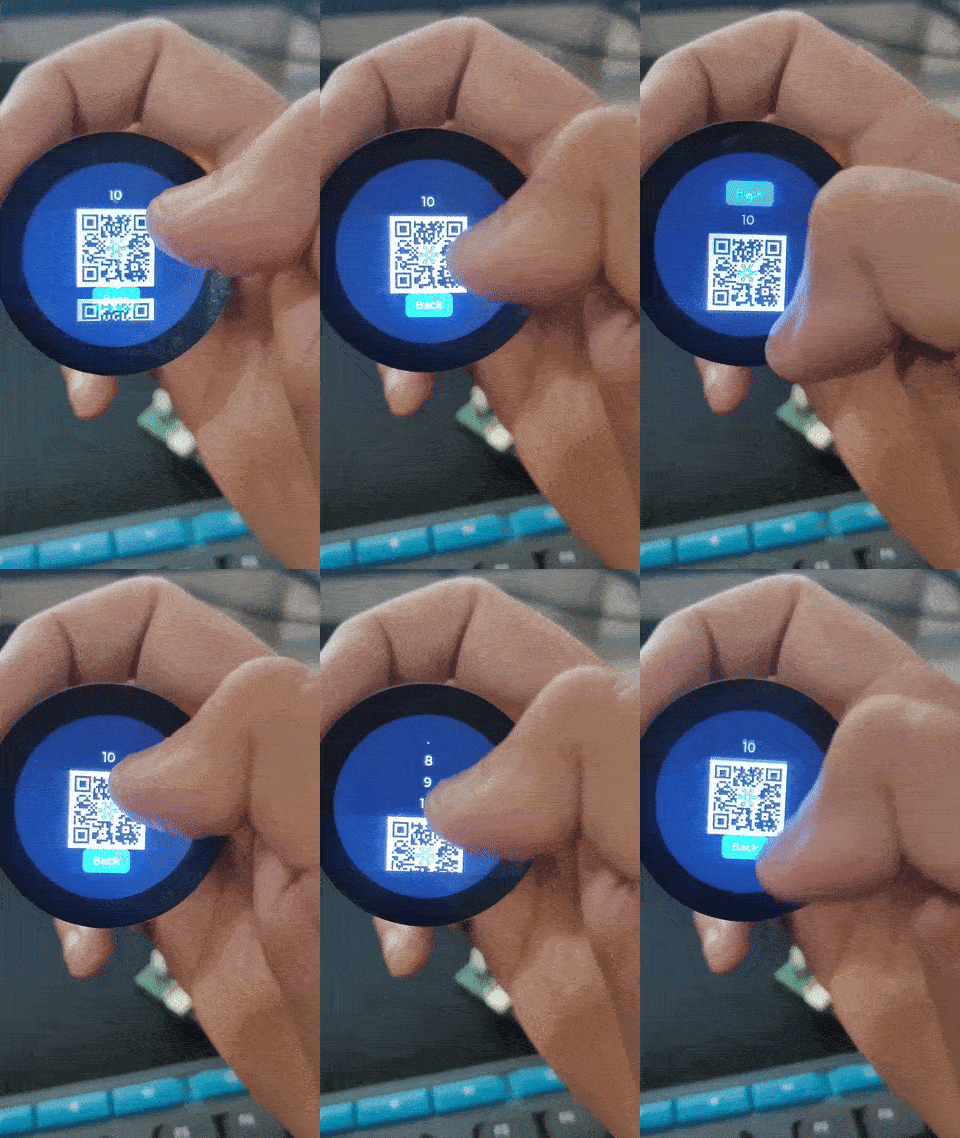
I am having an esp32s3 and a round display by seed studio, now what is happening with my ui is that if i am at the bottom of the screen and if i try to go up to the top it just moves a little bit here and there and comes back to the bottom , another observation lets say i am at the top and i scroll down to go more towards the top so it drags me down to the bottom
I have attached a video of the issue and all the code file i am using lvgl v9.4.0 and esp board packages version 3.1.0
ui.c (5.3 KB)
ui.h (2.0 KB)
ui_Screen1.c (1.2 KB)
ui_Screen2.c (11.9 KB)
#include <lvgl.h> //9.4.0
#include <TFT_eSPI.h> //2.5.43
#include <SPI.h>
#define USE_TFT_ESPI_LIBRARY
#include “lv_xiao_round_screen.h”
#include “ui.h”
#include <esp_timer.h>

#define TFT_HOR_RES 240
#define TFT_VER_RES 240
#define TFT_ROTATION LV_DISPLAY_ROTATION_90

/* Draw buffer: 1/10 screen (good starting point) */
#define DRAW_BUF_SIZE (TFT_HOR_RES * TFT_VER_RES / 10 * (LV_COLOR_DEPTH / 8))
uint32_t draw_buf[DRAW_BUF_SIZE / 4];

void my_disp_flush(lv_display_t *disp, const lv_area_t *area, uint8_t *color_p) {
uint32_t w = (area->x2 - area->x1 + 1);
uint32_t h = (area->y2 - area->y1 + 1);

tft.startWrite();
tft.setAddrWindow(area->x1, area->y1, w, h);
// color_p → lv_color_t* (usually 16-bit) → cast to uint16_t* for TFT_eSPI
tft.pushColors((uint16_t *)color_p, w * h, true);
tft.endWrite();

lv_display_flush_ready(disp);
}

/* Touch read callback for LVGL v9 */
void my_touchpad_read(lv_indev_t *indev_driver, lv_indev_data_t *data) {
lv_coord_t touchX = 0, touchY = 0;

if (!chsc6x_is_pressed()) {
data->state = LV_INDEV_STATE_REL;
} else {
data->state = LV_INDEV_STATE_PR;

chsc6x_get_xy(&touchX, &touchY);

/*Set the coordinates*/
data->point.x = touchX;
data->point.y = touchY;
}
}

static uint32_t my_tick(void) {
return (esp_timer_get_time()/1000ULL);
}

void setup() {
Serial.begin(115200);

/* Initialize LVGL first */
lv_init();

lv_tick_set_cb(my_tick);
tft.begin(); /* TFT init /
tft.setRotation(180); / Landscape orientation, flipped /
/ Optionally set tick source */
lv_display_t disp;
/ Create/display via the TFT_eSPI helper which sets up the draw buffer & flush for you.
Pass the buffer pointer and its size in bytes. */
// disp = lv_tft_espi_create(TFT_HOR_RES, TFT_VER_RES, draw_buf, sizeof(draw_buf));
// lv_display_set_rotation(disp, TFT_ROTATION);

/* Initialize your touch helper (requires lv_init previously) */
lv_xiao_touch_init();

// create the display object
disp = lv_display_create(240, 240);

// set flush callback
lv_display_set_flush_cb(disp, my_disp_flush);

// provide draw buffers (pixels count, not bytes)
lv_display_set_buffers(disp, draw_buf, NULL, DRAW_BUF_SIZE, LV_DISPLAY_RENDER_MODE_PARTIAL);

// optionally set rotation, etc.
// lv_display_set_rotation(disp, LV_DISPLAY_ROTATION_0);

// in flush: notify LVGL the flush finished
lv_display_flush_ready(disp);

/* Create an input device (v9) and set its read callback */
lv_indev_t *indev = lv_indev_create();
lv_indev_set_type(indev, LV_INDEV_TYPE_POINTER);
lv_indev_set_read_cb(indev, my_touchpad_read);

/* Initialize UI generated by SquareLine / ui.h if present */
ui_init();

Serial.println(“Setup done”);
}

void loop() {
/* LVGL v9: use lv_timer_handler() */
lv_timer_handler();
delay(5);
}