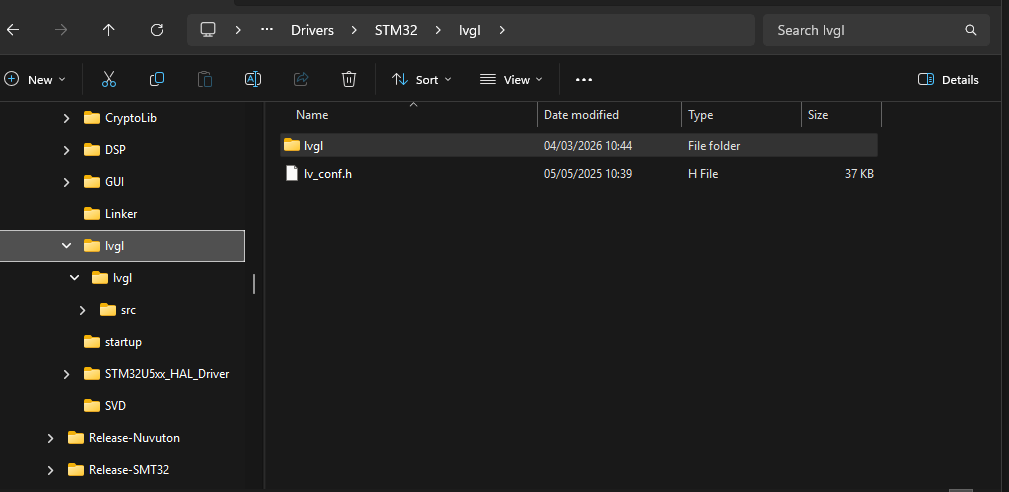
I have been trying to get LVGL to run on an stm32 project using a 3.5" screen with ST7796. I followed the implementation guidance under LVGL 9.6 documentation as I downloaded the repo last night.
I am using STM32CubeIDE.
I copied everything from the lvgl master branch to my src folder and then as per the guide:
- I changed the name of the “lv_conf_template” file to “lv_conf” and it is now at the path: …/Core/Src/lvgl/lv_conf.h.
- I set lv_conf.h line#15 to #if 1 to enable its use.
- Added a preprocessor called “LV_CONF_INCLUDE_SIMPLE” to the list of preprocessors under C build settings.
- My display claims to have 65k colours so I left #define LV_COLOR_DEPTH to 16.
- I added the path / Core /Src / lvgl to my list of include paths in C build settings.
- I added the lvgl to my project by using #include lvgl.h in the main.c file.
- I even tried #include “lvgl / lvgl.h” thinking I got the paths confused.
These are the errors I ran into and how I tried to resolve them:
“test_A1_NONE_align64:97:3: error: field name not in record or union initializer”
So I went to the top of the test_A1_NONE_align64.c and found a macro I could use called “LV_LVGL_H_INCLUDE_SIMPLE”, so I added this to my list of preprocessors.
I then started getting errors like:
decomp_raw:5:10: error: #include expects “FILENAME” or
for #include LV_STDDEF_INCLUDE in decomp_raw.c file.
This is something clearly defined in lv_conf.h
#define LV_STDINT_INCLUDE <stdint.h>
#define LV_STDDEF_INCLUDE <stddef.h>
So I changed the decomp_raw.c file to specifically include <stdint.h> and <stddef.h> instead of using macro defines. I then get further errors like:
lv_binfont_loader.h:28:5: error: unknown type name ‘uint32_t’
Which means it clearly cannot find the stdint.h file or does not know what it is. Before I go changing code I probably should not in the LVGL files, could someone more experienced and a different set of eyes please see if I have missed something out when following the implementation guidance? Thank you.
Note: I had to remove the topic template and paths to files above because it thinks I am trying to post more than 3 links. I could try to post them in a seperate reply if needed?