Problem Description
I am using LVGL with Zephyr on an ST7735 TFT display (128×160, RGB565) and trying to render very small fonts (8 px).
Despite using a pre-rendered 1bpp bitmap font, the 8px glyphs (especially digits and diagonal strokes) look visually noisy / frayed.
The effect is visible with the naked eye, not only in photos. Larger sizes (10px, 12px, 14px) look fine.
Setup
- Display: ST7735, 128×160, RGB565
- MCU: STM32 (Cortex-M33)
- RTOS: Zephyr
- GUI: LVGL (no FreeType)
Font Generation (8px)
Font generated using lv_font_conv:
--size 8
--bpp 1
--no-compress
--format lvgl
Verified in the generated font file:
.bpp = 1.subpx = LV_FONT_SUBPX_NONE- Kerning disabled:
.kern_dsc = NULL,
.kern_scale = 0,
LVGL Rendering Test
Minimal test screen:
- single label
- no wrap (CLIP)
- no letter/line spacing
- solid black background
- label background explicitly opaque
Displayed characters:
0–9
A–Z
a–z
Observations
- 8px glyphs appear unstable / noisy (especially
0, 6, 8, 9)
- No subpixel rendering or anti-aliasing is used
- Larger fonts render correctly
Already Tested
- 1bpp bitmap font
- Subpixel rendering disabled
- Kerning disabled
- No spacing
- Opaque label background
- No FreeType
Questions
- Are there known limitations of LVGL + ST7735 (RGB565) for 8px fonts?
- Is 2bpp generally better than 1bpp for very small fonts on RGB565?
- Is Helvetica simply too thin at 8px, and should a Bold or screen-optimized font be used?
- Could the ST7735 driver or RGB565 pipeline introduce dithering or blending artifacts?
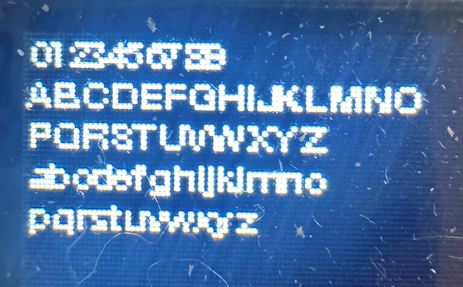
That doesn’t look like an LCD display. It looks more like a dot matrix display…
a dot matrix display is literally like it sounds. it’s rows of “dots”. When the dots are lit up they actually have the appearance of being round. This is going to make anything that you want to be a straight line look a little bit choppy along it. It’s the nature of the display. An LCD uses rectangles instead of dots for the pixels. This will give you a nice smooth edge…
What makes me think that your display is a dot matrix display is is this…
When I zoom into your image you can see the “dots”
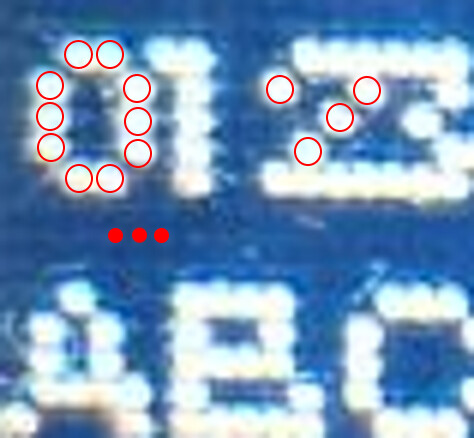
The illuminated pixels are round.
The problem is not LVGL, it’s the hardware you are using…
I am using a small TFT color display, and it is difficult to photograph properly. However, the visible artifacts are not caused by the camera.
The display uses rectangular RGB pixels, so the dot structure itself is well defined and stable.
From my current assessment, LVGL is not the issue. The problem seems to be related to the conversion of TrueType fonts into C files for LVGL. At very small sizes (8 px), the generated glyphs do not look clean, even when using 1 bpp and with all anti-aliasing and subpixel rendering disabled.
I have read that bitmap fonts converted to C files are more accurate at such small pixel sizes. What is unclear to me is the recommended workflow:
- How do you correctly convert a bitmap font (e.g. BDF) into an LVGL-compatible C font file?
- Are there already pre-generated LVGL C font files available that work well at 8 px?
I have currently switched to a monospace font, but the visual result is still not very satisfying. The built-in 8 px LVGL font is actually quite readable, but I do not like its appearance.
So the remaining question for me is: how do you obtain a good-looking 8 px font for LVGL, especially on a TFT with rectangular RGB pixels?
Should bitmap/pixel fonts generally be preferred over TTF-based fonts at this size, and are there recommended tools or sources for high-quality LVGL font C files?