What do you want to achieve?
Rotate the label correctly or centered after rotation.
What have you tried so far?
using lv_obj_set_style_transform_angle() and lv_obj_set_style_transform_rotation()
using lv_obj_align() and lv_obj_center()
Code to reproduce
lv_obj_t *title1 = lv_label_create(lv_screen_active());
lv_obj_set_style_text_font(title1, &lv_font_montserrat_22, 0);
lv_obj_set_style_text_color(title1, lv_color_hex(0xffffffff), LV_PART_MAIN);
lv_obj_set_style_text_align(title1, LV_TEXT_ALIGN_CENTER, 0);
lv_obj_align(title1, LV_ALIGN_CENTER, 0, 0);
lv_label_set_text(title1, "Centered text ** Centered Text");
// horizontal

// vertical
lv_obj_set_style_transform_angle(title1, 900, LV_PART_MAIN);
lv_obj_set_style_transform_rotation(title1, -900, 0);

lv_obj_center(title1);
Screenshot and/or video
Environment
- LVGL version: 9.3
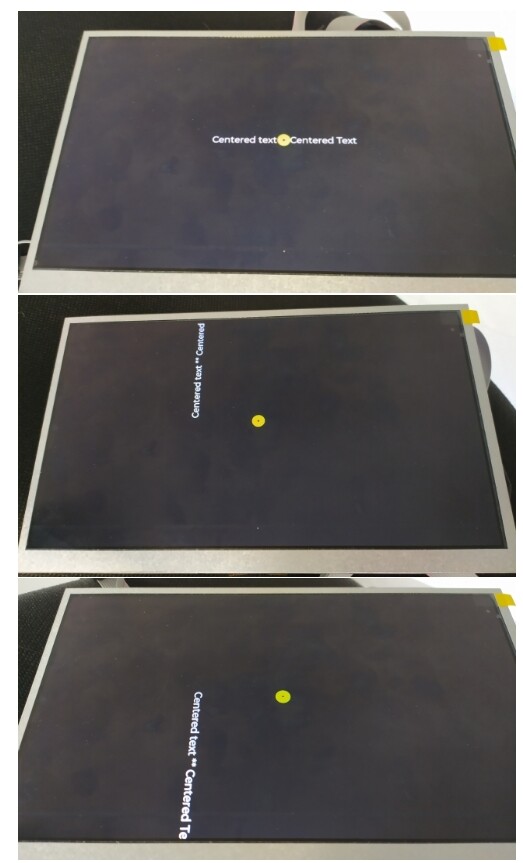
The label appears centered on the screen, until I don’t rotate it (first photo)
If I apply -90 or +90 degrees, the label won’t be centered anymore (2nd and 3rd photo).
I used two methods to rotate and center, but no success.
How can I center the label after rotation?
Thanks
