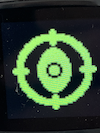
Description
Is there any better way to scale an image up? I resize an image in Swift or Android (using FIT_CENTER) and it seems to be very smooth, but when I do it in lvgl it doesn’t look anywhere near as good. Is there a better algorithm for scaling up?
What MCU/Processor/Board and compiler are you using?
nRF52832 PineTime Dev Kit
What LVGL version are you using?
8.3
What do you want to achieve?
Resize an image
What have you tried so far?
Resizing using lv_img_set_zoom and lv_img_set_antialias.
Code to reproduce
Add a code snippet which can run in the simulator. It should contain only the relevant code that compiles without errors when separated from your main code base.
The code block(s) should be formatted like:
void main(void)
{

	backlight_init();
	display_init();

	lv_obj_t * img = lv_img_create(lv_scr_act());
	lv_obj_align(img, LV_ALIGN_CENTER, 0, 0);

	LV_IMG_DECLARE(TEST_TRUE_COLOR);
	lv_img_set_src(img, &TEST_TRUE_COLOR);

	lv_img_set_antialias(img, true);
	lv_img_set_zoom(img, 1024);

	for (;;) {
		lv_task_handler();
	}
}
TEST_TRUE_COLOR.c (133.7 KB)