What do you want to achieve?
I just started using LVGL and got it running on a STM32F407VET. I tried to use DMA as sending a single pixel each time was too slow and ran into different issues with DMA.
The 3.5" screen has size of 480 (W) x 320 (H) with ST7796 and SPI interface.
What have you tried so far?
The first issue was gibberish or corruption when drawing the first screen.
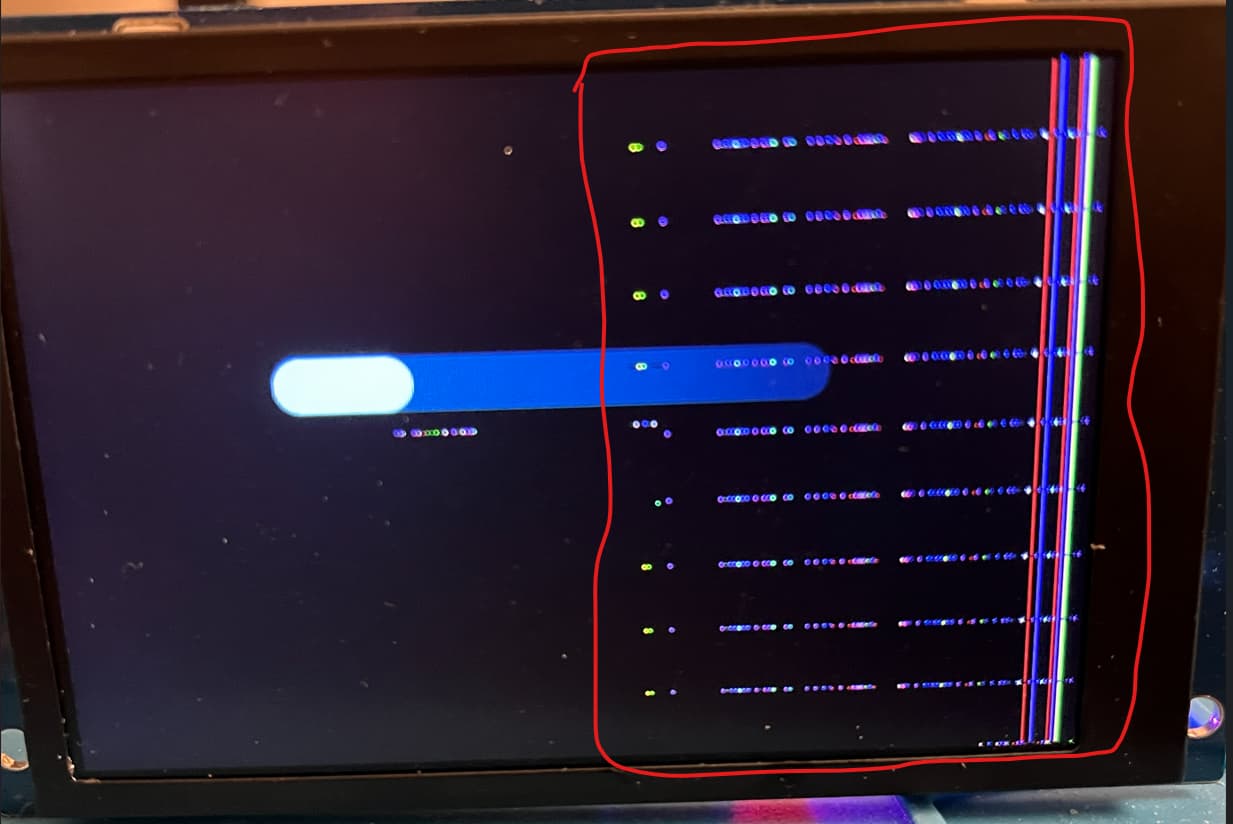
The right hand side of the screen was drawing extra gibberish.
I resolved this by splitting the buffer when giving it to DMA to send.
i.e.
void Lcd_WriteData_16Bit_DMA(uint16_t *Data, uint16_t u16_size)
{
	uint8_t u8_buff[u16_size * 2];

	uint16_t u16_buffCounter = 0;

	for (uint16_t i = 0; i < u16_size; i++)
	{
	    u8_buff[u16_buffCounter] =  (*(Data + i) >> 8);
	    u16_buffCounter++;
	    u8_buff[u16_buffCounter] =  *(Data + i);
	    u16_buffCounter++;
        } /* in the above for loop, I need to split 16 bit data into 8 bit data because that is what the DMA function below wants. Once that is done, I give DMA the memory address of the array u8_buff and how many bytes to send. */


            LCD_CS_CLR();
	        LCD_RS_SET();
            HAL_SPI_Transmit_DMA(&DISPL_SPI_PORT , u8_buff, u16_buffCounter);
	    u16_buffCounter = 0;
}
If I put a delay (HAL_Delay(1 or 5) ) around HAL_SPI_Transmit_DMA then it would resolve the problem, the screen would draw cleanly but again this was very slow. I then came up with the following solution to split the buffer and send it in chunks:
void Lcd_WriteData_16Bit_DMA(uint16_t *Data, uint16_t u16_size)
{
	int8_t u8_buff[u16_size / 60];
	uint16_t u16_buffCounter = 0;

	for (uint16_t i = 0; i < u16_size; i++)
	{
		u8_buff[u16_buffCounter] =  (*(Data + i) >> 8);
		u16_buffCounter++;
		u8_buff[u16_buffCounter] =  *(Data + i);
		u16_buffCounter++;

		if (u16_buffCounter == u16_size / 60) /* Each time there are 8 bytes of data give it to DMA and reset the buffer counter so that it starts filling the array from 0 again. */
		{
			LCD_CS_CLR();
			LCD_RS_SET();
			HAL_SPI_Transmit_DMA(&DISPL_SPI_PORT , u8_buff, u16_buffCounter); /
			u16_buffCounter = 0;
		}
	}
Now the above resolved the first issue. The first screen was drawing cleanly but the second issue is that when I try to update the the text or the value of the bar in my main while loop, I get gibberish/corruption again. It is hard to capture it on a still picture and don’t think I can directly upload videos here but the text is red so all I see is red specs being drawn where the text should be. The bar is blue and all I see is blue lines being drawn within the area where the bar should be.
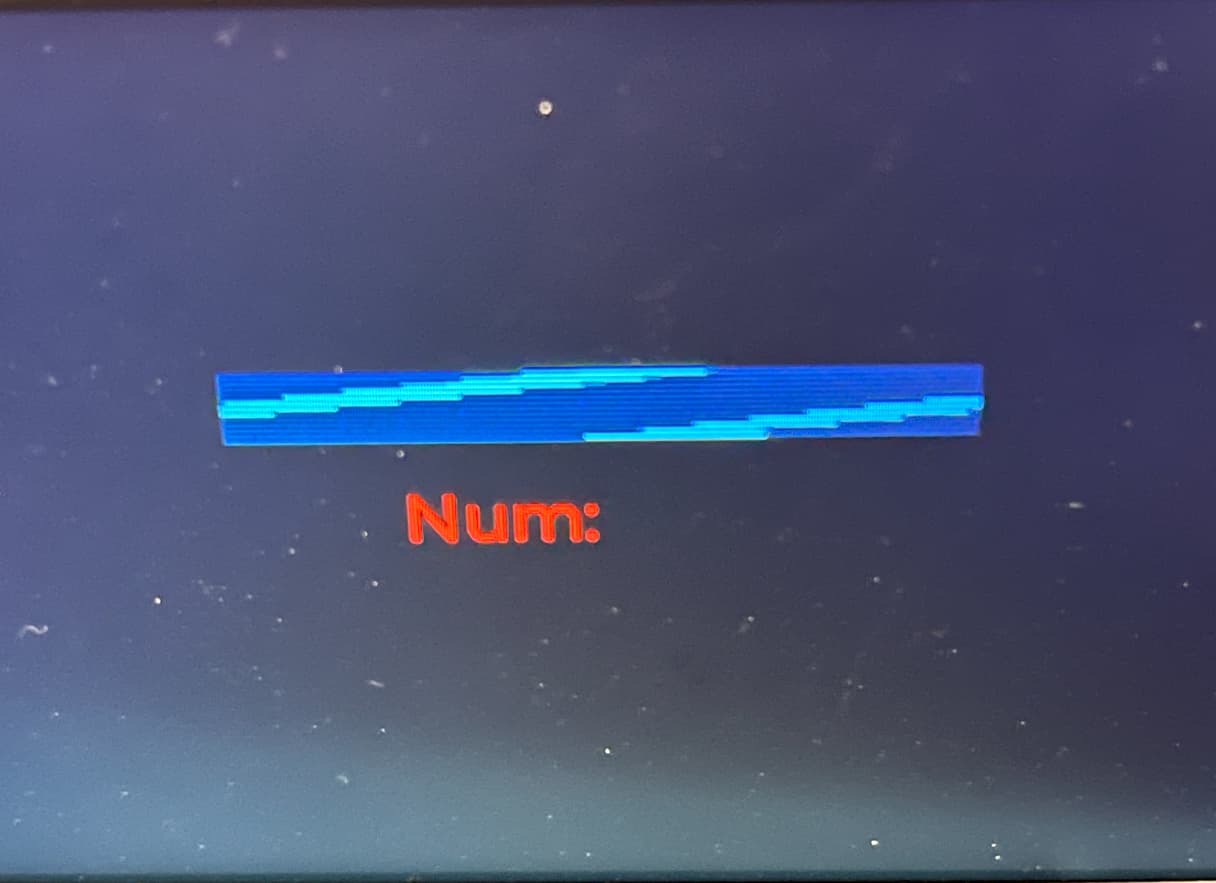
The bar is meant to go from 0 to 100 and repeat and it does seem to be doing that as the bar becomes almost filled with blue lines before clearing and starting again.
Code to reproduce
/* Defines and declaration of main variable for buffer use */
#define DISPLAY_WIDTH 480
#define DISPLAY_HEIGHT 320
#define BYTES_PER_PIXEL (LV_COLOR_FORMAT_GET_SIZE(LV_COLOR_FORMAT_RGB565))

static uint8_t buf1[DISPLAY_WIDTH * DISPLAY_HEIGHT / 10 * BYTES_PER_PIXEL];

/* Initialisation */
LCD_Init();
LCD_Clear(BLACK);
HAL_Delay(5);

lv_init();
lv_tick_set_cb(HAL_GetTick);

lv_display_t * display1 = lv_display_create(DISPLAY_WIDTH, DISPLAY_HEIGHT);
lv_display_set_buffers(display1, buf1, NULL, sizeof(buf1),  LV_DISPLAY_RENDER_MODE_PARTIAL);

lv_display_set_flush_cb(display1, my_flush_cb);

ui_init(); /* I used a software to generate LVGL templates */

/* my_flush_cb */
void my_flush_cb(lv_display_t * display, const lv_area_t * area, uint8_t * px_map)
{
LCD_SetWindows(area->x1, area->y1, area->x2, area->y2);

uint16_t * buf16 = (uint16_t *)px_map;

int32_t x, y;
for(y = area->y1; y <= area->y2; y++) {
for(x = area->x1; x <= area->x2; x++)
{
	u16_tempDMABuff[x] = *buf16; /* Fill a 16 bit array of size 480 with all horizontal data then give to the write data function before the height is incremented */
	buf16++;
}

    Lcd_WriteData_16Bit_DMA(&u16_tempDMABuff, buffLimit);
}
    lv_display_flush_ready(display);
}

/* Main while loop when trying to update bar for example */
while (1) {
lv_timer_handler(); /*Might return immediately or execute some timers*/
lv_sleep_ms(5);

sprintf(buf, "Num : %d", u8_sliderVal); /* Not updating text in second picture I showed you guys */

lv_label_set_text(objects.obj0, buf);
lv_bar_set_value(objects.obj0, u8_sliderVal, LV_ANIM_OFF);

u8_sliderVal++;
if (u8_sliderVal == 100)
{
      u8_sliderVal = 0;
}

}
I am kind of stuck now, do you have any suggestions please? I can’t think of what is going wrong, setting the window seems to have the correct position and size because it is being drawn in the correct place with correct dimensional constraints. I first thought DMA was too fast so I lowered the DMA peripheral clock speed from about 42MHz to ~20MHz which did not help then pushed the clock back to about 42MHz and tried to increase the SPI baud rate prescaler divider so that it only really impacts SPI but that does not help either. I also came across other topics on this forum regarding people getting corrupted images but they said the solution was to clear cache, STM32F407 does not have that. I tried to clear u16_tempDMABuff using zeros just before calling lv_display_flush_ready(display); as someone described that as a solution but it does not help me.
Thank you.
Environment
- MCU/MPU/Board: STM32F407VET
- LVGL version: 9.6.0
- Further info: Using a single buffer and partial mode when setting LVGL buffers.