Using LVGL v9.3, how can I resize the root back button on a menu? It’s very small. Example code is very similar to the “complex” example in the documentation.
lv_obj_t *menu = lv_menu_create(ui_menuScreen);
lv_menu_set_mode_root_back_button(menu, LV_MENU_ROOT_BACK_BUTTON_ENABLED);
lv_obj_set_size(menu, lv_disp_get_hor_res(NULL), lv_disp_get_ver_res(NULL));
lv_obj_center(menu);
lv_obj_t * back_btn = lv_menu_get_main_header_back_button(menu);

root_page = lv_menu_page_create(menu, "Settings");
lv_obj_set_style_pad_hor(root_page, lv_obj_get_style_pad_left(lv_menu_get_main_header(menu), 0), 0);
So i’m trying to get the back button (the little “<” icon to the left of the text) and then resize it. I’ve tried:
lv_obj_set_style_size(back_btn, 60, 60, LV_PART_MAIN);
and
lv_obj_set_width(back_btn, 60);
lv_obj_set_height(back_btn, 60);
Thanks in advance!
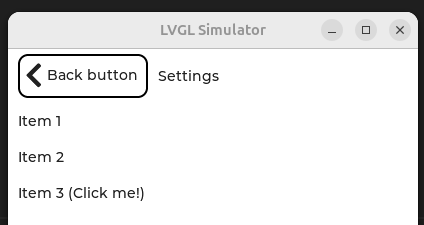
Hi @extremerotary ! I got the menu example code from LVGL docs and added some styling to the back button. I was able to increase the button width, add a border and also increase size of the “<” symbol. Could you take a look and see if it works for you?
static void back_event_handler(lv_event_t * e)
{
    lv_obj_t * obj = lv_event_get_target_obj(e);
    lv_obj_t * menu = (lv_obj_t *)lv_event_get_user_data(e);

    if(lv_menu_back_button_is_root(menu, obj)) {
        lv_obj_t * mbox1 = lv_msgbox_create(NULL);
        lv_msgbox_add_title(mbox1, "Hello");
        lv_msgbox_add_text(mbox1, "Root back btn click.");
        lv_msgbox_add_close_button(mbox1);
    }
}

void lv_example_menu_2(void)
{
    lv_obj_t * menu = lv_menu_create(lv_screen_active());
    lv_menu_set_mode_root_back_button(menu, LV_MENU_ROOT_BACK_BUTTON_ENABLED);
    lv_obj_add_event_cb(menu, back_event_handler, LV_EVENT_CLICKED, menu);
    lv_obj_set_size(menu, lv_display_get_horizontal_resolution(NULL), lv_display_get_vertical_resolution(NULL));
    lv_obj_center(menu);

    /* Get button and icon reference from the menu */
    lv_obj_t * btn  = lv_menu_get_main_header_back_button(menu);
    lv_obj_t * icon = lv_obj_get_child_by_type(btn, 0, &lv_image_class);

    /* Use a larger font */
    lv_obj_set_style_text_font(icon, &lv_font_montserrat_28, 0);

    lv_obj_set_style_border_width(btn, 2, 0);
    lv_obj_set_width(btn, 130);

    lv_obj_t * back_btn_label = lv_label_create(btn);
    lv_label_set_text(back_btn_label, "Back button");
    lv_obj_set_style_pad_top(back_btn_label, 6, 0);

    lv_obj_t * cont;
    lv_obj_t * label;

    /*Create a sub page*/
    lv_obj_t * sub_page = lv_menu_page_create(menu, NULL);

    cont = lv_menu_cont_create(sub_page);
    label = lv_label_create(cont);
    lv_label_set_text(label, "Hello, I am hiding here");

    /*Create a main page*/
    lv_obj_t * main_page = lv_menu_page_create(menu, "Settings");

    cont = lv_menu_cont_create(main_page);
    label = lv_label_create(cont);
    lv_label_set_text(label, "Item 1");

    cont = lv_menu_cont_create(main_page);
    label = lv_label_create(cont);
    lv_label_set_text(label, "Item 2");

    cont = lv_menu_cont_create(main_page);
    label = lv_label_create(cont);
    lv_label_set_text(label, "Item 3 (Click me!)");
    lv_menu_set_load_page_event(menu, cont, sub_page);

    lv_menu_set_page(menu, main_page);
}
This is the result I got:
giobauermeister:
lv_obj_set_style_border_width(btn, 2, 0);
    lv_obj_set_width(btn, 130);

    lv_obj_t * back_btn_label = lv_label_create(btn);
    lv_label_set_text(back_btn_label, "Back button");
    lv_obj_set_style_pad_top(back_btn_label, 6, 0);
Thanks! I tried the styles you provided, but did not have the same result. I was working off the example of the “Complex Menu” from the documentation. Any chance you could look at that and see if you can get the back button icon to change size?
Did you try doing the same just after lv_obj_center(menu); ?
    /* Get button and icon reference from the menu */
    lv_obj_t * btn  = lv_menu_get_main_header_back_button(menu);
    lv_obj_t * icon = lv_obj_get_child_by_type(btn, 0, &lv_image_class);

    /* Use a larger font */
    lv_obj_set_style_text_font(icon, &lv_font_montserrat_28, 0);

    lv_obj_set_style_border_width(btn, 2, 0);
    lv_obj_set_width(btn, 130);

    lv_obj_t * back_btn_label = lv_label_create(btn);
    lv_label_set_text(back_btn_label, "Back button");
    lv_obj_set_style_pad_top(back_btn_label, 6, 0);
I wasn’t able to test that in the complex menu, that example is crashing for me.