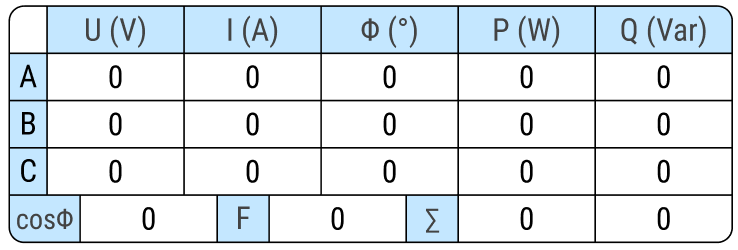
How to use lvgl_editor and lvgl to implement a table widget where the column widths vary in different rows, with rounded corners on all four sides (as shown in the figure).
Hi!
Well, one way of doing it would be doing a heavy work with objects as containers and flex layout.
<screen>
	<styles>
		<style
			name="style_cont"
			bg_opa="0"
			border_width="2"
			border_color="0x000000"
			radius="20"
			pad_all="0"
			clip_corner="true"
		/>
		<style
			name="style_row_cont"
			bg_opa="0"
			border_width="0"
			layout="flex"
			flex_flow="row"
			pad_all="0"
			pad_column="0"
		/>
		<style
			name="style_column_cont"
			bg_opa="0"
			border_width="0"
			layout="flex"
			flex_flow="column"
			pad_all="0"
			pad_row="0"
		/>
		<style name="style_cell" bg_opa="0" border_width="1" border_color="0x000000" radius="0" pad_all="0" />
		<style
			name="style_cell_highlight"
			bg_opa="255"
			bg_color="0x88e8ff"
			border_width="1"
			border_color="0x000000"
			radius="0"
			pad_all="0"
		/>
		<style name="style_" />
	</styles>
	<view>
		<lv_obj width="544" height="content" align="center">
			<style name="style_cont" />

			<!-- Row object -->
			<lv_obj width="content" height="content">
				<style name="style_column_cont" />

				<!-- Row 1 -->
				<lv_obj width="content" height="content">
					<style name="style_row_cont" />

					<lv_obj width="40" height="40">
						<style name="style_cell" />
					</lv_obj>
					<lv_obj width="100" height="40">
						<style name="style_cell_highlight" />
					</lv_obj>
					<lv_obj width="100" height="40">
						<style name="style_cell_highlight" />
					</lv_obj>
					<lv_obj width="100" height="40">
						<style name="style_cell_highlight" />
					</lv_obj>
					<lv_obj width="100" height="40">
						<style name="style_cell_highlight" />
					</lv_obj>
					<lv_obj width="100" height="40">
						<style name="style_cell_highlight" />
					</lv_obj>
				</lv_obj>

				<!-- Row 2 -->
				<lv_obj width="content" height="content">
					<style name="style_row_cont" />

					<lv_obj width="40" height="40">
						<style name="style_cell_highlight" />
					</lv_obj>
					<lv_obj width="100" height="40">
						<style name="style_cell" />
					</lv_obj>
					<lv_obj width="100" height="40">
						<style name="style_cell" />
					</lv_obj>
					<lv_obj width="100" height="40">
						<style name="style_cell" />
					</lv_obj>
					<lv_obj width="100" height="40">
						<style name="style_cell" />
					</lv_obj>
					<lv_obj width="100" height="40">
						<style name="style_cell" />
					</lv_obj>
				</lv_obj>

				<!-- Row 3 -->
				<lv_obj width="content" height="content">
					<style name="style_row_cont" />

					<lv_obj width="40" height="40">
						<style name="style_cell_highlight" />
					</lv_obj>
					<lv_obj width="100" height="40">
						<style name="style_cell" />
					</lv_obj>
					<lv_obj width="100" height="40">
						<style name="style_cell" />
					</lv_obj>
					<lv_obj width="100" height="40">
						<style name="style_cell" />
					</lv_obj>
					<lv_obj width="100" height="40">
						<style name="style_cell" />
					</lv_obj>
					<lv_obj width="100" height="40">
						<style name="style_cell" />
					</lv_obj>
				</lv_obj>

				<!-- Row 4 -->
				<lv_obj width="content" height="content">
					<style name="style_row_cont" />

					<lv_obj width="40" height="40">
						<style name="style_cell_highlight" />
					</lv_obj>
					<lv_obj width="100" height="40">
						<style name="style_cell" />
					</lv_obj>
					<lv_obj width="100" height="40">
						<style name="style_cell" />
					</lv_obj>
					<lv_obj width="100" height="40">
						<style name="style_cell" />
					</lv_obj>
					<lv_obj width="100" height="40">
						<style name="style_cell" />
					</lv_obj>
					<lv_obj width="100" height="40">
						<style name="style_cell" />
					</lv_obj>
				</lv_obj>

				<!-- Row 5 -->
				<lv_obj width="content" height="content">
					<style name="style_row_cont" />

					<lv_obj width="70" height="40">
						<style name="style_cell_highlight" />
					</lv_obj>
					<lv_obj width="100" height="40">
						<style name="style_cell" />
					</lv_obj>
					<lv_obj width="35" height="40">
						<style name="style_cell_highlight" />
					</lv_obj>
					<lv_obj width="100" height="40">
						<style name="style_cell" />
					</lv_obj>
					<lv_obj width="35" height="40">
						<style name="style_cell_highlight" />
					</lv_obj>
					<lv_obj width="100" height="40">
						<style name="style_cell" />
					</lv_obj>
					<lv_obj width="100" height="40">
						<style name="style_cell" />
					</lv_obj>
				</lv_obj>
			</lv_obj>
		</lv_obj>
	</view>
</screen>
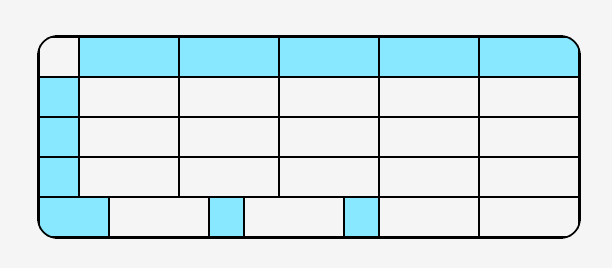
The XML from above will generate the following result:
Then it would be just a matter of adding labels and symbols inside each cell. The borders widths might need some adjustments as well.