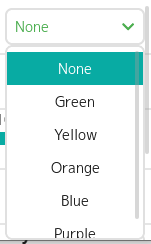
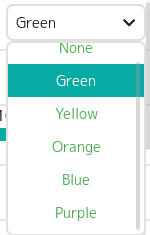
Description
I have a drop-down text list and I would like the elements of this list to have different styles, for example, as in the picture there is a list with the names of colors, I need the text of the elements to be colored in the color corresponding to the name
What MCU/Processor/Board and compiler are you using?
LVGL Windows Simulator, Visual Studio 2022
What LVGL version are you using?
9.1
What do you want to achieve?
How to do that elements of text dropdown list have different styles.
What have you tried so far?
1)Set the style for dropdown list
2)Get the list object from dropdown list and set style for list
3)Get child from dropdown list, but all elements presented like one child
Results of codes below:
1)Only the selected list item changed color.
2)All the elements are colored in the same color
3)All the elements are colored in the same color
Code to reproduce
 lv_obj_t* dd = lv_dropdown_create( cont );
 lv_dropdown_set_options( dd, "None\nGreen\nYellow\nOrange\nBlue\nPurple");
 lv_obj_set_style_text_color( dd, lv_palette_main(LV_PALETTE_GREEN), LV_PART_MAIN );
 lv_obj_t* dd = lv_dropdown_create( cont );
 lv_dropdown_set_options( dd, "None\nGreen\nYellow\nOrange\nBlue\nPurple");
 lv_obj_t* list = lv_dropdown_get_list( dd );
 lv_obj_set_style_text_color( list, lv_palette_main(LV_PALETTE_GREEN), LV_PART_MAIN );