Description
Hi,I’ve been trying to test widget list recently,and I want to do some custom effects.But,I found that I cannot change the bg color and bg opacities of buttons wrapped by list to be same with labels’ above.I don;t know why and I want to figure out.
Results from simulator and real device are the same.
What LVGL version are you using?
released V8.3.0
What do you want to achieve?
Change styles.
Code to reproduce
Add a code snippet which can run in the simulator. It should contain only the relevant code that compiles without errors when separated from your main code base.
The code block(s) should be formatted like:
 lv_obj_t *list = lv_list_create(lv_scr_act());

    static lv_style_t style_label, style_btn;
    lv_style_init(&style_label);
    lv_style_init(&style_btn);
    lv_style_set_bg_color(&style_label, lv_palette_main(LV_PALETTE_CYAN));
    lv_style_set_bg_opa(&style_label, LV_OPA_50);

    lv_style_set_bg_color(&style_btn, lv_palette_main(LV_PALETTE_CYAN));
    lv_style_set_bg_opa(&style_btn, LV_OPA_50);
    lv_style_set_opa(&style_btn, LV_OPA_COVER);
    lv_style_set_text_color(&style_btn, lv_color_white());

    lv_obj_t *list_item;

    list_item = lv_list_add_text(list, "Start");
    lv_obj_add_style(list_item, &style_label, 0);
    list_item = lv_list_add_btn(list, LV_SYMBOL_BATTERY_FULL, "Full Battery");
    lv_obj_add_style(list_item, &style_btn, LV_STATE_PRESSED);
    // lv_obj_add_event_cb(list_item, test_list1_pressed_cb, LV_EVENT_PRESSED, NULL);

    list_item = lv_list_add_btn(list, LV_SYMBOL_BATTERY_3, "3 Battery");
    lv_obj_add_style(list_item, &style_btn, LV_STATE_PRESSED);
    list_item = lv_list_add_btn(list, LV_SYMBOL_BATTERY_2, "2 Battery");
    lv_obj_add_style(list_item, &style_btn, LV_STATE_PRESSED);
    list_item = lv_list_add_btn(list, LV_SYMBOL_BATTERY_1, "1 Battery");
    lv_obj_add_style(list_item, &style_btn, LV_STATE_PRESSED);
    list_item = lv_list_add_btn(list, LV_SYMBOL_BATTERY_EMPTY, "Empty Battery");
    lv_obj_add_style(list_item, &style_btn, LV_STATE_PRESSED);

    list_item = lv_list_add_text(list, "End");
    lv_obj_add_style(list_item, &style_label, 0);
    list_item = lv_list_add_btn(list, LV_SYMBOL_CLOSE, "End Exist");
    lv_obj_add_style(list_item, &style_btn, LV_STATE_PRESSED);
Screenshot and/or video
If possible, add screenshots and/or videos about the current state.
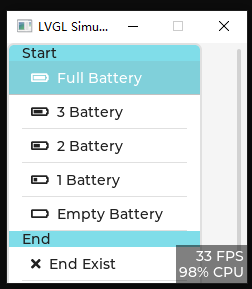
As above,you can see the first button’s bg color is not same with the first label’s.And text color of the button seems like not so pure white.