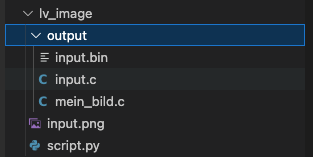
Hot to convert an image like PNG into a useable graphic bin file
You can use this python script
The answer from fbiego is excellent!
Recently I needed to convert a JPEG into a strictly B&W image for ePaper display. I needed to resize, convert to black or white pixels, and write the image as an array of unsigned chars.
I simply asked Gemini to create the code for me and a few seconds later it was done!
I’m not saying all tasks should be done this way, but these simple utility needs are well handled by AI.
Thank you but how to use the script properly
I tried
Als C-Array exportieren
python3 script.py --ofmt C --cf RGB565 input.png
Als BIN-Datei mit Kompression
python3 script.py --ofmt BIN --cf ARGB8888 --compress LZ4 input.png
Ganzen Ordner konvertieren
python3 script.py --ofmt C --cf I8 /pfad/zum/ordner/
Mit benutzerdefiniertem Namen
python3 script.py --ofmt C --cf RGB565 --name mein_bild input.png
but no output no message from the script just nothing
This seems correct, you did not specify the output folder, so it uses the default “ouptut” which should have been created.