I’m using a monochrome (1 bpp) display with LVGL v9.4. I’ve used [LVGL’s online font converter]
(Font Converter — LVGL) set for 1 bpp successfully for several pixel-perfect TTF fonts. But for one font, Warp Desktop, along diagonal lines there are many dropped pixels that should be black but are white. This only happens when converting to 1 bpp. At any of the higher bpp settings, those pixels are properly rendered as black.
The following screenshots are from EEZ Studio just because its display of glyphs is clear. The rendered appearance in my product is identical to EEZ Studio’s display.
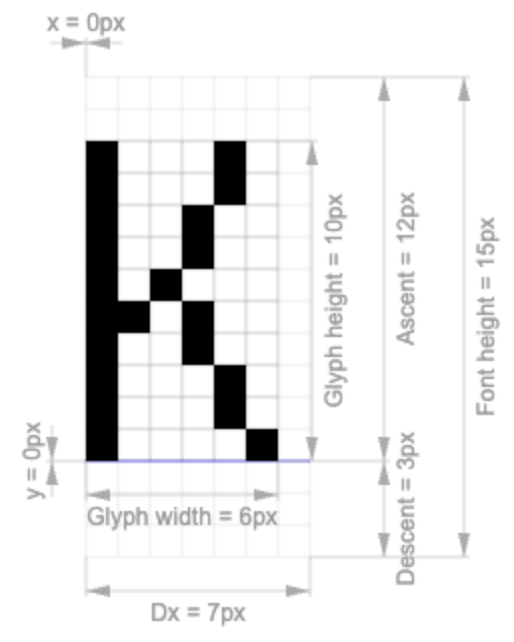
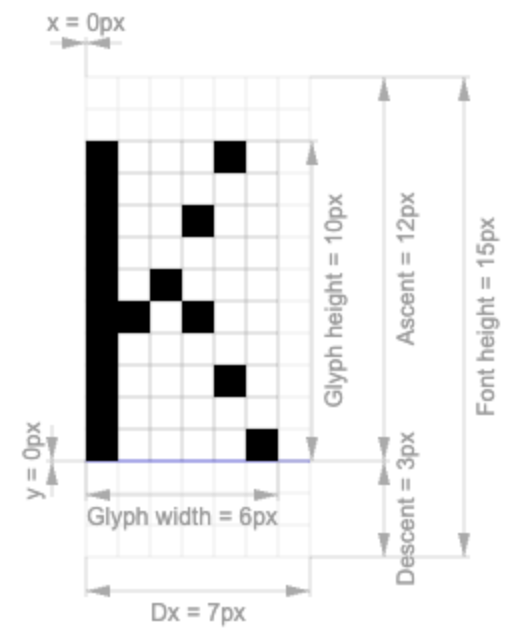
A clear example of this problem is the capital “K”. Other characters with this problem: include “A”, “M”, and “N”.
On the font’s website:

Good conversion at font size of 14 pixels (this yields the height and width) @ 2, 4, or 8 bits per pixel:
Bad conversion at same settings as above but @ 1 bit per pixel:
How can I achieve the correct conversion of this font at 1 bpp?
Thanks for any help.