Hi,
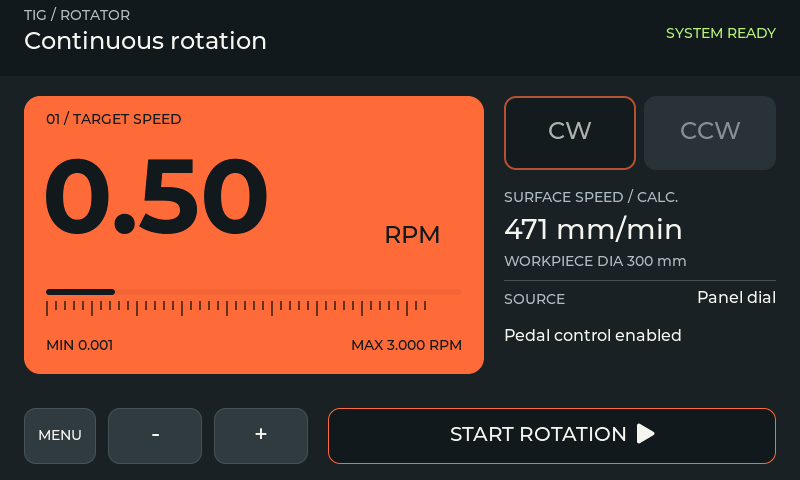
I’ve been working on an open-source touchscreen controller for my DIY TIG/MIG welding positioner, built around an ESP32-P4 and LVGL 9.6.
The hardware target is the GUITION JC4880P443C board:
-
ESP32-P4
-
4.3" capacitive touchscreen
-
800×480 landscape UI
-
ST7701S display
-
GT911 touch controller
The controller drives a NEMA 23 stepper motor through a PUL/DIR driver and is intended to be used as the main control panel for a single-axis welding rotator.
The LVGL interface currently includes:
-
Main machine control screen
-
Continuous, Jog, Pulse and Step modes
-
RPM and workpiece diameter controls
-
16 saved programs
-
Setup wizard
-
Guided 360° calibration
-
Motor configuration
-
E-stop and driver-fault states
-
Touch diagnostics
-
Display/settings pages
-
Idle screen saver
-
Status and warning dialogs
One of my main goals was to keep the UI and control logic reusable outside the ESP32 hardware.
Because of that, I also built a Windows x64 simulator that runs the actual LVGL interface and a large part of the production control code with simulated hardware.
This has been particularly useful for UI development because I can test screen layout, dialogs, state transitions and program/settings handling on the PC before flashing the ESP32-P4.
The project currently uses:
-
LVGL 9.6
-
Arduino / ESP-IDF
-
PlatformIO
-
FastAccelStepper
-
ESP32-P4
-
Native/PC simulator
The UI has gone through several redesigns. The current version uses a relatively flat industrial interface because I wanted it to remain readable from a distance and usable with gloves in a workshop environment.
The real machine also has physical controls alongside the touchscreen, including a potentiometer, direction switch and physical E-stop.
There is still work I want to do on the UI, so feedback from people with more LVGL experience would be very useful, particularly around:
-
screen/widget architecture
-
reducing unnecessary redraws
-
memory usage on ESP32-P4
-
reusable component structure
-
navigation/state handling
-
anything in the UI that could be simplified
Source code, screenshots, firmware and documentation:
There is also a prebuilt Windows simulator in the GitHub releases if anyone wants to try the interface without the hardware.
A short hardware demo is linked from the README as well.
Feedback and criticism are very welcome.