I am trying to build a digital clock - this is my very first LVGL project (I have decades of development experience, though, with C and many other languages.)
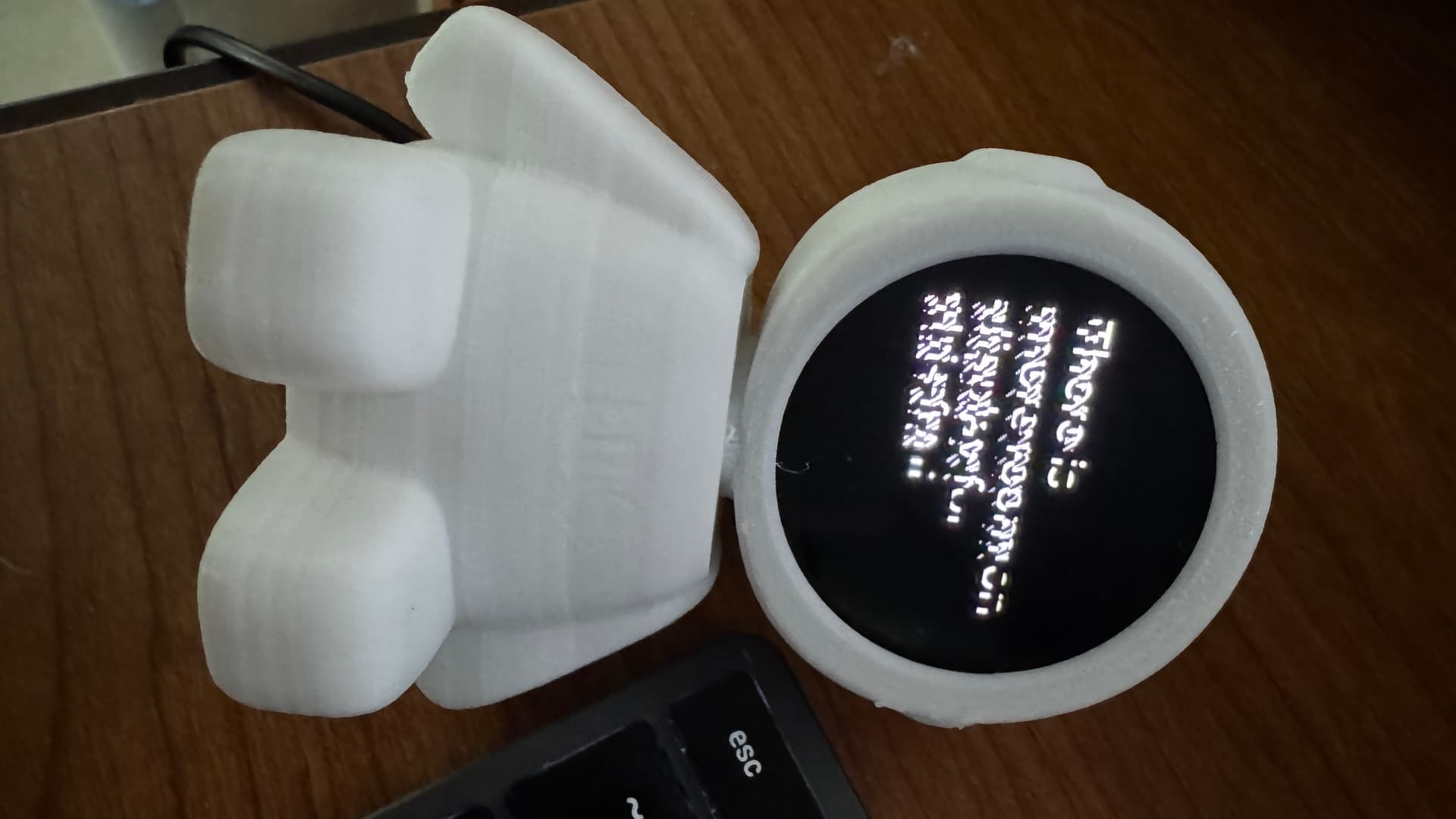
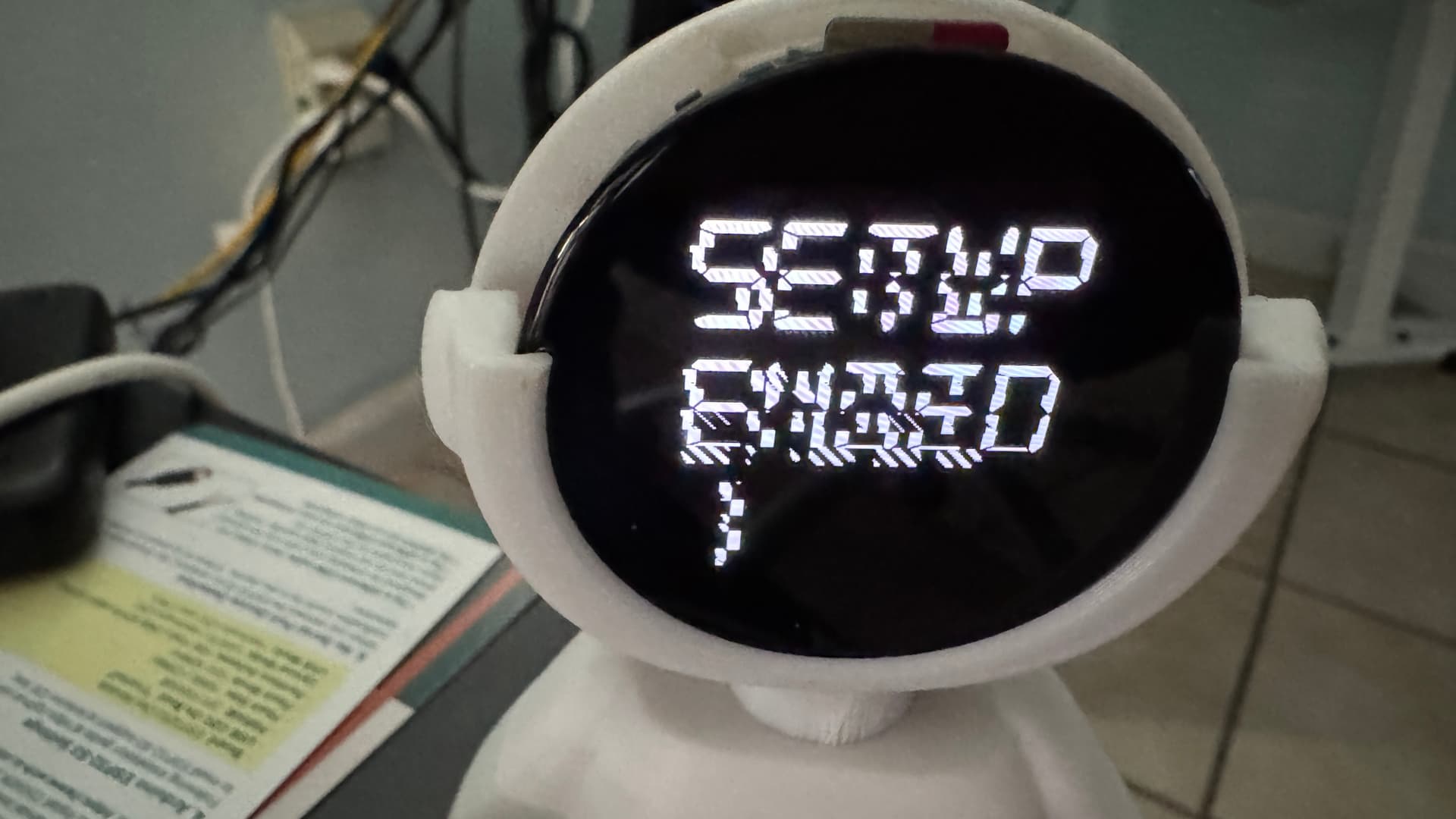
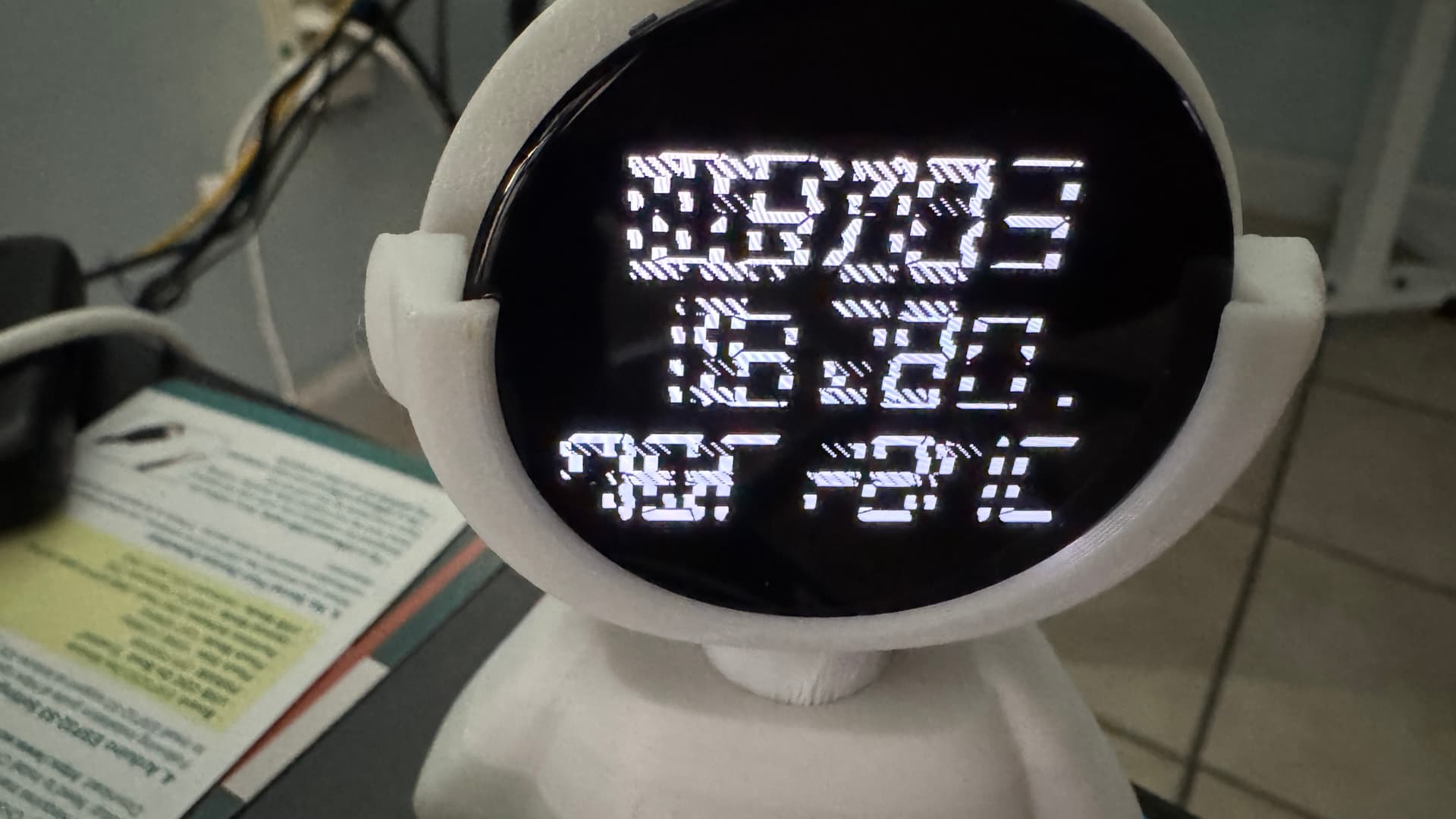
My approach to LVGL seems to be misguided on this project, as my results seem to involve a corrupted display or similar no-no that I assume is due to LVGL unfamiliarity.
This example code demonstrates the issue, which manifests with these displays in order, and increasingly corrupt after that)…
The display is actually a Waveshare ESP32-S3-Touch-AMOLED-1.75 board, and the environment is Arduino 2.3.3 with LVGL 8.4.0. I have not found any tutorials that explain how to get started, only examples from which (I suppose) I should be able to get the gist of what’s happening. I have always found it hard to learn by example because examples rarely explain the reasons behind the code, and the choices that had to be made to get there.
So I’ve made this effort, but clearly there are some things I don’t understand. Glaringly, of course, is the question of why the display gets (or looks) corrupted. But also, I haven’t grasped the use of lv_timer_handler() and lv_obj_update_layout(entity). And probably other things are misused or abused below.
I am not looking for someone to correct this; rather, I want to understand how I have gone wrong and what the right approach would be. And if someone wants to point out ways my approach could improve, I’m eagerly open to that.
Can you help?
#include "rc.h"

lv_disp_draw_buf_t draw_buf;
lv_color_t buf[LCD_WIDTH * LCD_HEIGHT / 10];
LV_FONT_DECLARE(DigiClock_120);

lv_obj_t *label;  // Global label object
SensorPCF85063 rtc;

Arduino_DataBus *bus = new Arduino_ESP32QSPI(
  LCD_CS /* CS */, LCD_SCLK /* SCK */, LCD_SDIO0 /* SDIO0 */, LCD_SDIO1 /* SDIO1 */,
  LCD_SDIO2 /* SDIO2 */, LCD_SDIO3 /* SDIO3 */);

Arduino_CO5300 *gfx = new Arduino_CO5300(
  bus, LCD_RESET /* RST */, 0 /* rotation */, LCD_WIDTH /* width */, LCD_HEIGHT /* height */, 6, 0, 0, 0);

void setup() {

  Serial.begin(115200); /* prepare for possible serial debug */
  while (! Serial) {} // Wait for serial connection

  gfx->begin();
  gfx->setBrightness(128);

  lv_init();

#if LV_USE_LOG != 0
  lv_log_register_print_cb(my_print); /* register print function for debugging */
#endif

  lv_disp_draw_buf_init(&draw_buf, buf, NULL, LCD_WIDTH * LCD_HEIGHT / 10);

  /*Initialize the display*/
  static lv_disp_drv_t disp_drv;
  lv_disp_drv_init(&disp_drv);
  /*Change the following line to your display resolution*/
  disp_drv.hor_res = LCD_WIDTH;
  disp_drv.ver_res = LCD_HEIGHT;
  disp_drv.flush_cb = my_disp_flush;
  disp_drv.rounder_cb = example_lvgl_rounder_cb;
  disp_drv.draw_buf = &draw_buf;
  disp_drv.sw_rotate = 1 ;
  disp_drv.rotated = LV_DISP_ROT_NONE ;
  lv_disp_drv_register(&disp_drv);

  lv_obj_t * scr = lv_scr_act();
  lv_obj_set_style_bg_color(scr, lv_color_hex(0x000000), LV_PART_MAIN);    // The page is black
  lv_obj_set_style_text_color(scr, lv_color_hex(0xffffff), LV_PART_MAIN);  // The ink is white
  lv_disp_set_rotation(NULL, LV_DISP_ROT_270) ; // We set "no rotation" and then "rotate 270" because straight-in 270 did not work for me

  /*Initialize the (dummy) input device driver*/
  static lv_indev_drv_t indev_drv;
  lv_indev_drv_init(&indev_drv);
  indev_drv.type = LV_INDEV_TYPE_POINTER;
  lv_indev_drv_register(&indev_drv);

  const esp_timer_create_args_t lvgl_tick_timer_args = {
    .callback = &example_increase_lvgl_tick,
    .name = "lvgl_tick"
  };

  const esp_timer_create_args_t reboot_timer_args = {
    .callback = &example_increase_reboot,
    .name = "reboot"
  };

  #define EXAMPLE_LVGL_TICK_PERIOD_MS 2
  esp_timer_handle_t lvgl_tick_timer = NULL;
  esp_timer_create(&lvgl_tick_timer_args, &lvgl_tick_timer);
  esp_timer_start_periodic(lvgl_tick_timer, EXAMPLE_LVGL_TICK_PERIOD_MS * 1000);

  label = lv_label_create(lv_scr_act());
  lv_obj_set_style_text_font(label, &DigiClock_120, LV_PART_MAIN);
  lv_obj_set_style_bg_color(label, lv_color_hex(0x000000), LV_PART_MAIN);    // The page is black
  lv_obj_set_style_text_color(label, lv_color_hex(0xffffff), LV_PART_MAIN);  // The ink is white
  lv_label_set_text(label,"Init...");
  lv_obj_align(label, LV_ALIGN_CENTER, 0, 0);
  lv_obj_update_layout(label) ;
  Serial.println("LCD Width = " + String(LCD_WIDTH) + ", Height = " + String(LCD_HEIGHT)) ;

  lv_obj_set_style_text_font(label, &DigiClock_120, LV_PART_MAIN);
  lv_obj_align(label, LV_ALIGN_CENTER, 0, 0);
  lv_obj_update_layout(label) ;

  if (!rtc.begin(Wire, IIC_SDA, IIC_SCL)) {
    Serial.println("Failed to find PCF85063 SDA/SCL - check your wiring!");
    Serial.print("IIC_SDA: ") ;
    Serial.print(IIC_SDA) ;
    Serial.print(", IIC_SCL: ") ;
    Serial.println(IIC_SCL) ;
    while (1) {
      delay(1000);
    }
  }
  Serial.print("The value of LV_COLOR_16_SWAP is ") ;
  Serial.println(LV_COLOR_16_SWAP) ;

  rtc.setDateTime(2026, 3, 3, 15, 20, 45) ;
  int i = 3 ;
  while (i) {
    lv_label_set_text_fmt(label, "Setup\nEnded\n%d", i) ;
    lv_timer_handler() ;
    delay(1000) ;
    i-- ;
  }
}


void updateClock() {
  static int lastMinuteOrSecond = -1 ; // Determines if we need to refresh the display
  int thisMinuteOrSecond ;             // Determines if we need to refresh the display
  RTC_DateTime datetime = rtc.getDateTime();

  lv_timer_handler();
  delay(5);

#ifdef SHOW_SECONDS
  thisMinuteOrSecond = datetime.getSecond() ;
#else
  thisMinuteOrSecond = datetime.getMinute() ;
#endif
  if (thisMinuteOrSecond != lastMinuteOrSecond) { // Displayed time has changed
    lastMinuteOrSecond = thisMinuteOrSecond ;

#ifdef SHOW_SECONDS
    lv_label_set_text_fmt(label, " %02d/%02d\n%02d:%02d:%02d"
                                  , datetime.getMonth(), datetime.getDay()
                                  , datetime.getHour(), datetime.getMinute(), datetime.getSecond()
                                      );
#else
    lv_label_set_text_fmt(label, " %02d/%02d\n %02d:%02d\n76F 24C"
                                  , datetime.getMonth(), datetime.getDay()
                                  , datetime.getHour(), datetime.getMinute()
                                        );
#endif

    // Update label with current time
    lv_obj_align(label, LV_ALIGN_CENTER, 0, 0);
    lv_obj_update_layout(label) ;
    lv_timer_handler();
  }
}


void loop() {
  static int firstTime = 1 ;
  if (firstTime) {
    lv_label_set_text(label, "loop...") ;
    lv_obj_update_layout(label) ;
    lv_timer_handler() ;
    delay(2000) ;
  }
  updateClock() ;
  delay(20);
  if (firstTime) {
    lv_timer_handler() ;
    delay(2000) ;
    lv_label_set_text(label, "again") ;
    lv_obj_update_layout(label) ;
    lv_timer_handler() ;
    delay(2000) ;
    firstTime = 0 ;
  }
}


void example_lvgl_rounder_cb(struct _lv_disp_drv_t *disp_drv, lv_area_t *area) {
    area->x1 &= 0xfffffffe ; // Make it even - was:  if(area->x1 % 2 !=0)area->x1-- ;
    area->y1 &= 0xfffffffe ; // Make it even - was:  if(area->y1 % 2 !=0)area->y1-- ;
    area->x2 |= 0x00000001 ; // Make it odd  - was:  if(area->x2 %2 ==0)area->x2++ ;
    area->y2 |= 0x00000001 ; // Make it odd  - was:  if(area->y2 %2 ==0)area->y2++ ;
}


/* Display flushing */
void my_disp_flush(lv_disp_drv_t *disp, const lv_area_t *area, lv_color_t *color_p) {
  uint32_t w = (area->x2 - area->x1 + 1);
  uint32_t h = (area->y2 - area->y1 + 1);

#if (LV_COLOR_16_SWAP != 0)
  gfx->draw16bitBeRGBBitmap(area->x1, area->y1, (uint16_t *)&color_p->full, w, h);
#else
  gfx->draw16bitRGBBitmap(area->x1, area->y1, (uint16_t *)&color_p->full, w, h);
#endif

  lv_disp_flush_ready(disp);
}

void example_increase_lvgl_tick(void *arg) {
  /* Tell LVGL how many milliseconds has elapsed */
  lv_tick_inc(EXAMPLE_LVGL_TICK_PERIOD_MS);
}

void example_increase_reboot(void *arg) {
  static uint8_t count = 0;
  count++;
  if (count == 30) {
    esp_restart();
  }
}
the rc.h file contains:
#include <lvgl.h>
#include "lv_conf.h"
#include "Arduino_GFX_Library.h"
#include "pin_config.h"
#include <Wire.h>
#include <SPI.h>
#include <Arduino.h>
#include "SensorPCF85063.hpp"

void example_lvgl_rounder_cb(struct _lv_disp_drv_t *disp_drv, lv_area_t *area) ;
void my_disp_flush(lv_disp_drv_t *disp, const lv_area_t *area, lv_color_t *color_p) ;
void example_increase_lvgl_tick(void *arg) ;
void example_increase_reboot(void *arg) ;