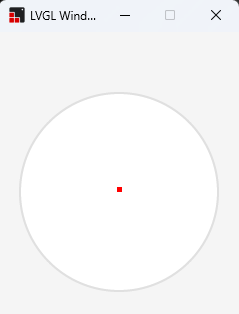
I am trying to draw a circle with a line going from the centre of the circle to the edge of the circle.
I have tried the code below but all I get is a circle with a red dot in the middle. If I make the line_points {0, 100}, {0,-100} I get a vertical line in the middle of the circle.
I am running this using the windows simulator, but have also tried it on an RP2350 Touch 2.8.
Code to reproduce
void create_circle(void)
{
    lv_obj_t* circle = lv_obj_create(lv_scr_act());
    lv_obj_set_size(circle, 200, 200);
    lv_obj_center(circle);
    lv_obj_set_style_radius(circle, LV_RADIUS_CIRCLE, 0);
    lv_obj_set_style_bg_color(circle, lv_color_hex(0xffffff), 0);
    lv_obj_set_style_bg_opa(circle, LV_OPA_COVER, 0);

    lv_obj_t* line = lv_line_create(circle);

    // One endpoint at (0,0) = circle center
    static lv_point_precise_t line_points[] = {
        {0, 0},     // circle center
        {0, -100}   // downwards to edge
    };
    uint32_t pts = sizeof(line_points) / sizeof(line_points[0]);
    lv_line_set_points(line, line_points, sizeof(line_points) / sizeof(line_points[0]));

    lv_obj_set_style_line_color(line, lv_color_hex(0xff0000), 0);
    lv_obj_set_style_line_width(line, 4, 0);

    // Align line object so its origin (0,0) is at circle center
    //lv_obj_align(line, LV_ALIGN_CENTER, 0, 0);
    lv_obj_center(line);
}
Hi. I updated your function changing a few things that were preventing the line to be properly positioned as you wanted.
void create_circle(void)
{
    lv_obj_t* circle = lv_obj_create(lv_screen_active());
    lv_obj_set_size(circle, 200, 200);
    lv_obj_center(circle);
    lv_obj_set_style_radius(circle, LV_RADIUS_CIRCLE, 0);
    lv_obj_set_style_bg_color(circle, lv_color_hex(0xffffff), 0);
    lv_obj_set_style_bg_opa(circle, LV_OPA_COVER, 0);
    // Remove padding from inside circle otherwise line position will be shifted by padding
    lv_obj_set_style_pad_all(circle, 0, LV_PART_MAIN);

    lv_obj_t* line = lv_line_create(circle);

    // One endpoint at (0,0) = circle center
    static lv_point_precise_t line_points[] = {
        {100, 100},     // circle center
        {100, 196}   // downwards to edge (196 here because line width is 4, otherwise a scrollbar will show up)
    };
    uint32_t pts = sizeof(line_points) / sizeof(line_points[0]);
    lv_line_set_points(line, line_points, sizeof(line_points) / sizeof(line_points[0]));

    lv_obj_set_style_line_color(line, lv_color_hex(0xff0000), 0);
    lv_obj_set_style_line_width(line, 4, 0);

    // DO NOT CENTER THE LINE INSIDE THE CIRCLE otherwise line will be shifted
    // lv_obj_center(line);
}
This is the result I got:
Basically Removed the padding from inside the circle - Padding adds space inside the parent and shifts the position of child elements.
Changed the line_points values - Imagine a square on top of the circle and the coordinates of this square. 0,0 will be top left corner and 200,200 will be bottom right corner. So the center of the circle is 100,100. The last point of the line will be at x=100 and y=196 to compensate for the line width of 4.
Removed positioning the line at center in the circle - Centering the line shifts its position inside the circle.