Board resetting if GUI is too large

Hello,

I’m having a problem where the CrowPanel ESP32 HMI 5.0-inch Display keeps resetting with my program thats use the LVGL library for UI. It shows half of the 1st screen and then resets, and keeps doing this in an endless loop. The UI was created with SquareLine Studio. I’m using VS Code with ESP-IDF to compile.

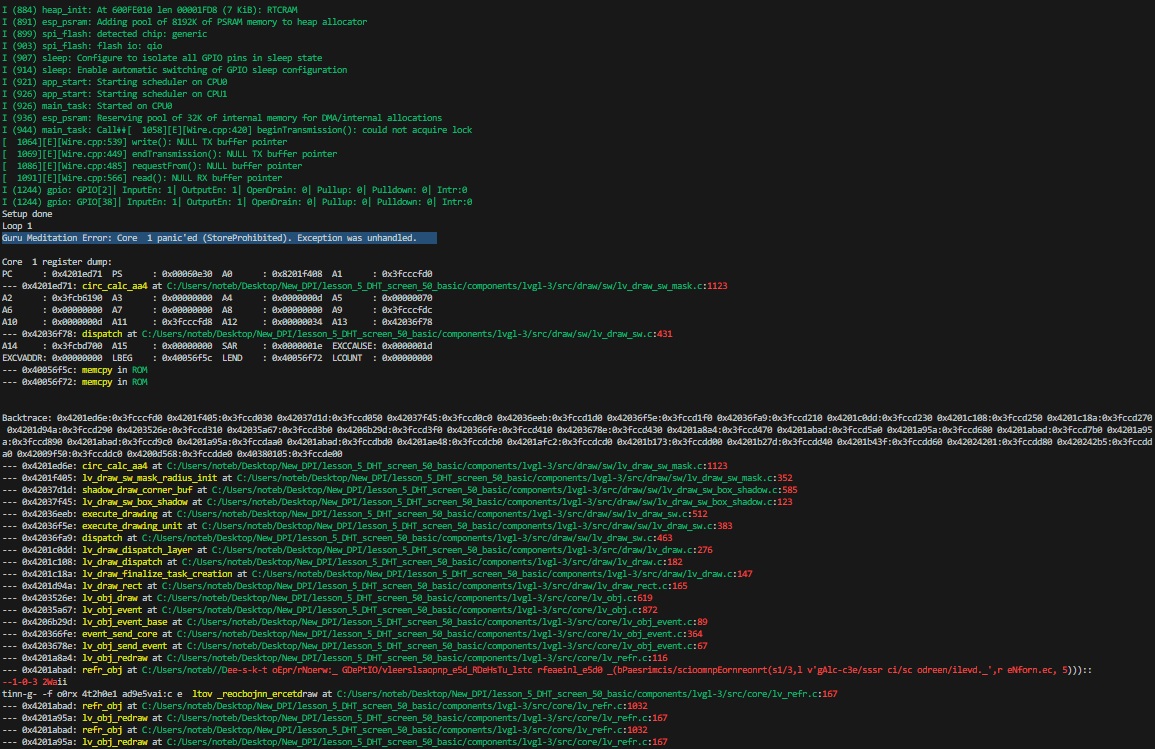
Using the “Monitor Device” terminal on VS Code, this is what the CrowPanel returns upon reset:
I’ve used the base project (source code) provided by Elecrow on this page as base for my C++ project: CrowPanel ESP32 5.0-inch with ESP-IDF - Elecrow Wiki

Tracing the problem, I’ve seen that exception is happening inside the lv_timer_handler() function that’s on the main loop.

What could it be? I’ve tried to change the UI, and when I keep the UI short it works without resetting. But if I create more screens, it resets on the 1st screen even without any access or references to the new screens on it. If I keep removing objects one my one from the last screen that caused the issue to start happening, at a certain point it will work. Just one object (any object) will cause the problem to start. I don’t think its the object itself, as I’ve tried other objects and other screens, and it still happens. It looks like its something related to SRAM allocation or FLASH memory addresses.

I believe it has to do with the base project provided by Elecrow. Can someone point me a base project that I can use to start developing for the CrowPanel with LVGL?

Thanks for your help!
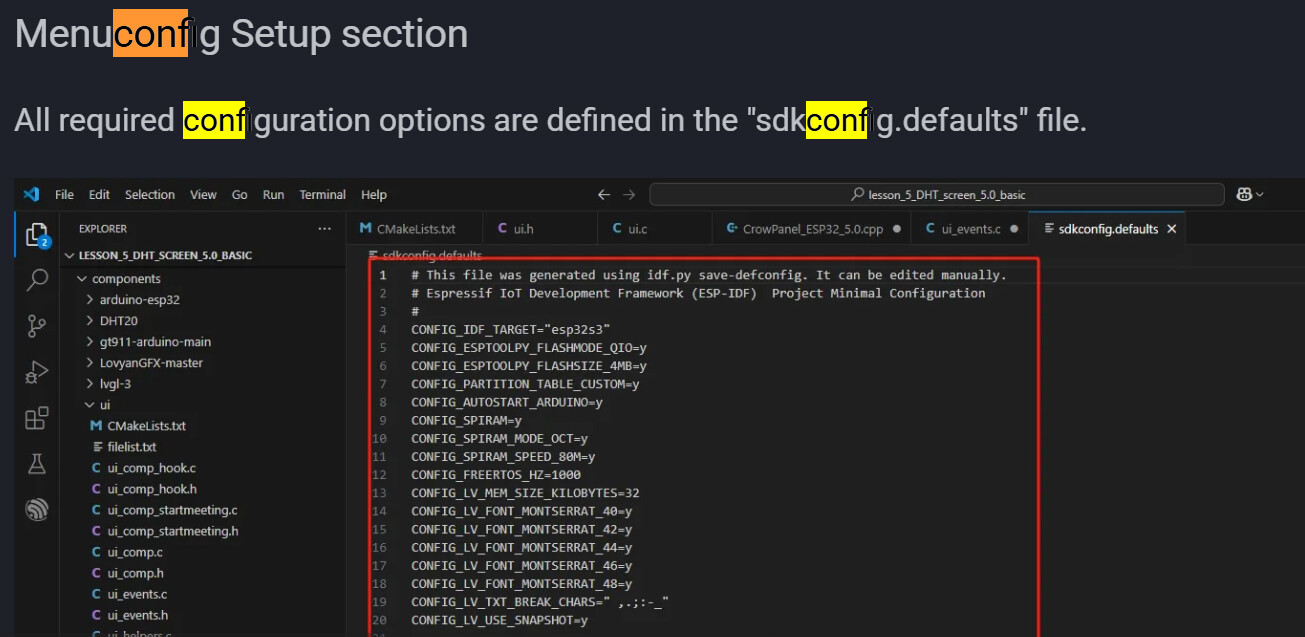
Try read carefully your Crow page and maybe see

32 kB is low limit for LVGL . Squareline on start load all screens into this area and afte ris full crash as you… A. change memory to more as 64k B. screens in squareline set as temporary = load on use…

The backtrace data is corrupted so something is overflowing the memory. You will need to remove one section at a time from loading and when it stops crashing then you know a general area to look at for what is causing the issue. Because the backtrace data is corrupted you really cannot rely on it to be accurate

the other thing is the code that is generated by SquareLine studio is not very efficient code. It really isn’t meant to be used directly as run-able code, you really need to go through the code to clean it up and make it more efficient.

Thanks Marian, that solved the problem.
I added:

lv_obj_add_event_cb(ui_MessageBox, scr_unloaded_delete_cb, LV_EVENT_SCREEN_UNLOADED, &ui_MessageBox);

to the creation of the windows, and it solved it.

This is an example of how it looks like now:

void ACP3_Show_Message(uint32_t box_BG_color, const char *Message) {

    if (ui_MessageBox) lv_obj_del(ui_MessageBox);
    ui_MessageBox = lv_obj_create(lv_screen_active());
    lv_obj_add_event_cb(ui_MessageBox, scr_unloaded_delete_cb, LV_EVENT_SCREEN_UNLOADED, &ui_MessageBox);
    
    lv_obj_remove_style_all(ui_MessageBox);
    lv_obj_set_width(ui_MessageBox, 400);
    lv_obj_set_height(ui_MessageBox, 100);
    lv_obj_set_align(ui_MessageBox, LV_ALIGN_CENTER);
    lv_obj_remove_flag(ui_MessageBox, LV_OBJ_FLAG_SCROLLABLE);      /// Flags
    lv_obj_set_style_bg_color(ui_MessageBox, lv_color_hex(box_BG_color), LV_PART_MAIN | LV_STATE_DEFAULT);
    lv_obj_set_style_bg_opa(ui_MessageBox, 255, LV_PART_MAIN | LV_STATE_DEFAULT);
    lv_obj_set_style_border_color(ui_MessageBox, lv_color_hex(0x000000), LV_PART_MAIN | LV_STATE_DEFAULT);
    lv_obj_set_style_border_opa(ui_MessageBox, 255, LV_PART_MAIN | LV_STATE_DEFAULT);
    lv_obj_set_style_border_width(ui_MessageBox, 2, LV_PART_MAIN | LV_STATE_DEFAULT);
    lv_obj_set_style_shadow_color(ui_MessageBox, lv_color_hex(0x000000), LV_PART_MAIN | LV_STATE_DEFAULT);
    lv_obj_set_style_shadow_opa(ui_MessageBox, 100, LV_PART_MAIN | LV_STATE_DEFAULT);
    lv_obj_set_style_shadow_width(ui_MessageBox, 20, LV_PART_MAIN | LV_STATE_DEFAULT);
    lv_obj_set_style_shadow_spread(ui_MessageBox, 0, LV_PART_MAIN | LV_STATE_DEFAULT);
    lv_obj_set_style_shadow_offset_x(ui_MessageBox, 10, LV_PART_MAIN | LV_STATE_DEFAULT);
    lv_obj_set_style_shadow_offset_y(ui_MessageBox, 10, LV_PART_MAIN | LV_STATE_DEFAULT);

    ui_MessageText = lv_label_create(ui_MessageBox);
    lv_obj_set_style_text_font(ui_MessageText, &lv_font_montserrat_14, 0);
    lv_obj_set_align(ui_MessageText, LV_ALIGN_CENTER);
    lv_obj_set_pos(ui_MessageText, 0, 0);
    lv_label_set_text(ui_MessageText, Message);

    lv_timer_handler();     // LVGL task processing, for updating the screen with the given window
    lv_refr_now(NULL);      // Force an immediate redraw. Otherwise if you for example call this function and then call a delay(3000) to show the window for 3 seconds, the window might not show
}

The first 3 lines takes care of deleting old windows. But am I doing this right? This is just a simple message box to show a text message.

Hello,

This only works if the ui_messagebox variable is set to NULL when you delete it. If your scr_unload_delete_cb also sets the global ui_messagebox = NULL, this will work.

Otherwise, ui_MessageBox will still have a value (even after calling lv_obj_delete(), hence that if-statement will not go through and your messagebox remains

I’m having problems in some windows where when I enter or leave the window, the system will reset with the exception “Guru Meditation Error: Core 1 panic’ed (LoadProhibited). Exception was unhandled.”

It looks to be related to usage of RAM or to how I allocate the objects of that window.

What do I have to do when I enter or leave a window?

When I leave, should I always do this to destroy the window and its objects to free RAM?

void ui_scrStatus_screen_destroy(void)
{
    if(ui_scrStatus) lv_obj_del(ui_scrStatus);

    // NULL screen variables:

    ui_Status_Obj = NULL;
    ui_Status_Obj_Text = NULL;
    ui_Status_BtNext = NULL;
    ui_Status_LbNext = NULL;
    ui_Status_BtReturn = NULL;
    ui_Status_LbReturn = NULL;
    
}

This is how the objects are being declared for UI usage:

lv_obj_t * ui_scrStatus = NULL;
lv_obj_t * ui_Status_Obj_Text = NULL;
lv_obj_t * ui_Status_Obj = NULL;
lv_obj_t * ui_Status_BtNext = NULL;
lv_obj_t * ui_Status_LbNext = NULL;
lv_obj_t * ui_Status_BtReturn = NULL;
lv_obj_t * ui_Status_LbReturn = NULL;

This is the function I’m calling to enter the window:

void ui_event_btStatus(lv_event_t * e)
{
    lv_event_code_t event_code = lv_event_get_code(e);

    if(event_code == LV_EVENT_CLICKED) {
        ui_scrMainMenu_screen_destroy();
        StatusWindow_Enter();
    }
}

And this is the function I’m calling to leave the window:

void ui_event_scrStatus_btCancel(lv_event_t * e)
{
    lv_event_code_t event_code = lv_event_get_code(e);

    if(event_code == LV_EVENT_CLICKED) {
        ui_scrStatus_screen_destroy();
        _ui_screen_change(&ui_scrMainMenu, LV_SCR_LOAD_ANIM_NONE, 0, 0, &ui_scrMainMenu_screen_init);
    }
}

This is how I’m creating the window with the scr_unloaded_delete_cb event to delete it when its unloaded:

void ui_scrStatus_screen_init(void)
{
    ui_scrStatus = lv_obj_create(NULL);
    lv_obj_remove_flag(ui_scrStatus, LV_OBJ_FLAG_SCROLLABLE);      /// Flags
    lv_obj_add_event_cb(ui_scrStatus, scr_unloaded_delete_cb, LV_EVENT_SCREEN_UNLOADED, &ui_scrStatus);    
    lv_obj_set_style_bg_color(ui_scrStatus, lv_color_hex(0xFFFFFF), LV_PART_MAIN | LV_STATE_DEFAULT);
    lv_obj_set_style_bg_opa(ui_scrStatus, 0, LV_PART_MAIN | LV_STATE_DEFAULT);
    lv_obj_set_style_opa(ui_scrStatus, 0, LV_PART_MAIN | LV_STATE_DEFAULT);

Am I missing any step?

This is how the memory settings of my sdkconfig look like:

#
# Memory Settings
#
CONFIG_LV_USE_BUILTIN_MALLOC=y
# CONFIG_LV_USE_CLIB_MALLOC is not set
# CONFIG_LV_USE_MICROPYTHON_MALLOC is not set
# CONFIG_LV_USE_RTTHREAD_MALLOC is not set
# CONFIG_LV_USE_CUSTOM_MALLOC is not set
CONFIG_LV_USE_BUILTIN_STRING=y
# CONFIG_LV_USE_CLIB_STRING is not set
# CONFIG_LV_USE_CUSTOM_STRING is not set
CONFIG_LV_USE_BUILTIN_SPRINTF=y
# CONFIG_LV_USE_CLIB_SPRINTF is not set
# CONFIG_LV_USE_CUSTOM_SPRINTF is not set
CONFIG_LV_MEM_SIZE_KILOBYTES=32
CONFIG_LV_MEM_POOL_EXPAND_SIZE_KILOBYTES=0
CONFIG_LV_MEM_ADR=0x0
# end of Memory Settings

What should I do to stop those LoadProhibited resets?

Primary you cant destroy screen, that is active .