In my app I have a row of objects and want to draw a border around one as a highlight.
When I add a border, the child objects now have less room so appear in different positions relative to the others.
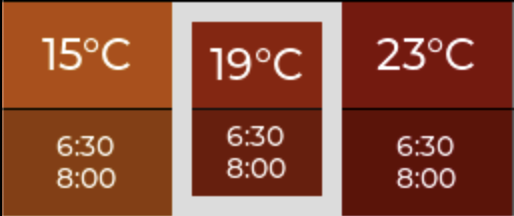
Is there a way with LVGL to add a border to an object without affecting placement?
I don’t mind if the border is inside the edge of the object, or outside (so long as it’s always on top and visible)
I am highlighting a child using:
static void ui_highlight(lv_obj_t *parent, uint32_t index) {
    uint32_t i;
    uint32_t count = lv_obj_get_child_count(parent);
    for(i = 0; i < count; i++) {
        lv_obj_t * child = lv_obj_get_child(parent, i);
        if (i == index) {
            lv_obj_set_style_border_width(child, UI_HIGHLIGHT_BORDER_WIDTH, LV_PART_MAIN);
            lv_obj_set_style_border_opa(child, 255, LV_PART_MAIN);
            lv_obj_scroll_to_x(parent, lv_obj_get_x(child), LV_ANIM_ON);
        } else {
            lv_obj_set_style_border_width(child, 0, 0);
            lv_obj_set_style_border_opa(child, 0, LV_PART_MAIN);
        }
    }
}
Thanks