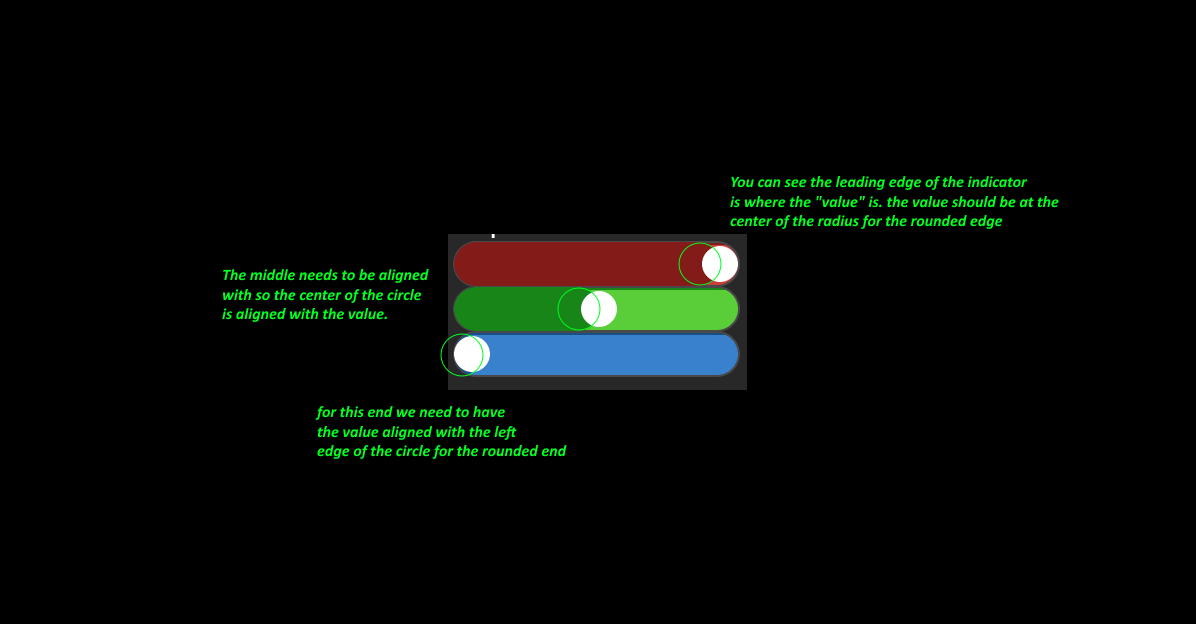
Now that you posted that graphic I see where the issue is. It’s in the knob offset. the “knob” is being rendered so the center of the knob is attached to where the value is on the indicator but the indicator when it is being drawn it not being drawn to align the center with the value but is is being drawn so the outside edge is aligned with the value. if you pad the knob on the right side by 15 to push it over that should fix the problem. it may however cause an issue at the other end of the slider.
so what has to happen is the padding needs to dynamically change as the slider is moving but the change is not going to be aligned in a manner that is even with the indicator. Te problem there is if you are say at a 50 on a 0 to 100 scale the knob would not be in the center of the slider like it should be.
This is actually a bug.
Look here.
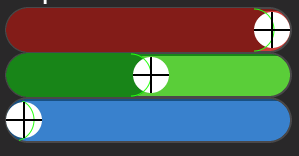
The knobs position relative to the indicator changes as it moves. it’s not locked to the indicator at all… In order for this to work properly the knobs alignment to the value needs to move from left left side of the knob to the right side of the knob as the knob moves across the slider. the indicator also needs to do the same kind of a thing as well but it has to move from the right edge being attached to the value when the slider is at max and it needs to shift to the center as it is being slid to the left.
You can see it better here.