Hi everyone,
I’d like to share LVGLab, an open-source (MIT) desktop UI designer for LVGL that I’ve been building for my own ESP32 display projects. It’s written in Rust and runs on Windows, macOS and Linux.
What it does
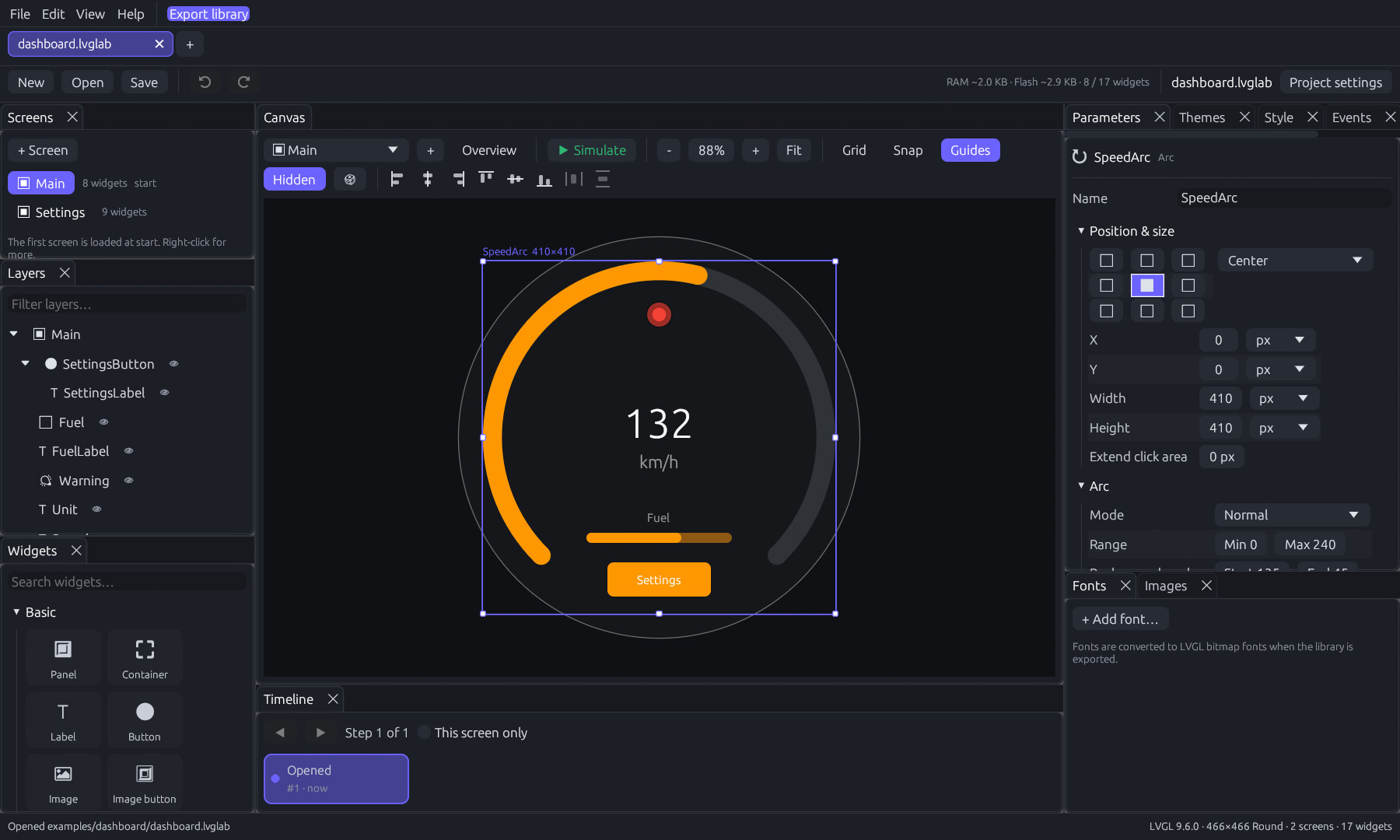
- Visual editor for screens, widgets, styles (per part and state), themes and events, with layers, alignment guides, snapping and a timeline you can jump through.
- Exports readable C code for LVGL 8.3 or LVGL 9.2–9.6, ready to drop into PlatformIO or the Arduino IDE. Images and TTF fonts are converted for you. The export is compile-checked in CI against six LVGL releases.
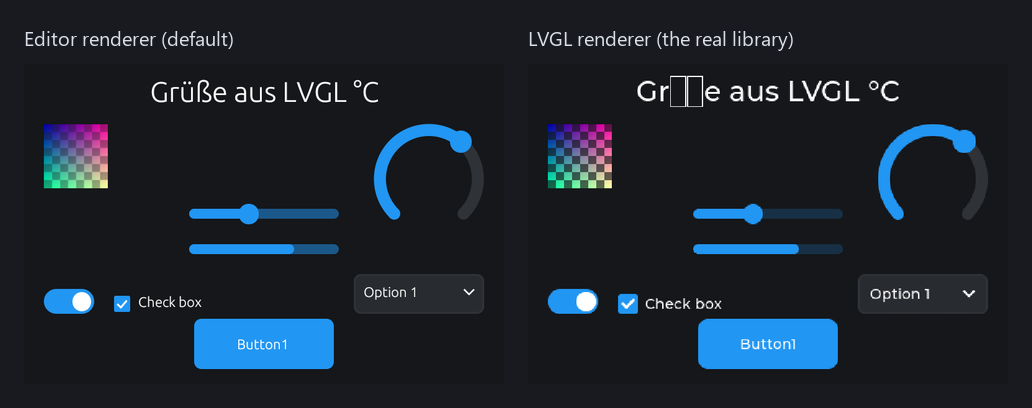
- Real LVGL preview (LVGL 8): LVGL 8.3 is compiled into the editor, and the generated C code of a screen is run against it. The canvas then shows exactly what your device will draw, including fonts, anti-aliasing, themes, images and components. This already caught some problems for me that a “looks right in the designer” preview would have hidden.
- Imports SquareLine Studio projects (
.spj), so you can move existing UIs over. - Simulator to click through your UI, with screen animations, events, sliders, keyboards and tab views, plus GIF recording.
- Practical extras: components, multi-language texts (lv_i18n), several projects in tabs, search across all widgets and styles, a randomizer for nicer screenshots and a PNG export of every screen.
- An optional AI assistant that designs screens from a description (bring your own Anthropic API key).
Why LVGLab?
- Fast and lightweight: a native Rust application (egui), no Electron and no web view. It starts in about a second, stays responsive with large projects, and the LVGL preview redraws a full screen in a few milliseconds.
- Free and open source (MIT): no license fees, no subscription, no account, no project or widget limits. You can read, change and build all of it yourself.
- Works offline, no telemetry: your projects never leave your machine. The only network access is an optional check for new releases (and the AI assistant, if you choose to use it).
- Exact preview: besides the fast editor renderer, LVGL 8.3 itself can draw your screens from the exported code. What you see is what the device draws.
- Reliable export: readable, flat C code with a small API, for LVGL 8.3 and 9.2–9.6 using only the native API of the chosen release. Every export path is compile-checked in CI against six LVGL versions.
- Cross-platform: Windows (installer or portable), macOS (Apple Silicon and Intel) and Linux.
- Git-friendly: projects are plain JSON files with relative asset paths, so diffs and reviews work. An optional timeline file keeps your undo history between sessions.
- No lock-in: import your SquareLine Studio projects, and the generated code is yours, with no runtime of LVGLab needed on the device.
- Built for real firmware: symbol prefixes for several UI libraries in one firmware, byte-swapped images for
LV_COLOR_16_SWAP, lv_i18n multi-language support, and checks that warn about missing glyphs or unsupported widgets before you flash.
[Image]
Left: the editor’s own renderer. Right: the same screen drawn by LVGL itself. The built-in Montserrat fonts have no umlauts, which only the real library shows.
Links
- GitHub: GitHub - bluecraank/lvglab: UI designer for LVGL 8 and 9 on ESP32 written in Rust. Imports SquareLine Studio projects and exports a ready-to-use UI library. · GitHub
- Downloads (Windows installer, macOS, Linux): Releases · bluecraank/lvglab · GitHub
The Windows build isn’t code-signed yet, so SmartScreen may warn on first start. Choose More info → Run anyway.
Status
I use it daily for a round 466×466 and a rectangular display on ESP32, but it’s still young (v0.12). I’d really appreciate feedback, bug reports and ideas, especially from people coming from SquareLine Studio or using LVGL 9.
LVGLab is not affiliated with LVGL LLC. It’s an independent project built on LVGL’s public API.
Thanks for having a look!
Developed with Claude.

