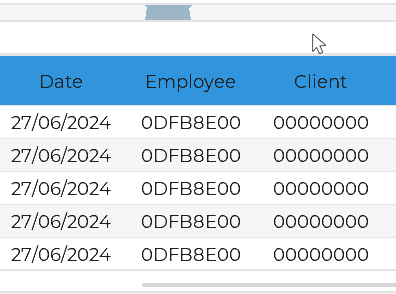
If anyone else is having difficulty with tables, I managed to solve it as follows:
I created a style with the desired settings and added it to lv_style_selector_t LV_PART_ITEMS.
lv_style_t my_table_style;

lv_style_init(&my_table_style);
lv_style_set_max_height(&my_table_style, 50);
lv_style_set_min_width(&my_table_style, 100);
lv_style_set_max_width(&my_table_style, 200);
lv_style_set_pad_all(&my_table_style, 5);
lv_style_set_text_align(&my_table_style, LV_TEXT_ALIGN_CENTER);

lv_obj_add_style(table, &my_table_style, LV_PART_ITEMS);
I also used the example code to decorate the table with different colors for the rows:
static void draw_event_cb(lv_event_t *e)
{
    lv_draw_task_t *draw_task = lv_event_get_draw_task(e);
    lv_draw_dsc_base_t *base_dsc = draw_task->draw_dsc;
    /*If the cells are drawn...*/
    if (base_dsc->part == LV_PART_ITEMS)
    {
        if (row == 0)
        {
            lv_draw_fill_dsc_t *fill_draw_dsc = lv_draw_task_get_fill_dsc(draw_task);
            if (fill_draw_dsc)
            {
                fill_draw_dsc->color = HIRO_PALETTE_BLUE;
                fill_draw_dsc->opa = LV_OPA_COVER;
            }
        }
    }

    ...
}
Result: