ESP32S3 LVGL not displaying on Screen

Not sure if its valid but i tried pasting the src folder (from inside the lvgl folder) and the lvgl.h and lv_conf.h files inside the main and ui folders. The “can not locate the file lvgl.h” error stopped but still show some errors when i try to build (will paste them below).

C:/Users/welli/sunton-teste-2/main/main.c: In function 'app_main':
C:/Users/welli/sunton-teste-2/main/main.c:356:47: error: implicit declaration of function 'ESP_LCD_TOUCH_IO_I2C_GT911_CONFIG' [-Werror=implicit-function-declaration]
  356 |     esp_lcd_panel_io_i2c_config_t io_config = ESP_LCD_TOUCH_IO_I2C_GT911_CONFIG();
      |                                               ^~~~~~~~~~~~~~~~~~~~~~~~~~~~~~~~~
C:/Users/welli/sunton-teste-2/main/main.c:356:47: error: invalid initializer
C:/Users/welli/sunton-teste-2/main/main.c:29:23: error: expected identifier before numeric constant
   29 | #define TOUCH_RST_PIN 38
      |                       ^~
C:/Users/welli/sunton-teste-2/main/main.c:379:10: note: in expansion of macro 'TOUCH_RST_PIN'
  379 |         .TOUCH_RST_PIN = TOUCH_RST_PIN,
      |          ^~~~~~~~~~~~~
C:/Users/welli/sunton-teste-2/main/main.c:380:9: error: expected '}' before '.' token
  380 |         .int_gpio_num = TOUCH_INT_PIN,
      |         ^
C:/Users/welli/sunton-teste-2/main/main.c:376:37: note: to match this '{'
  376 |     esp_lcd_touch_config_t tp_cfg = {
      |                                     ^
In file included from C:/Users/welli/esp/esp-idf/components/esp_hw_support/include/esp_intr_alloc.h:11,
                 from C:/Users/welli/esp/esp-idf/components/esp_hw_support/include/esp_cpu.h:20,
                 from C:/Users/welli/esp/esp-idf/components/esp_hw_support/include/spinlock.h:11,
                 from C:/Users/welli/esp/esp-idf/components/freertos/FreeRTOS-Kernel/portable/xtensa/include/freertos/portmacro.h:74,
                 from C:/Users/welli/esp/esp-idf/components/freertos/FreeRTOS-Kernel/include/freertos/portable.h:59,
                 from C:/Users/welli/esp/esp-idf/components/freertos/FreeRTOS-Kernel/include/freertos/FreeRTOS.h:71,
                 from C:/Users/welli/sunton-teste-2/main/main.c:4:
C:/Users/welli/sunton-teste-2/main/main.c:393:21: error: implicit declaration of function 'esp_lcd_touch_new_i2c_gt911' [-Werror=implicit-function-declaration]
  393 |     ESP_ERROR_CHECK(esp_lcd_touch_new_i2c_gt911(io_handle, &tp_cfg, &tp));
      |                     ^~~~~~~~~~~~~~~~~~~~~~~~~~~
C:/Users/welli/esp/esp-idf/components/esp_common/include/esp_err.h:117:30: note: in definition of macro 'ESP_ERROR_CHECK'
  117 |         esp_err_t err_rc_ = (x);                                        \
      |                              ^
C:/Users/welli/sunton-teste-2/main/main.c:400:26: error: implicit declaration of function 'read'; did you mean 'fread'? [-Werror=implicit-function-declaration]
  400 |     indev_drv->read_cb = read();
      |                          ^~~~
      |                          fread
C:/Users/welli/sunton-teste-2/main/main.c:400:24: warning: assignment to 'void (*)(struct _lv_indev_drv_t *, lv_indev_data_t *)' from 'int' makes pointer from integer without a cast [-Wint-conversion]
  400 |     indev_drv->read_cb = read();
      |                        ^
cc1.exe: some warnings being treated as errors
[21/170] Building C object esp-idf/main/CMakeFiles/__idf_main.dir/ui/src/draw/nxp/vglite/lv_vglite_utils.c.objninja: build stopped: subcommand failed.
ninja failed with exit code 1, output of the command is in the C:\Users\welli\sunton-teste-2\build\log\idf_py_stderr_output_27296 and C:\Users\welli\sunton-teste-2\build\log\idf_py_stdout_output_27296
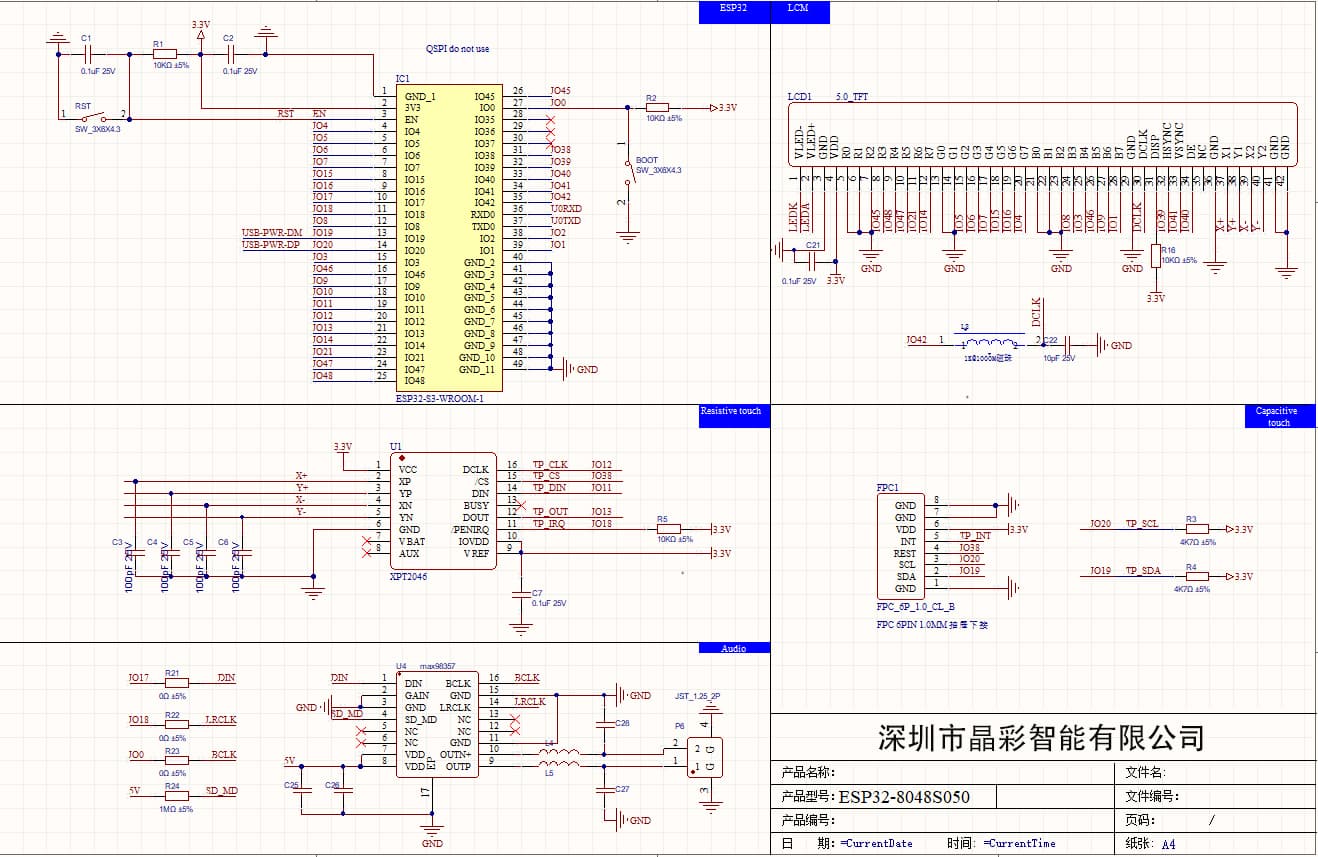
OK so first issue I am noticing is you are building on Windows. It is much harder to get things to work properly under Windows. I suggest using WSL. Are you familiar with WSL?

Sunton.zip (149.9 KB)

This should also correct some of the problems. I forgot to add some includes and I had a couple of other boo boo’s

also make sure in the lv_conf.h file you have LV_USE_USER_DATA set to a 1.

just any of the LVGL 8.3.* versions.

The code is written to be compatable to IDF 5.0.4. IDK if there is anything that has changed from 5.0.4 to 5.1 that would cause any issues. we can cross that bridge when we get there.

Yeah, using Windowns 11. I know what WSL but never used (also never used any linux version)

It did, now when i build there is only one error.


C:/Users/welli/suntontest3/main/main.c: In function 'app_main':
C:/Users/welli/suntontest3/main/main.c:399:5: error: 'indev_drv' may be used uninitialized [-Werror=maybe-uninitialized]
  399 |     lv_indev_drv_init(indev_drv);
      |     ^~~~~~~~~~~~~~~~~~~~~~~~~~~~
C:/Users/welli/suntontest3/main/main.c:398:21: note: 'indev_drv' was declared here
  398 |     lv_indev_drv_t *indev_drv;
      |                     ^~~~~~~~~
cc1.exe: some warnings being treated as errors

OK cool, that’s an easy fix.

you will also save yourself quite a bit of hair pulling if you use WSL and Ubuntu. WSL is basically a virtual machine for Linux except it allows Linux to interact with the desktop. So if you run a Linux application it runs like any other Windows application.

the ESP-IDF was written to run on Linux and Windows support was slapped into it as an after thought. So it’s not really streamlined to run on Windows. There is all kinds of jumping through hoops you have to do to get it to work right a lot of times.

Yeah, will take a look at it. Thanks.

Finally no problems with the build and was able to flash successfully too. But the screen is too dark so can’t even see anything, only able to see something when i put my phone flashlight directly on the screen.

OK so you got it to compile ?

I have to see what the backlight pin is and that has to be added to the code. Everything is already in place or it jut have to put the GPIO number in.

also what did you do as a solution to the indev issue? This way I can update the board.

Yeah, but it doesn’t compile on my VSCode, had to change to the ESP-IDF terminal and then it works.

Just changed it to

lv_indev_drv_t *indev_drv = malloc(sizeof(*indev_drv));

OK cool.

you can see the display connector in the upper right corner. LEDA and LEDK but it doesn’t show any kind of a connection. I am going to continue to poke about and see if I am able to locate a GPIO number for that.

Oh, and i forgot to say before cause it was a simple fix. But there’s a typo on a “user_data” variable too. It comes as userdata, don’t remember the exact location now since i fixed it earlier but i can try to start a new project and look search on it

I think there is only a single location where I used user_data.

scratch that there were 4 places. I know it’s not one of them so that leaves 3 I have to check.

here in my code there are 5 user_data. I guess the missing one is the one written as “userdata” then

just found it. It’s supposed to be user_data not userdata

Sunton.zip (149.9 KB)

That should fix the issue with the backlight, the indev and also the user_data

Yeah, and its working now. Just had one more typo on this line.

gpio_set_level(BK_LIGHT_PIN_NUM BK_LIGHT_ON_LEVEL);

Just changed to

gpio_set_level(BK_LIGHT_PIN_NUM, BK_LIGHT_ON_LEVEL);

Also not sure if the touch is working. Added an event on SquareLine studio just to make sure but nothing’s happening, not even the button animation when it gets clicked.